

 SFDO-Community
[BUG] Lists in Rich Text Fields not displaying properly in delivered template (GeneralSLDS)
When viewing a registration page that use the delivered "GeneralSLDS" template, what is entered in the "Event Description" field on the Summit Event object should match what is displayed. However this is not currently the case, as features like bullet points and numbered lists in the Event Description field aren't displaying the same way on the registration page.
Examples of this are
- Bullet points are displaying to the left, with the text itself being aligned with the text above and below. It should be that the bullet points themselves should line up with the surrounding text, with the text indented to match.
- Numbered lists are not displaying as a list at all, instead being just displaying the individual points.
In talking with Thad, it appears the issue is a difference between the value of the rich text field and the stylizing of Salesforce's SLDS. I believe the solution is to either add CSS to the delivered template or see if the apex:outputText component can be used to account for these differences.
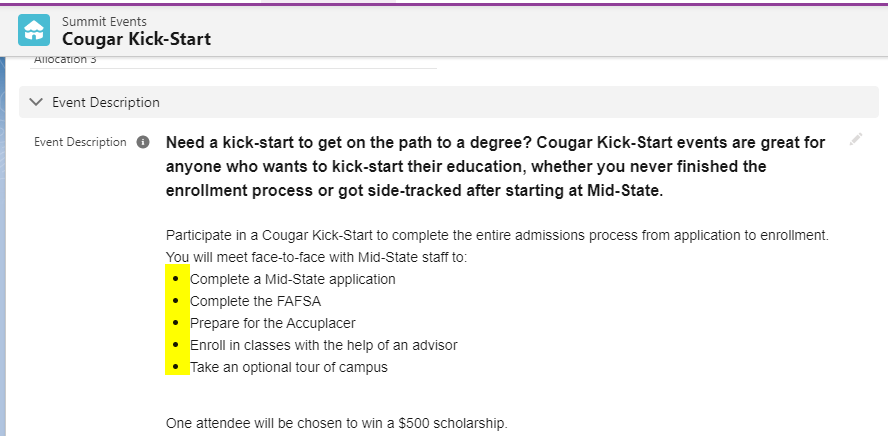
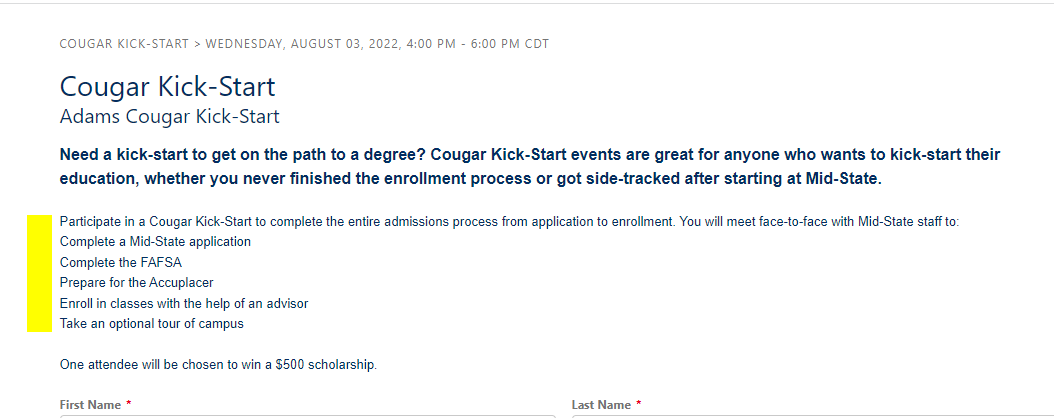
I have the code to fix these two examples, but they should be included in the template by default instead of relying on the users to fix this.
.slds-scope ul {
	list-style: disc !important;
	margin: initial !important;
	padding: 0px 0px 0px 30px !important;
}

.slds-scope ol {
	list-style: decimal;
	margin: inherit;
	padding: 0px 0px 0px 30px;
}

These were only the two problems I was solving, other rich text editor features such as indents haven't been tested so they need to be checked to see if they work with SLDS. These may require additional edits to our template.
