

 SAP
SAP
Side Navigation with expandable item, bundled with Angular 13 doesn't display properly at first load in Firefox
Bug Description
When displaying a
Expected Behavior
The expandable arrow is displayed on first load as well as any expanded
Steps to Reproduce
- Open the provided reproduction in Firefox (use the Open in New Window functionality)
- Observe the visualisation of the side navigation doesn't include an arrow and subitems for the navigation item.
- Click on the item.
- Observe that the arrow and subitems are visualised
Isolated Example
The problem is reproduced when using the web components with Angular 13 so the provided reproduction is in stackblitz
Context
- UI5 Web Components version: {1.4.0}
- OS/Platform: {OS X}
- Browser: {Mozilla Firefox 100.0.2 (64-bit) }
- Affected component: {ui5-side-navigation}
Log Output / Stack Trace / Screenshots
Priority
- [ ] Low
- [ ] Medium
- [x] High
- [ ] Very High
The priority indicates the severity of the issue. To set the appropriate priority consider the following criteria:
- Breaks entire application or system - High or Very High
- Accessibility issue - Medium or High
- Functional issue - Medium or High
- Visual issue - Low or Medium
Note: The priority might be re-evaluated by the issue processor.
Stakeholder Info (if applicable)
- Organization: {SAP}
- Unit: {Automation Pilot}
- Business impact: {hindered Firefox users experience}

Dear team, can you, please, check this issue? I can reproduce it also on Chrome Version 102.0.5005.61.
Regards, Petya Markova.

Hello colleagues,
This has something to do with the invalidation flow and initial rendering. When the SideNavigation is rendered for the first time, it renders 1 SideNavigationItem with 0 SideNavigationSubItems. If you pause at SideNavigation#onBeforeRendering, you will see that the items of the only child are not yet available.
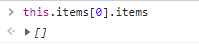
Later, the items are updated to 2 sub items, but the SideNavigation is not rerendered.
 If you invalidate it manually, for example by executing
 document.querySelector("ui5-side-navigation-sub-item").setAttribute("text", "Hello world") then everything is displayed correctly.
From SideNavigation side I would expect that every time a child has changed, the SideNavigation is invalidated. In the metadata of SideNavigation and SideNavigationItem invalidateOnChildChange is set to true.
Can you please check it?
Best regards, Petar

Hello, I have updated the reproduction to include the proposed workaround and the subitems still do not get displayed right away in Firefox.
Hello, that bug is also present on Windows machines on all Browsers that we tested (Chrome, Edge, Firefox) Are there any updates on that issue?
Hello @ilhan007. The issue is still present even on the latest version 1.23.1. Do you have any plans to fix it soon? It makes this part of the component unusable for us...
Here's a link which reproduces it (tested on Mac with Chrome, Firefox and Safari): https://stackblitz.com/edit/angular-ivy-txqtui?file=package.json

Hi @kloyan, @ixiler,
Could you please check version 1.24.7 of the @ui5 packages? I've updated it in the stackblitz provided by @kloyan and everything seems to be working as expected.
