

 SAP
SAP
Vertical misalignment on ProgressIndicator bars text
OpenUI5 version: 1.106.0
Browser/version (+device/version): Chrome/105.0.5195.127 (Official Build) (64-bit)
Any other tested browsers/devices(OK/FAIL):
URL (minimal example if possible):
User/password (if required and possible - do not post any confidential information here):
Steps to reproduce the problem: When using sap.m.ProgressIndicator bars inside sap.m.ColumnListItem, the percentage text doesn't align vertically with the rest of the text in other columns (all other columns are Text classes)
What is the expected result? Vertical alignment with ProgressIndicator percentage text with other ColumnListItems
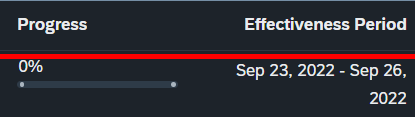
What happens instead? Percentage text is slighty misaligned
Any other information? (attach screenshot if possible) As you can see below, the percentage text is slightly above the date on the right

Try adjusting the vAlign value at either both sap.m.Column controls or at the sap.m.ColumnListItem.
So far, I could not reproduce the above screenshot where the ProgressIndicator is higher positioned than the text in the adjacent column. Does this help? https://jsbin.com/racebuk/edit?html,js,output If not; could you clone the JSBin, edit it, and share the new JSBin that can reproduce the above screenshot?

I am using vAlign="Top" on the ColumnListItem already, but I found out that using a formatter on the percentValue property makes the text go up for some reason. I don't know how to insert an example of this on the jsbin, sorry.
I'm using it like this: <ProgressIndicator percentValue="{path: 'goals>', formatter:'.formatProgressValue'}" ... />
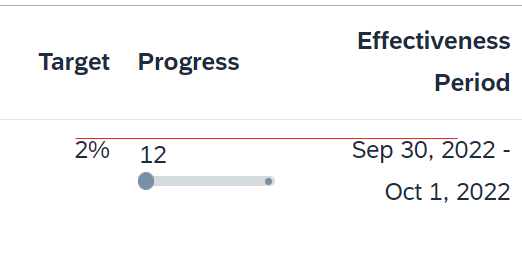
I also noticed that if I hardcoded the values just like in your example, the text would be lower than the one on other columns (even with Top alignment) as seen on the image below
Hello @Ghilga , Thank you for sharing this finding. I've created an internal incident 2270143234. The status of the issue will be updated here in GitHub.

Hello @Ghilga,
Unfortunately, I can`t reproduce the issue on my side. Can I kindly ask you to provide JSBin, where the behaviour from the screenshot above is reproducible , so I could see where exactly the problem is coming from.
Thanks and regards, Yana

Hi @yanaminkova. Thanks for looking into this issue.
I did some more testing and found out the problem. It is the "sapUiSizeCompact" CSS class added in the index.html file. It sems to create margins for every table item, except the ProgressIndicator bar.
I managed to get 2 examples of it. On one, the text is above the others. On the other, the text is below the others.
Note that if you remove the "sapUiSizeCompact" class from the index.html, in both cases, the misalignment goes away.
https://jsbin.com/nocuyabowu/edit?html,js,output https://jsbin.com/keqohulomo/edit?html,js,output
I hope this is helpful!