

 SAP
SAP
401 error while executing a request using generated custom OData v2 service
Hi,
after following the instructions on https://sap.github.io/cloud-sdk/docs/js/tutorials/getting-started/introduction I thought that connections to our on-premise systems will work out of the box.
Unfortunately I get an 401 error when calling the generated custom OData v2 service. Cloud connector was set up and is working for other ui5 applications in same subaccount and OData service.
Connectivity, destination and xsuaa services are bind to the application:
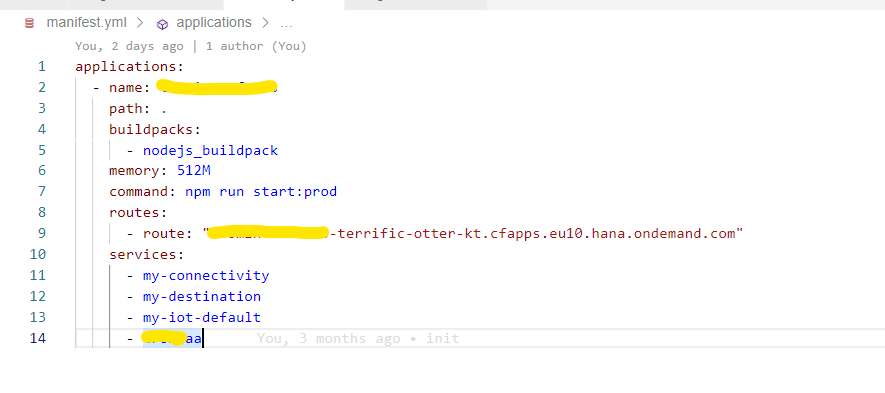
I'm also getting valid values when calling getDestinationFromDestinationService.
Is there anything to consider when using the cloud sdk and on-premise systems regarding additional authorization settings? My final function call looks as following:

Thanks in advance for your support.
Kind regards

Hello @u-siv,
thanks for reaching out to us.
Could you tell us what version of the SAP Cloud SDK you used to generate the custom client? Also, can you specify which kind of authentication you configured to reach the on-premise destination? (Basic Auth / Principal Propagation)

Hi @tomfrenken ,
here is a screenshot of package.json file:
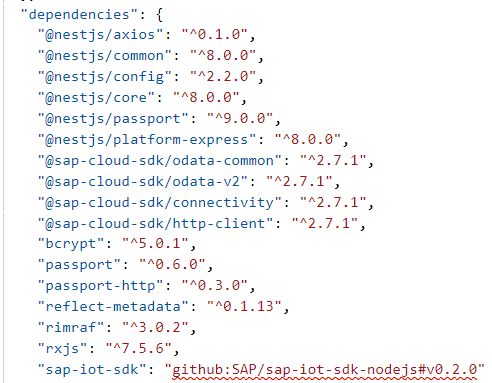
I updated the version yesterday, but it doesn't help unfortunately.
We are using basic authentication to reach our SAP on-premise system.
Thank you for the additional information.
Since we run multiple E2E applications and test their on-premise connectivity, it is highly unlikely that this is an SDK issue.
Therefore I would advise to look for configuration-related issues.
In our documentation we discuss different details of on-premise connectivity, perhaps you might find the cause there, (e.g. maybe you have multiple cloud connectors but your destination doesn't contain the information to use the correct one), besides that I would advise to read the logs of the target system, since it is a 401 error the target system will have information what exactly went wrong.
If it doesn't contain information, then the Cloud Connector you are using to connect to the on-premise system will have more details.
Hi, thanks for providing the links to further documentation and debugging guides. We checked the connectivity pages again. But I still wonder why it is not working out of the box for standard SAP tools. Our application was developed on BAS and deployed to cloud foundry subaccount. As I wrote, connectivity and destination service are bound to the application to establish a connection to SAP on-premise backend. As far as I understood the documentation and described here again as automatic flow https://sap.github.io/cloud-sdk/docs/js/features/connectivity/proxy , there are no further settings needed. Is it possible to provide a sample project with a connection to SAP on-premise backends as minimum viable product? This would be really helpful.
Thanks
Hi @u-siv,
if everything is configured correctly it does work out of the box. Here is a sample running on Cloud Foundry and here is its on-premise basic auth endpoint.
In this sample, the approuter is used, which is required for principal propagation, since you only use basic auth you won't need it.
@u-siv
a few more pointers from my side - since it is 401 and basic perhaps simply the user/password are not correct? You can use the getDestiantion() method in the SDK to see the user and password if you want. Perhaps the user is also just locked in the backend due to many failed login attempts?
In order to reduce the amount of complexity I would do the following:
- Use a destination using basic to test that cloud connector and everything is set up correctly
- Since you mention BAS you can make a test without code using the CURL described here.
- If this is working use the basic destination in the SDK - this should work
Best Frank

Hi,
thanks for providing so much information.
I think we solved the issue finally. But there are still unresolved questions.
First we tried your sample application on another subaccount with connection to a onpremise backend, this time with principal propagation. This worked directly.
But the same application on original subaccount (with basic authentication) failed again with 401 error. So we checked the sap backend again and could solve that issue by selecting "Use All Logon Procedures" in icf node of the odata service:
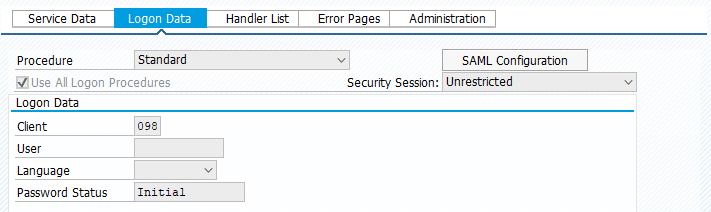
The main question is why we need to select this checkbox for your cloud sdk and not for ui5 applications? We deployed already few ui5 applications on same subaccount. They are using same cloud connector, destinsations and therefore same user/password. Also the odata service is the same. So from my point of view there is still a difference between calling the odata service through ui5 applications and cloud sdk applications. Can you give me a hint for this? To be honest, it is very expensive to change all services and to transport the changes through all landscapes.
Thanks
Hi @u-siv,
this is an interesting case that it works with call done by ui5 application but not with the SDK. Since the backend is the same it should behave the same for both calls. In the end both are just clients to the same backend. Could you perhaps investigate if you have multiple clients in your systems? Sometimes there is also a gateway involved forwarding the requests to different hosts in the S/4 having different default clients. So my hypothesis is that there is a client made for manual testing let's call it 123. For this client in sicf the basic auth is included in the logon procedure. For some reason the UI5 request end up in this client.
To be specific you can add the sap-client property to the destination. This will set the client for which the request is processed in the backend. In general I would not change the allowed login procedure without asking is this ok (dev,test system) and ensure that there is not already a client where basic is already possible.
Best Frank
Since I have not heard back for a while I close this issue.
Best Frank