

 RocketChat
Create invite links permission does not work for room owner role in RC 5.4.0
Description:
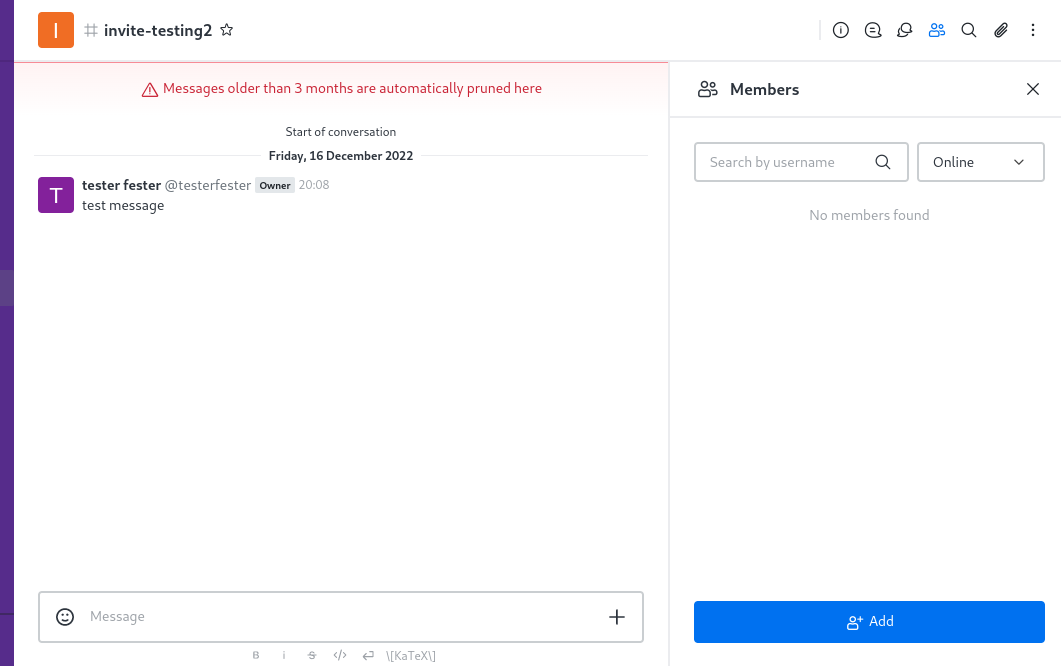
The button to create invites has disappeared for the room owner role in RC 5.4.0.
The Invite button is still visible for admins. The issue did not exist in RC 5.3.x yet.
Steps to reproduce:
- Check that Owner-role has privileges to create invites under admin permission settings
- Create a channel as a regular user
- Go to member list
- Look for
Invitebutton next toAddbutton
Expected behavior:
Invite button exists and is visible
Actual behavior:
Invite button is missing
Server Setup Information:
- Version of Rocket.Chat Server: 5.4.0
- Operating System: RHEL8
- Deployment Method: tar
- Number of Running Instances: 2
- DB Replicaset Oplog: yes
- NodeJS Version: 14.19.3
- MongoDB Version: 4.4
Client Setup Information
- Desktop App or Browser Version: Latest Firefox and Chrome
Additional context
The issue is reproducible at open.rocket.chat at the time of bug report.

I tested with a separate role with Create Invite Links permission, and this permission seems to work alright.
The owner role has the bug. It has the same permission but it is not effective.
Can i work on this issue Please guide me where can i find the code related to this topic

Sorry! I'm not an actual dev or RC project maintainer. Just reporting. :)
I tried investigating this issue, and found that for some reason the usePermission hook is returning false when called with 'create-invite-links' for these three roles namely- moderator, leader and owner. I also checked the apis which are adding the permission to the role, they are working fine for these roles but somehow the hook is returning false. If someone knows the working of the usePermission hook can help, it would be great. I am still figuring out why this is happening, but if anyone need reference the code for this is at RoomMembersWithData.tsx, there you can check the value of boolean canCreateInviteLinks for every role. Also, @dudanogueira can you have a look into this ?

We are also experiencing this bug, invitation links created in the default "general"-channel as admin (default admin-User) only redirect to the normal login-page, but not the registration form. Normal registration is deactivated.
RC 5.4.1 behind Loadbalancer
I cannot confirm @Gummikavalier workaround with a testuser, Permissions: admin, user, invite-link(create invite-link-permission), didnt work.
unfortunately, im no Dev, so i cant help with code search, but im up for testing or providing logs.

And even when the workaround works, as the regular owner role is builtin and special compared to hand made ones, it means allowing the invite permission to any member of the "invite role" to create invites in any other channel.
Unless the role is limited to specific channel, in which case the admins would be in a role and channel management hell instead.
This issue is a blocker to use of RC 5.4.1.
The issue is still present in 5.4.3, as I unfortunately had to learn. How is this still not addressed, even three version into this release? This is quite disappointing.
As a workaround I considered to give the create-invite-links permission to the moderator role as well (since they can invite anyway) but in our test system the problem affects the moderator role as well! :astonished:

I also confirm that this is still an issue on RC 6.0.0 release candidate 0. :(
I tried investigating this issue, and found that for some reason the usePermission hook is returning false when called with 'create-invite-links' for these three roles namely- moderator, leader and owner. I also checked the apis which are adding the permission to the role, they are working fine for these roles but somehow the hook is returning false. If someone knows the working of the usePermission hook can help, it would be great. I am still figuring out why this is happening, but if anyone need reference the code for this is at RoomMembersWithData.tsx, there you can check the value of boolean canCreateInviteLinks for every role. Also, @dudanogueira can you have a look into this ?
Sorry for the delay here :(
You are right on your findings, @Barrylimarti
The proof is that if you give the role user the invite permission, the link will appear correctly.
not sure we can still ship this in 6.0.0, but I'll poke around for a patch right after.

@Barrylimarti we both were able to fix it!
usePermission will receive an optional second argument, which is the room id. When passed, it will look for the that permission on a room scope level.
So this will fix it:
const hasPermissionToCreateInviteLinks = usePermission('create-invite-links', rid);
and this is the line: https://github.com/RocketChat/Rocket.Chat/blob/2d4e916df954a14337f3ef90111203d97e4304f0/apps/meteor/client/views/room/contextualBar/RoomMembers/RoomMembersWithData.tsx#L37
If you could, please, go ahead and do the honors of producing this colaborative PR ;)
Thanks you very much!