
Rocket.Chat

Rocket.Chat copied to clipboard
 RocketChat
Livechat: line breaks do not appear
Description:
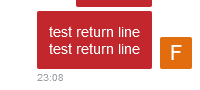
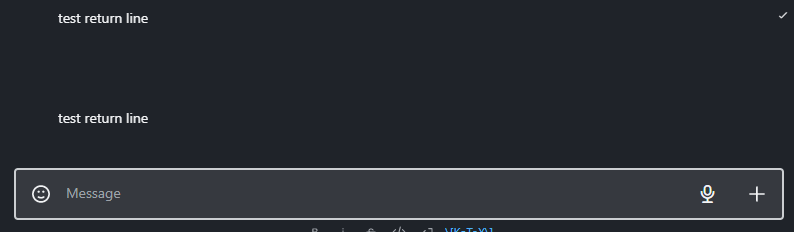
In the livechat client, the line break does not appear either when sending a message or when receiving a message.
Steps to reproduce:
- Send a message with line breaks
- Look in the livechat, no line breaks are displayed
- Look in Rocketchat, line breaks are displayed
Expected behavior:
Show line breaks in the livechat
Actual behavior:
Livechat:

Livechat:
Rocketchat:
Server Setup Information:
- Version of Rocket.Chat Server: 5.3.3
- Operating System: Ubuntu 20.04.5 LTS
- Deployment Method: snap
- Number of Running Instances: 1
Client Setup Information
- Desktop App or Browser Version: Firefox 107.0
- Operating System: Linux


@albetros24, thanks for your interest, Actually I was a little busy with other tasks so couldn't focus on it much. I will also be working on it soon. But as you are interested you can try solving this. I will be very happy to help you, you can check out my PR to for getting some more information about the issue or ping me on rocket.chat server.