RobinLinus
Issue running locally via docker-compose
If you git clone the repo and try to run via docker-compose up …
https://github.com/RobinLinus/snapdrop/blob/5c4aeb0108c77c653e496bf843452e010b1b2838/docker-compose.yml#L25
… will cause an issue: ‘ [emerg] "daemon" directive is in /etc/nginx/nginx.conf’
Removing the -g option altogether makes the error go away but then there is an issue with:
https://github.com/RobinLinus/snapdrop/blob/5c4aeb0108c77c653e496bf843452e010b1b2838/docker/nginx-with-openssl.Dockerfile#L3
Because openssl package is not found
In the end, editing the dockerfile as follows …
FROM nginx
RUN apt install openssl
… made everything work as expected.
This might confuse some people when trying to run this locally?

It seems like you got everything to work — could you help me with my setup? I followed the instructions on the guide but they were a bit confusing and I ran into some problems. I cloned the repo and ran the command docker-compose up -d. The command ran successfully, but when I pointed the browser (Firefox) to http://localhost:8080, I received the error "Problem loading page".
Inspection in Docker Desktop revealed that "snapdrop_node1" was running on port 3000, but pointing to the browser here did not work as well (http://localhost:3000). I noticed here that "snapdrop_nginx_1" exited with the error: standard_init_linux.go:219: exec user process caused: no such file or directory. Here, I tried your fix, and edited the .Dockerfile as you indicated above (also removed the -g option). No changes.
Not sure what to do from here - any help would be greatly appreciated. Thanks.


Change the docker/openssl/create.sh line endings from CRLF to LF.
I did it, but this still not run
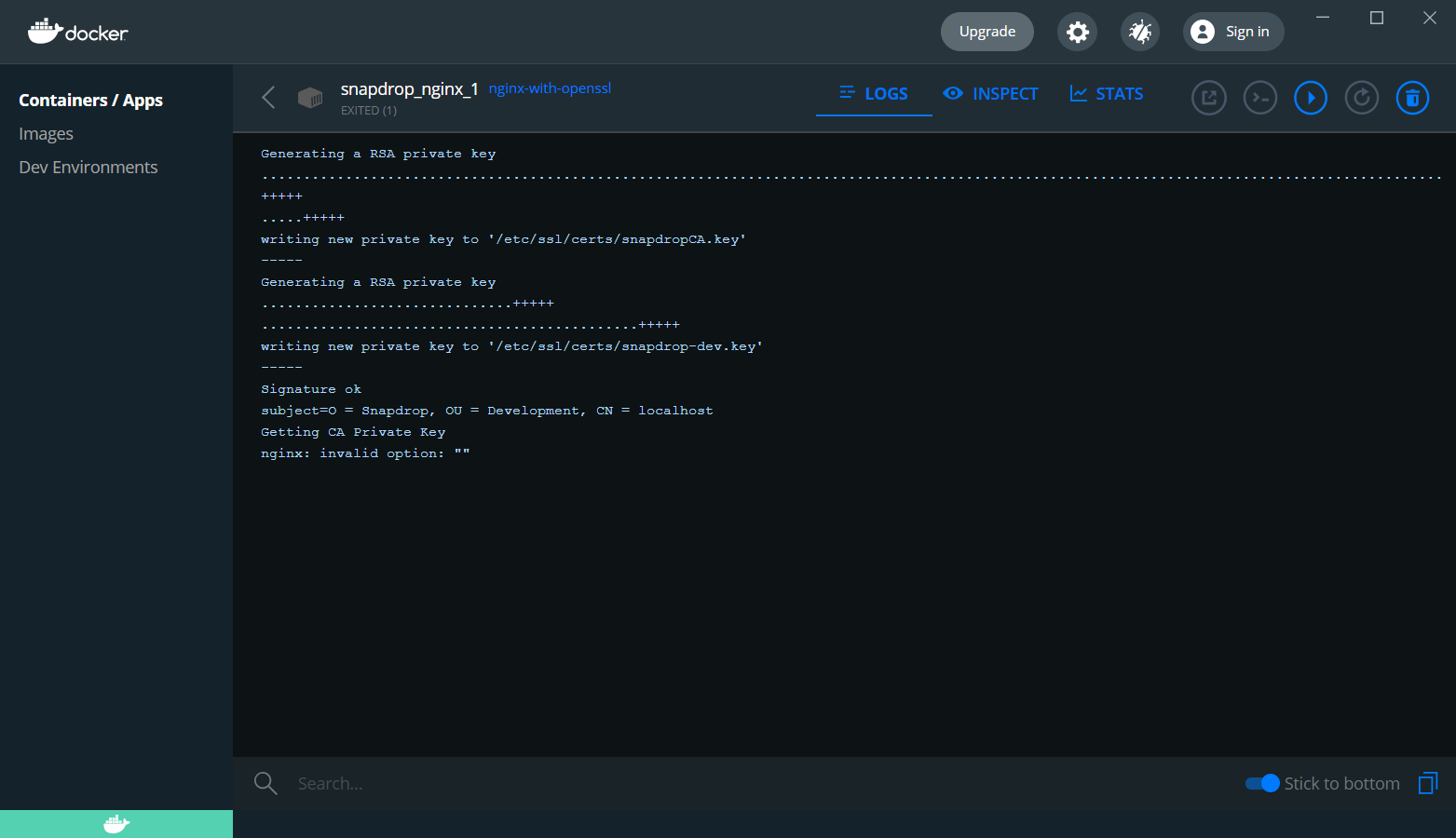

Don't think it worked for me either. I did not see any "CRLF" ending within the create.sh file. I added LF endings to the three middle lines, but it still did not work (same error as my previous comment above). I think it's also important to note that I haven't followed the instructions under "Testing PWA related features" as they were a bit confusing to understand (I'm unsure how to identify the FQDN on my Windows 10 PC). Is that necessary in order to run Snapdrop locally?
I just downloaded the repo and tried to start docker, but the nginx_1 would tell me "standard_init_linux.go:219: exec user process caused: no such file or directory". I switched to LF and it works.
How did you switch to LF? I just deleted my previous configuration and re-cloned the repo, then did docker compose -up d (with the same error that you indicated above). Here's what my create.sh file looks like currently:
#!/bin/sh

cnf_dir='/mnt/openssl/'
certs_dir='/etc/ssl/certs/'
openssl req -config ${cnf_dir}snapdropCA.cnf -new -x509 -days 1 -keyout ${certs_dir}snapdropCA.key -out ${certs_dir}snapdropCA.crt
openssl req -config ${cnf_dir}snapdropCert.cnf -new -out /tmp/snapdrop-dev.csr -keyout ${certs_dir}snapdrop-dev.key
openssl x509 -req -in /tmp/snapdrop-dev.csr -CA ${certs_dir}snapdropCA.crt -CAkey ${certs_dir}snapdropCA.key -CAcreateserial -extensions req_ext -extfile ${cnf_dir}snapdropCert.cnf -sha512 -days 1 -out ${certs_dir}snapdrop-dev.crt

exec "$@"
How do I switch this to LF? There is no CRLF ending on any of these lines.
Thanks - that worked for me. Currently, it works on localhost but not on any other device. Can you help me figure out how to access locally hosted Snapdrop on other devices?
Every connection to your host using the port docker is listening will access the page locally (You can change the port in the docker file config, then restart it).
Sorry, I should have explained my previous question better. Currently, Snapdrop is running perfectly on http://localhost:8080 and http://{IPv4 address}:8080 (on my local computer). If I want to access it on my mobile device (for example), what URL should I put in the phone browser? I've tried doing http://{IPv4 address}:{3000, 8080, 80, 443}, as well as http://localhost:{3000, 8080, 80, 443}. The ports listed on docker-compose.yml are 8080:80 and 443:443.
Thanks for your help so far — I'm a bit inexperienced with Docker and you have been super helpful.
EDIT: It might be related to https://github.com/RobinLinus/snapdrop/issues/266#issuecomment-791853677. I'm using an iPhone to access the server. Tried the solution here but did not work, maybe putting the wrong URL in the browser?
You can use your local computer up (192.168.0.20 for example) and the port 8080. You can Google search how to discover your Local ip)
Thank you, change CRLF to LF in the entire project files (without deleting -g and change docker files) helped!
I do get the familiar landing page in my browser (Waterfox G4) when I run docker-compose up in the the current repo, but I get a recurrent connection lost/reconnecting message every 2-3 seconds or so.