

 Riverscapes
Delete Multiple DoDs
With the batch DoD tools its now possible to quickly and easily populate a GCD project with a LOT of DoDs. It would be really helpful to have a quick way to clear these out for several reasons:
- You specified incorrect parameters in one or more batches.
- You simply want to clean out (reduce the size of) a project.
- You add a new DEM to a multi-epoch project and then want to perform all the analysis again (newest minus oldest, every DEM minus the previous).
I ran into that last case when processing Boyd's 2019 Yankee Fork data. A new 2019 DEM was added to each project. It was easy with the existing tools to perform "newest minus every other". But 2019 minus all other was lots of extra work that could have been avoided if I could simply remove all DoDs and start again.
I believe @jb10016 expressed an interest in this issue some time ago.
I suggest a rick click menu on the DoD node in the GCD project tree that launches a simple checklistbox form for multi-selecting DoDs. (Somewhat similar to the inter-comparison tool user interface).
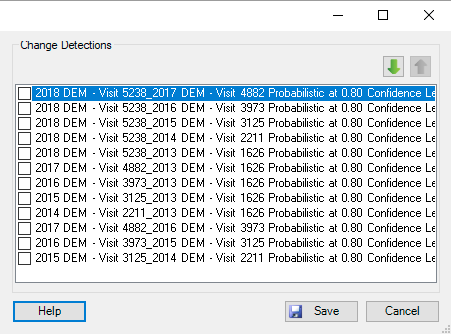

This sounds like a great idea. The batch processing, while powerful, can create a lot of debris that could use a simple means of cleaning up. Using a selection system lbased on checkboxes will certainly speed up the process and seems like the way to go.
| Professor James Brasington | Waikato Regional Council Chair of River Science|
| University of Waikato | Hamilton | New Zealand | Tel: +64 7 858 5046 |
| Google Scholar https://scholar.google.com/citations?user=38_8l8UAAAAJ&hl=en | ResearcherID http://www.researcherid.com/ProfileView.action?returnCode=ROUTER.Success&Init=Yes&SrcApp=CR&queryString=KG0UuZjN5WloQK%252BUpZcD9CXW%252FmTExVhZy39iLQ3aImY%253D&SID=F2th7mwOctvGtMoLkNw | ResearchGate https://www.researchgate.net/profile/James_Brasington| UoW Profile http://www.waikato.ac.nz/staff-profiles/people/jbrasing |
On Tue, 18 Feb 2020 at 06:13, Philip Bailey [email protected] wrote:
With the batch DoD tools its now possible to quickly and easily populate a GCD project with a LOT of DoDs. It would be really helpful to have a quick way to clear these out for several reasons:
- You specified incorrect parameters in one or more batches.
- You simply want to clean out (reduce the size of) a project.
- You add a new DEM to a multi-epoch project and then want to perform all the analysis again (newest minus oldest, every DEM minus the previous).
I ran into that last case when processing Boyd's 2019 Yankee Fork data. A new 2019 DEM was added to each project. It was easy with the existing tools to perform "newest minus every other". But 2019 minus all other was lots of extra work that could have been avoided if I could simply remove all DoDs and start again.
I believe @jb10016 https://github.com/jb10016 expressed an interest in this issue some time ago.
I suggest a rick click menu on the DoD node in the GCD project tree that launches a simple checklistbox form for multi-selecting DoDs. (Somewhat similar to the inter-comparison tool user interface).
[image: Screen Shot 2020-02-17 at 9 13 22 AM] https://user-images.githubusercontent.com/8645379/74674207-c1037f00-5165-11ea-82d8-e6c486607fad.png
— You are receiving this because you were mentioned. Reply to this email directly, view it on GitHub https://github.com/Riverscapes/gcd/issues/379?email_source=notifications&email_token=AIRHCGM7SQ3IEQMQEQYKVKLRDLAUBA5CNFSM4KWVTSI2YY3PNVWWK3TUL52HS4DFUVEXG43VMWVGG33NNVSW45C7NFSM4IODA2HQ, or unsubscribe https://github.com/notifications/unsubscribe-auth/AIRHCGPWCM7VZFZCSC4Z5IDRDLAUBANCNFSM4KWVTSIQ .
