

 Riverscapes
Morphological Methods Problems
@philipbaileynar @MattReimer @joewheaton
Hi All,
I'm running up against some oddities with the Morphological Method calculator, which appear to be replicable, though there is of course, the chance it's always me!
The bottom line is a mismatch between the sums (e.g., VD and VE) in the morphological sediment budget table and those reported for each cell. Let me illustrate.
Below is a morphological calculation based on 22 cells for the Rees (Event 1 - Event 0).
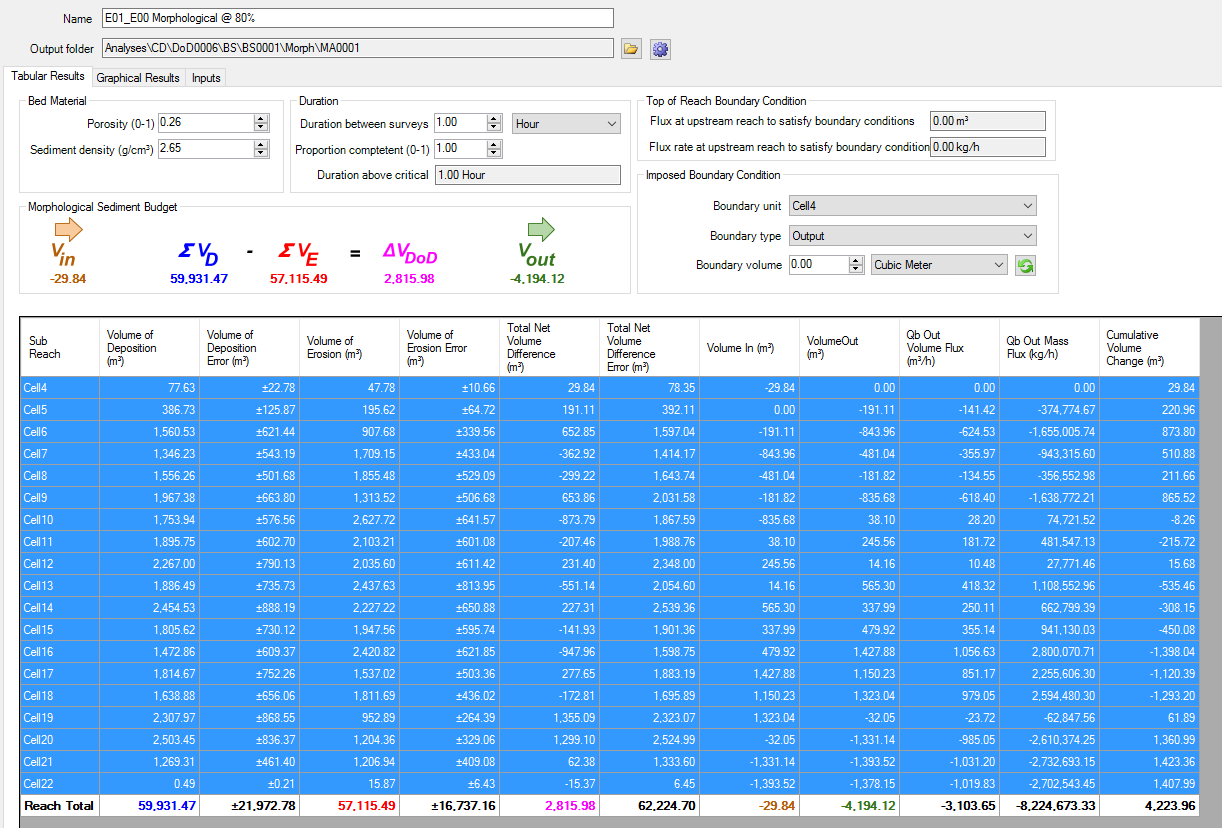
As you see, the reach volumetric deposition is reported here as 59,931.47 m3 but if you add up the figures in the column, you find a value of 29,965.72 m3. The applies to the other sums. There is a link here ... in that the reported sum (59,931.47) is exactly twice the actual sum, and this scaling holds across the table.
Interestingly, this glitch only appears here ... i.e., the summary of the whole change detection reports the correct values ... see below:
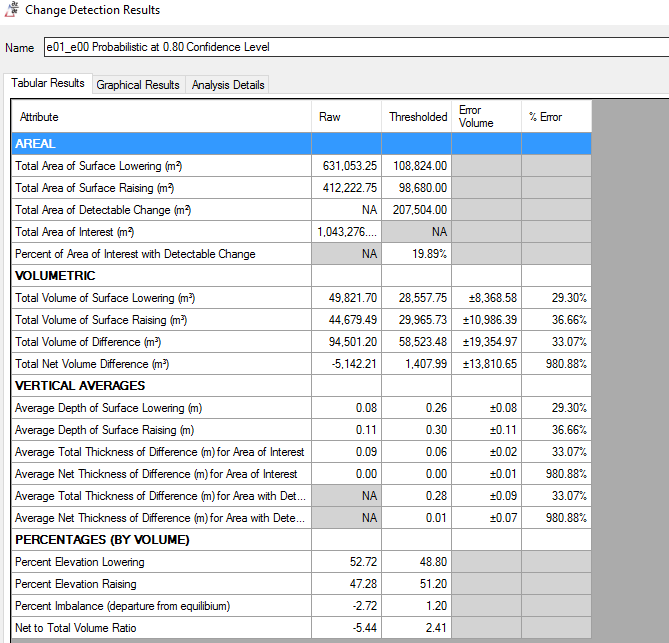
and the individual cell values reported in the budget segregation are correct too.
So, by the process of elimination, it appears that something fishy is going on with the dynamic morphological approach calculator.
There is a weakly related issues that I will now document in a follow-up comment.
--

@philipbaileynar @joewheaton @MattReimer
So - the follow-up comments:
a) First and foremost. this is not a biggy - but ....
it is rather confusing that the dynamic table presents the Depositional volume before the erosion volume, while the output spreadsheet does the opposite.
Not sure what to suggest here ... I appreciate that this most likely reflects the way in which the coloured calculation is presented, while the spreadsheet was based on Joe, Damia and my spreadsheet.
Main question to you here, is do you feel this affects the usability?
The question really emerges as my approach to determining the budget has been to use the output spreadsheet to determine an appropriate boundary condition to insert into the top cell (by determining the input volume required to adjust to the first (and often multiple) depositional cell volumes) and then inserting this into the dynamic form. It may well be that this is just a problem for me therefore, but I'd be interested to hear your thoughts.
@philipbaileynar @joewheaton
b) I seem to be finding some nit-picky problems with morphological calculations:
Let's run through an example:
This is an analysis of the same (E1-E0) Rees change detection (so not the volume sums are wrong as described earlier).
here is a clip of the dynamic calculator as it is first initialized:

and here is a clip of the auto-generated spreadsheet:
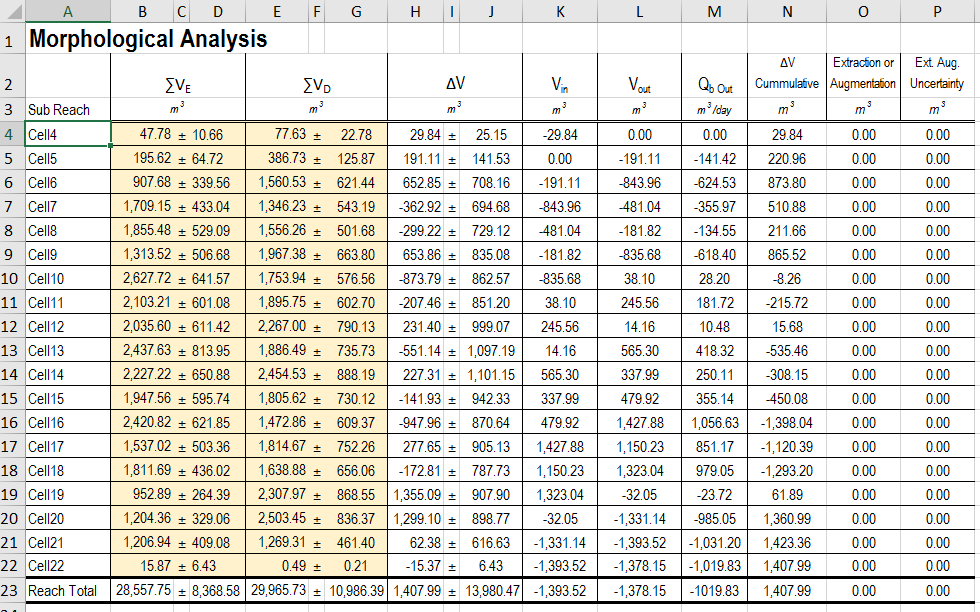
So, immediately, we see differences between these two.
Let's continue for a moment.
To estimate the minimum transport rate, I need to enter into the first cell (K4) a Vin that will make all Vouts positive throughout the sequence, while reducing one cell (where the cumulative depositional rate peaks) to zero.
Often this can be found by identifying the first net depositional cell, and then working backwards, estimate how much material must enter the reach to account for this deposition given the pattern of erosion and deposition upstream.
However, in this example, this doesn't work, as the first three cells are all depositional but even adding these up and using that as an estimate fails, as the subsequent battle of E and D turns the VOut down the series negative again, implying a higher necessary load to enter the reach.
So ... to go back to basics, I thought it might be useful to run these numbers through the original spreadsheet Joe and I created a few years back, and see how things look.
So, to aid this discussion, I've attached the two spreadsheets (the autogenerated one from GCD and one where I have transfered the vols into the original spreadsheet).
Rees_E1_E0_Calcs_based_GCD_generated_Worksheet.xlsx Rees_E1_E0_Calcs_based_original_MorphApproach_Worksheet.xlsx
So far so good, the numbers translate and we have the same vols of E,D and net in the spreadsheets.
Recall, in our original spreadsheet, the approach involved setting an unrealistically high number (9999) as the input (Vin) boundary flux. So, we see, a value of 10,029 being returned in this first cell, reflecting the addition of t~30 m3 of net deposition in the first cell. The estimated output from this initial cell is then adjusted to account for this deposition, so returning a boundary flux of 9999. All good, except clearly the fluxes that follow are unnecessarily high to account the pattern of E and D.
So, we now need to determine what the minimum upstream boundary flux should be. The classic procedure has been to identify the first positive depositional cell and work backwards from this volume to determine the volume required to satisfy this. It doesn't work here, as we have three depositional cells straight out and then a complex pattern of E and D.
Interestingly, the autogenerated spreadsheet has the answer ... found by running the calculations with the initial boundary flux set to zero. This estimates the final net input to final cell as -1393.52 which is the volume needed to be input at the top of the reach to set all the outputs positive. I'll let you do this in the original spreadsheet, and you should get an answer that looks like:
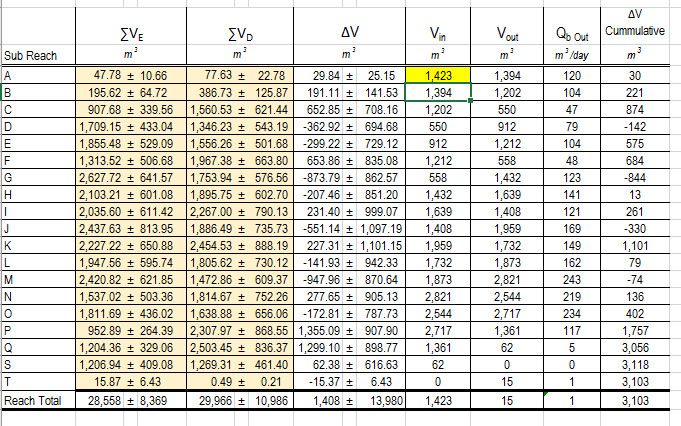
However, do the same thing in the online calculator, and numbers are don't quite work.
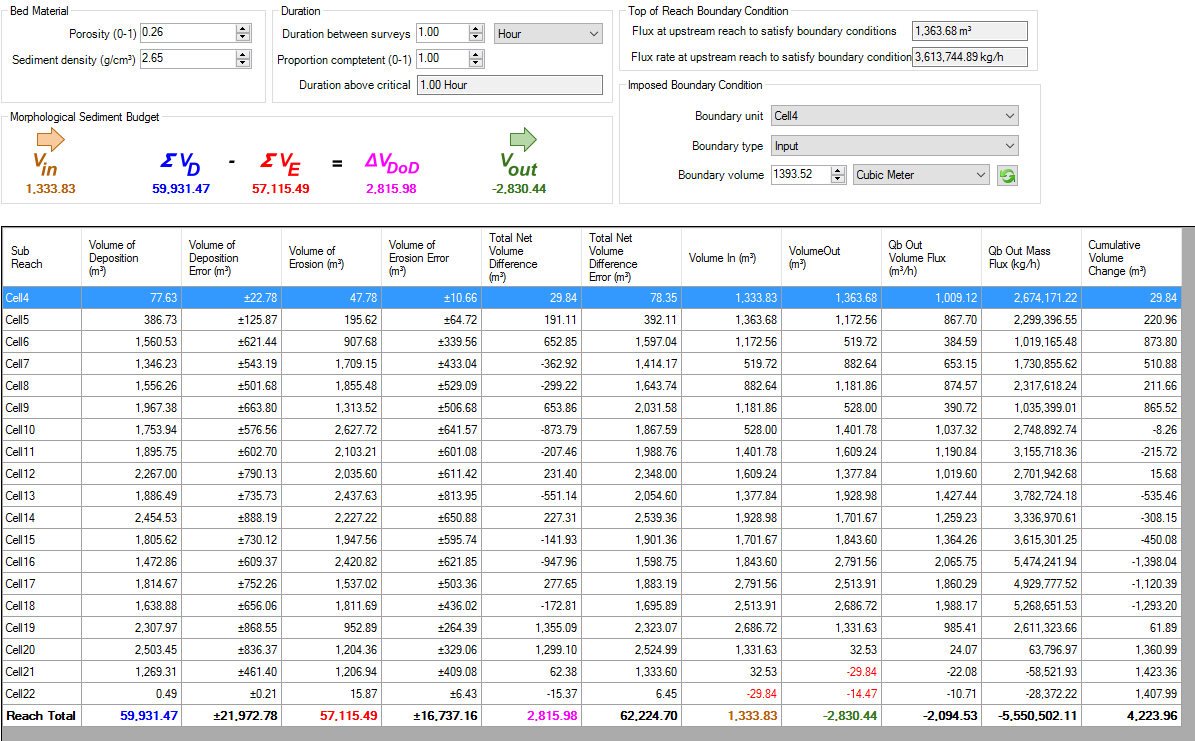
- the initial 1393.52 appears to be reset to 1363.68 (in the top estimator box) by deducting the net positive storage (rather than adding it);
- this now cascades, so that the Vin is now further reduced by another 30 m3 to 1333 and the output from this first cell reduced to 1363.
The result of this, is that the final numbers fail to incorporate the initial net volumetric change in cell one ... so we end up with a -29.84 (i.e., 30 m3) negative flux in cell 21.
- I'm also not sure what's happened to the final reach totals ... which should be Vin = 1393.52 and the Vout = 15.37
I think this should be pretty easy to fix, it looks as though the initial value is being overly adjusted, presumably in a couple of lines of code.
Finally, where this gets confusing ... is that when you update the analysis to generate a new spreadsheet, these problems then disappear, leaving you with the correct answer as shown below:
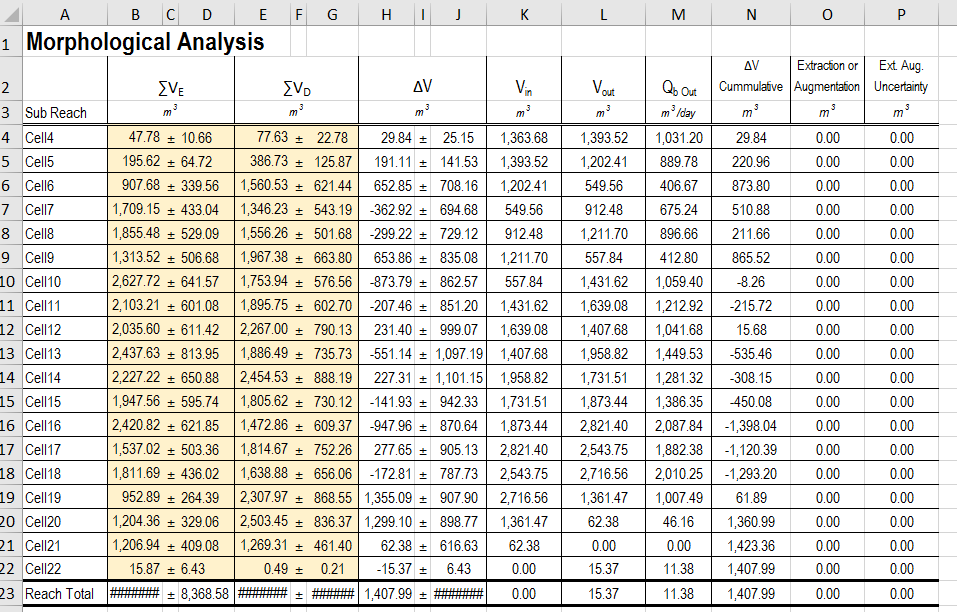
So, all a little confusing ... some differences between the online calculator and the spreadsheet at the root of it, and down to just a couple of lines in the code I think.
Hope this all makes sense!!?!!