

 ReproNim
error: cannot create directory '/opt/freesurfer-6.0.0': file exists
Hi everyone,
i don t really know what i am doing here. I am at the very beginning of my learning process on how to use singularity and neurodocker. Currently I am trying to use neurodocker to make a freesurfer container. after i created the recipe file using
neurodocker generate singularity --base=ubuntu:bionic --pkg-manager=apt --install sshfs --freesurfer version=6.0.0 method=binaries --copy /tmp/ym2/Tsukuba/Freesurf_license/license.txt /opt/freesurfer-6.0.0 > freesurf6.0_recipe
i did singularity build --fakeroot freesurf6.0caro.sif freesurf6.0_recipe
i get the following error:

When i look into the /opt directory there is no freesurfer-6.0.0 directory. I would be grateful for any help ! Thank you very much in advance!

thanks for the report. can you please try the following?
neurodocker generate singularity \
  --base=ubuntu:bionic --pkg-manager=apt \
  --install sshfs \
  --freesurfer version=6.0.0 method=binaries \
  --copy /tmp/ym2/Tsukuba/Freesurf_license/license.txt /opt/freesurfer-6.0.0/ > freesurf6.0_recipe
it's a subtle change. i replaced /opt/freesurfer-6.0.0 with /opt/freesurfer-6.0.0/ in the --copy instruction. can you please let us know if that works?

Hello Jakub,
thank you very much for your quick reply! That solved the problem and I was able to built the container.
However, when I entered the container and tried to open Freeview I got the following error:

Sounds like some libraries are missing? Is this container not meant to be used for opening the Freeview GUI? I need a container where I can run freesurfer processing but also where I can open Freeview for freesurfer editing. Is there any way the command above can be changed to make that possible?
Thank you very much for your help! Carolin
Dear Carolin,
GUI applications are a bit tricky and you need to add addititonal libraries to work.
For apt based distribtuions you need in addition: libqt5widgets5 libqt5x11extras5 libglu1-mesa qt5-default libqt4-scripttools libqt4-opengl libxss1 libxft2 libjpeg62 libegl1-mesa libqt5dbus5
for yum based distrbutions you need in addition: qt-x11 qt5-qtdeclarative qt5-qtbase-gui qt5-qtx11extras mesa-libGLU libXScrnSaver libXft libjpeg-turbo mesa-libEGL epel-release
Another option is to use the neurodesk neuroimaging containers: https://hub.docker.com/repository/docker/vnmd/freesurfer_7.1.1
you could directly build your singularity container based on these docker containers by for example running: singularity build freesurfer_7.1.1_20210421.simg docker://vnmd/freesurfer_7.1.1:20210421
or to get an older version of freesurfer: singularity build freesurfer_6.0.0_20210726.simg docker://vnmd/freesurfer_6.0.0:20210726

Hi! I built a freesurfer singularity container (6.0.0) based on the second command from the previous reply. But when I tried using it I got an error message that the freesurfer license file was not found. I got the license file from freesurfer now but I don t know how I can include it into the container so that everything works?
Thank you very much for any help Carolin
Dear @carolin31,
You could add the license to the container and then set the license environment variable :)
Including this in your build script should work:
   --copy license.txt /license.txt \
   --env FS_LICENSE=/license.txt \
In case you directly converted a docker container to singularity and don't want to rebuild you could also add the license without changing the container. For this place the license file in your homedirectory outside the container and when starting the container set the FS_LICENSE file to this (the homedirectory should be automatically mounted inside the container):
export FS_LICENSE=~/.license
Kind regards Steffen
Hi Steffen, thank you for your reply. I think it would be more convenient if I just rebuilt the container. I did this previously by using the docker container. So I tried the following:
singularity build --copy license.txt /license.txt --env FS_LICENSE=/license.txt freesurfer_6.0.0_20210726.simg docker://vnmd/freesurfer_6.0.0:20210726
but I get an error message saying 'Error for command "build": unknown flag: --copy'
Can I not use --copy and --env with the command above?
Dear @carolin31
if you want to rebuild the container you could use neurodocker and use our freesurfer container as a base-image:
neurodocker generate singularity
--base vnmd/freesurfer_6.0.0:20210726
--pkg-manager apt
--copy license.txt /license.txt
--env FS_LICENSE=/license.txt
--user=neuro
singularityfile.def
Then build this recipe using singularity: singularity build freesurfer_6.0.0_20210726.simg singularityfile.def
Dear @carolin31
if you want to rebuild the container you could use neurodocker and use our freesurfer container as a base-image:
neurodocker generate singularity \
   --base vnmd/freesurfer_6.0.0:20210726 \
   --pkg-manager apt \
   --copy license.txt /license.txt \
   --env FS_LICENSE=/license.txt \
   --user=neuro
  > singularityfile.def
Then build this recipe using singularity:
singularity build freesurfer_6.0.0_20210726.simg singularityfile.def
Hi,
I rebuild the container using the exact command above. I still got an error message that the FS license file /opt/freesurfer-6.0.0/license.txt is not found.
So I replaced the /license.txt with /opt/freesurfer-6.0.0/license.txt in the command above and rebuild the container again. And then it finally worked!
Thank you very much for your help!! :)
Dear @carolin31 - interesting! Then somehow the environment variable got overwritten again (or Freesurfer 6 ignores the environment variable for some reason?) ... good to hear you got it to work by placing the license file where freesurfer expects it :)
Cheers Steffen
thank you @stebo85. I think FS_LICENSE environment variable was introduced just after freesurfer 6 was released. if the base image vnmd/freesurfer_6.0.0:20210726 uses freesurfer 6.0.0, it won't look at FS_LICENSE.
Hi, me again ;) Looks like I was wrong. The first script I ran was just re-running FS after editing (RUNNING: recon-all -autorecon2-cp -autorecon3 -s P2009 -openmp 10) That seemed to work. But looking back at the log I do see some errors being reported like nu_correct: command not found and other errors. and the script exited with errors.

When I try to run recon-all from the beginning (recon-all -autorecon1 -noskullstrip -s P3038 -i /mnt/yassamri2/Tsukuba/hierarchical/BOLD_variability/data/P3/G1/P3038/corticalthickness/outputBrainExtractionBrain.nii.gz -openmp 10) it exits very soon because of the nu_correct command not found:
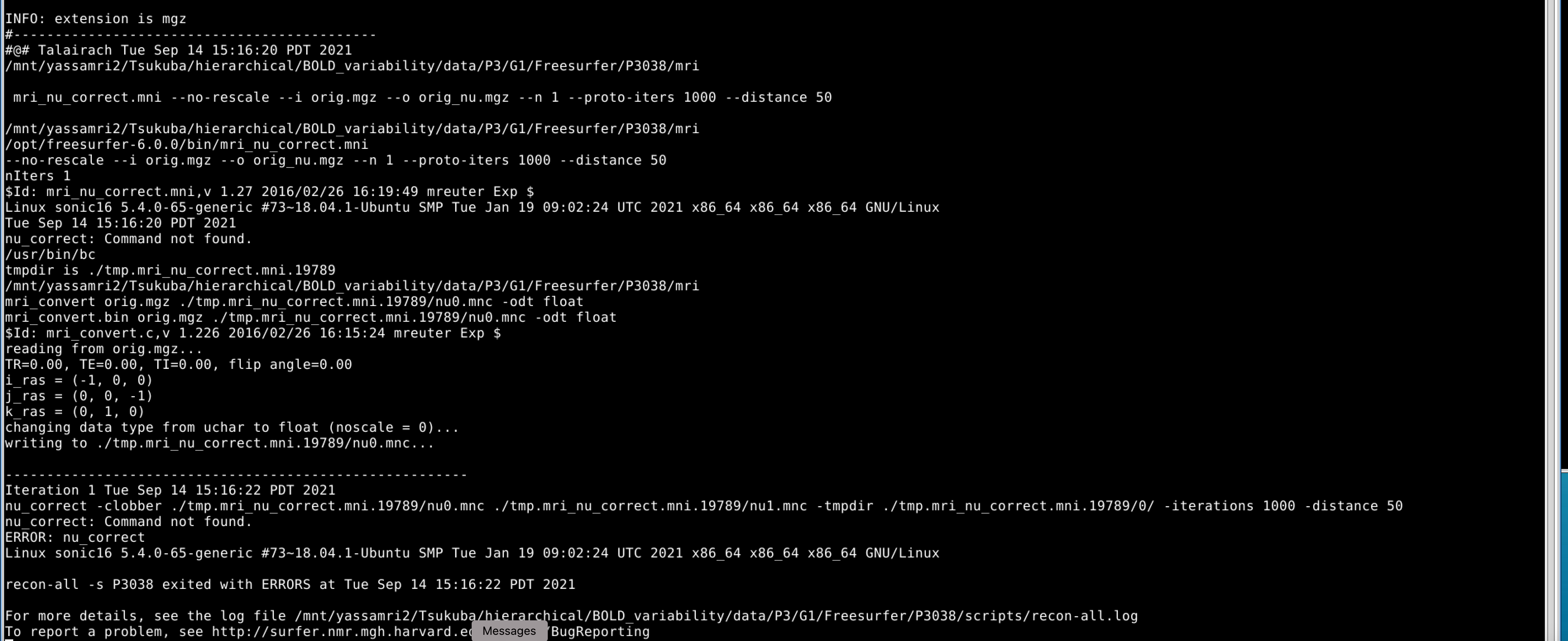
Does somebody have any idea what the problem with this container is and how to fix that? Thank you very much in advance Carolin
Dear @carolin31,
It looks like nu_correct is not on the path inside this container. Neurodocker set's up these paths https://github.com/ReproNim/neurodocker/blob/e9ff4f8a09cc9fb8ea66d86a53c2a5de2f909daa/neurodocker/templates/freesurfer.yaml#L56 but they didn't persist into the container.
Dear @carolin31
I found the problem and a solution: The PATH wasn't setup in the container you have, because the change in neurodocker was done after I build the container, so a quick fix for your problem is to run:
source /opt/freesurfer-6.0.0/SetUpFreeSurfer.sh
before you start your analysis :)
Kind regards Steffen
This issue is stale because it has been open for 30 days with no activity.
![github-actions[bot] avatar](https://avatars.githubusercontent.com/in/15368?v=4 "Published by a pub.dev verified publisher")