

 RenderHeads
Android audio popping noise when built to HTC VIVE Focus 3.
Describe the issue I believe this may be a duplicate / extension of #960. We are encountering a similar issue with audio producing a popping noise when using Facebook360 audio output on the HTC VIVE Focus 3 VR headset. (We require this as we are using an .mkv with 360 audio.)
When running in editor, we do not notice any popping audio, but when built to the Focus 3 you will clearly hear a popping noise within the first 10 seconds of the video. The issue also sometimes appears at random. (Sample project has been attached via email for you to reproduce the issue.)
I noticed that this issue was said to be resolved in AVPro 2.3.0, but that doesn't appear to be the case. Tested both in Unity 2020.3.36f1 and 2020.3.18f1, both had the same issue.
Your Setup (please complete the following information):
- Unity version: 2020.3.36f1
- AVPro Video version (number and edition (trial/core/ultra/enterprise)): Tested in both v2.5.4 (trial) & v2.2.0 (ultra)
- Operating system version: HTC Vive Focus 3 v5.0.999.514
- Device model: HTC Vive Focus 3
- Video specs (resolution, frame-rate, codec, file size): 4096x2048, 29.97, MPEG-H Part2/HEVC (H.265) (hvec), 299MB
To Reproduce Note: Please see attached Unity project sent via email and open the AudioIssue-Demo scene. You will need to make a build, but I can also provide an APK if necessary.
There isn't anything special about this scene, it's pulled directly from the Demo_360Stereo scene in AVPro. However, I have replaced the video with one allowing you to replicate the issue on the Focus 3.

Thanks for your email, we'll look into this. Can I just check, is it specific videos that are causing this or is it random? Have you tried other headsets with your scene (I know you said you needed to use the Vive, but was wondering if you had any others)

NOTE: This is not linked to the mentioned issue (#960). That issue was an optimisation in the 'Unity piped' audio path. The FB360 audio path is being used here.

@Ste-RH Interesting... We're having almost an identical issue, but instead we are using the FB360 audio path.
@Chris-RH It is random across videos in general, but specific videos seem to cause the issue more often. (Like the one included in the sample project.) What you'll hear is audio discontinuity that sounds like low pops in the track, almost like a CD skip.
IIRC, you could build the exact same thing to an Oculus platform and not experience that issue. I do have a Quest2 on hand and will give test the sample project I forwarded to you later this afternoon, just for the sake of research.
All audio popping and glitching issues we have encountered have been down to audio thread starving.
I tested your project, after stripping out the WaveXR packages, on an Oculus 2 and a Pico Neo 2. Zero issue heard with the audio. We do not have access to any Vive devices currently.
Have you tried changing the Audio settings? (DSP buffer size)
@Ste-RH Thanks for taking the time to test. I haven't tried changing the DSP buffer size yet, is there a specific value that would work better?
Edit: Okay, so I've tried a bunch of different DSP buffer sizes but to no avail. Still hearing a popping sound.
Yeah, I think most modern Unity versions default to 'Best Performance'.
What format are you encoding at to give you 11 channels? AMBIX_9_2 ? FFPROBE reports as '11 channels'. Wondering if if should be reporting as something more specific and that is a clue?
We are defaulting to 'Best Performance'. I did also test all other available options within Unity, all caused the same popping issue.
The video in my sample project is using AMBIX_9_2. We have had the same issue though at both lower and higher channel counts.
Hey everyone, has there been any updates or ideas on what might be going on here?
I wonder if the Wave SDK is throttling the CPU/GPU? Can you check they are set to 'maximum' so there is no limiting performance?
We have seen this with the Oculus SDK in the past affecting output.
Good catch, and definitely worth looking into further. For now, I have disabled the 'Adaptive Quality Mode' within our WaveXR settings. Unfortunately however, we are still seeing the issue with popping audio.
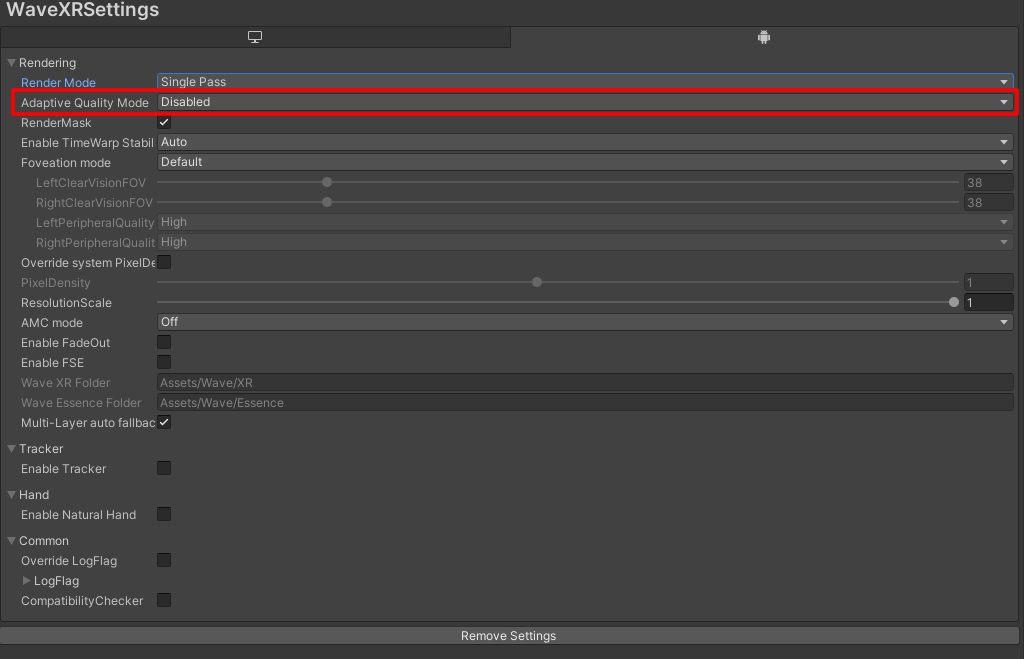
Happy Monday everyone!
I went ahead and did some more testing this morning, this time with just the audio track. I found that if I remove AVPro and run the audio track separately, (just the audio track, playing through a Unity audio source & no video) the audio will come through crystal clear, even in an empty scene. Which I believe may rule out Wave throttling our device, especially since 'Adaptive Quality Mode' is disabled.
It's also interesting to note that the audio popping only occurs when running AVPro on our Focus3, we also tested on a Focus Plus (still using Wave) and didn't encounter the audio popping issue.
Does anyone from the AVPro team have any updates or other ideas to further narrow down the issue?
This issue has been automatically marked as stale because it has not had recent activity. It will be closed if no further activity occurs. Thank you for your contributions.
![stale[bot] avatar](https://avatars.githubusercontent.com/in/1724?v=4 "Published by a pub.dev verified publisher")
Do not close this ticket, we are still investigating with the HTC engineering team.
This issue has been automatically marked as stale because it has not had recent activity. It will be closed if no further activity occurs. Thank you for your contributions.
@Ste-RH @Chris-RH Thanks for your patience on this ticket. We've been working on troubleshooting this directly with HTC and do have some updates to share.
To start, I'd like to re-frame the problem and then go into what we've discovered. During our testing we have uncovered another issue that is potentially related to the audio popping issue.
CET (our application name) experiences two audio problems in relation to Ambisonic sound using an HTC Focus 3 headset:
- Artifacts and "skipping" sounds either at video start or when a video is paused, then un-paused, on an HTC Focus 3.
- Identical videos played on an Oculus headset do not experience this bug
- Identical videos played on an HTC Focus Plus headset do not experience this bug
- A varying level of audio-video sync "drift" that can cause audio to appear "out of sync" with video on an HTC Focus 3.
- Identical videos played on an Oculus headset do not experience this bug
- Identical videos played on an HTC Focus Plus headset do not experience this bug
- Not clear if this is coincidental to the first bug or caused by it
- Because of the AVPro ↔ FB360 relationship, as well as the need for spatial audio, Axon (our company) cannot use alternate video or audio container formats (like .mp4). It is a product requirement (due to the deprecated FB360 plugin on which CET currently relies for audio decoding) that all CET content with spatial audio has the following specifications:
- 11, 10, or 9-channel audio (i.e., AMBIX_9_2, TBE_8_2, or AMBIX_9) encoded in .opus format
- Video and audio in the .mkv (Matroska) media container format. This is because encoding FB360-compatible audio for applications outside of Facebook (which required a deprecated .tbe file) required the use of a technique that remains experimental; see appendix following:

Further definitions:
Axon uses second-order Ambisonic B-format audio for spatial audio with CET. The following is some useful information about this unique format:
- Axon uses second-order Ambisonic (9 channels) that is platform-agnostic, with the following exceptions:
- Legacy CET content that uses the hybrid TBE_8_2 audio channel layout (8-channels + 2 stereo). This format existed because, when the Two Big Ears (TBE) spatial audio platform was originally acquired by Facebook, many popular digital audio workstations could only output up to ten channels.
- The "_2" refers to "head-locked stereo" audio (like narration or music) that is static and does not respond to player rotation.
- Modern CET content that uses the AMBIX_9_2 audio channel layout (9-channels + 2 stereo for a total of 11-channels) – again, the "_2" is "head-locked stereo."
- Legacy CET content that uses the hybrid TBE_8_2 audio channel layout (8-channels + 2 stereo). This format existed because, when the Two Big Ears (TBE) spatial audio platform was originally acquired by Facebook, many popular digital audio workstations could only output up to ten channels.
- Ambisonic audio can be easily mixed down simply by removing channels (i.e., 9-channel "second order" can become 4-channel "first order" by removing five channels)
- This can be confusing, since some spatial audio plugins (Steam Audio, Google Resonance, Vive 3DSP) use Ambisonic as an intermediary step to bake down point-based sources, and thus claim "higher order Ambisonics" than they can actually decode
- "Ambisonic audio," in Axon's use case, refers specifically to the rendered, linear, multichannel "B-format" audio file that is either 4, 9, or 16 channels.
- All "_2" head-locked stereo can be mixed into a single 9-channel file and transformed into a 4 channel "first order" Ambisonic mix if necessary
- Sample integrations besides AVPro (to potentially split out and sync video and audio separately)
- Unity natively supports "first order" (4-channel) Ambisonic B-format decoding but does not support "second order" – not a huge issue, since as per point 1, going down an order is straightforward
- Google Resonance (a mobile-first spatial audio SDK) appears to only support "first order" Ambisonic B-format decoding ("third-order" with baked down point-based sources, which is not the same)
- Oculus Spatializer only supports "first order" Ambisonic B-format decoding
- Vive3DSP supports “first order” Ambisonic B-format decoding
Recent updates from HTC:
This is our most recent direct response from HTC:
“We had dump the audio PCM data in HAL layer and found the output audio data from AVPro is not continuous and it caused pop-sounds. Keep debugging why it only happens with AVPro. Could you support to check if it happens with different video or audio file?”
As mentioned above, we have tested with other video / audio files and confirmed this occurs on the HTC VIVE Focus 3.
To continue I want to follow up with members from the AVPro team to see potentially why the audio would not always be continuous given the above data? Thank you again for your assistance on this issue.
As discussed further up this thread, audio thread starvation is almost always the reason that audio is not being put into the audio output buffer.
It is still very telling that this issue does not happen on other comparable devices.
Have you tried reproducing the issue in one of our demo scenes? Maybe with a video with a less demanding visuals (lower frame resolution and bitrate) but with the same audio track.
Have you tried a less taxing audio track (fewer channels)?
Hi @Funnyguy77, Have you been able to reproduce the issue using the demo scene as mentioned above?
I'm going to close this for now. Please reopen if you are still able to reproduce it as mentioned above, thank you.
Update on this issue, yes I am still able to reproduce as listed above.
Qualcomm has identified the issue (essentially this audio codec starts/stops which causes the popping) and is working on an unknown data handling change (good news!).
Bad News is that it requires a complete codebase change that is under review and may take months if they decide to even proceed with it. They are also looking at a potential driver workaround instead but they wanted to know why we are married to this codec.
Long story short, we may end up changing codec's. Just wanted to provide an update for any future internet travelers.
Hi, I know that this issue, is more than one year old and it's closed, but do you have any update from Qualcomm ?

@Fafou We have not heard anything from Qualcomm. It's best to assume that this issue will not be fixed, and if you plan to use AVPro on the VIVE Focus 3, it's best to use another headset or 360 video player.