

 Rem0o
Rem0o
GPU fans won't drop to 0 RPM unless fan curve is toggled off then on again
- Win10 Pro / 8700K @ 5Ghz / RTX 3090 FE
- NVidia CPanel Power mode set to "Normal" (i.e. it steps down the GPU to its lowest clock when power is not required)
- Idle temp is 39C; profile min temp for GPU is set to 45C
- Min speed 6% (minimum % for fan to start/stop)
Essentially, any time the GPU is activated to output full power and spin up the fans and the user comes out of that session returning to idle conditions, the GPU properly clocks down and the idle temp drops accordingly as well (below the min temp for the profile settings). At this point, the RPM will remain at 800RPM. Upon turning off the GPU fan curve assigned to FAN 1 and FAN 2 for the 3090 FE, it will then go to 0 RPM

0 RPM on some cards isn't properly supported by the driver implementation I'm using, Turning off the curve simply reverts back to whatever the card does built-in.
I'm aware that, It will get stuck to 30% on newer models.
Nvidia haven't updated their public API references for newer features, so there is no solution for this yet.

0 RPM on some cards isn't properly supported by the driver implementation I'm using, Turning off the curve simply reverts back to whatever the card does built-in.
I'm aware that, It will get stuck to 30% on newer models.
Nvidia haven't updated their public API references for newer features, so there is no solution for this yet.
@Rem0o I'm having the same issue.
I noticed it happened with MSI Afterburner as well, but they added a "Override zero fan speed with hardware curve" setting, that, once enabled, solves the problem in Afterburner (fan stop works), hopefully you can add something similar too.


I have no idea how MSI does it.
NvAPI does NOT support this.
The fact they say "override" kinda scares me, as they might be playing with the fan controller directly, bypassing the "safe" API.
Upon turning off then on the GPU fan curve assigned to FAN 1 and FAN 2 of the 3090 FE, it will then go to 0 RPM
How do you do the step you describe as "turning off then on the GPU fan curve"? I can't seem to do this. The only way I can turn off the fans of my 3080 Ti FE is shutting down Fan Control completely. Thanks!

I have no idea how MSI does it. NvAPI does NOT support this. The fact they say "override" kinda scares me, as they might be playing with the fan controller directly, bypassing the "safe" API.
@Rem0o Got it.
Many GPUs nowadays have a fanstop below 50°C: would it be possible to have a setting that disables a curve we defined IF the temperature is lower than a threshold, I try to explain better what I mean:
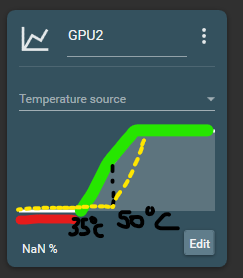
The yellow graph is the hardware fan curve (defined by GPU manufacturer, the default one): the GPU has by default a fan stop below 50°C Red and green is the curve we define within Fan Control.
Since most modern GPUs have this fan stop feature by default, it would be cool to have an option "disable custom curve if temperature is below XX°C", where XX°C is 35°C in this example.
TL;DR A setting that let us define threshold temperature below which our custom curve is ignored, since most modern GPUs have a fan stop by default, and we usually want a fan stop lower than the default temperature.
Upon turning off then on the GPU fan curve assigned to FAN 1 and FAN 2 of the 3090 FE, it will then go to 0 RPM
How do you do the step you describe as "turning off then on the GPU fan curve"? I can't seem to do this. The only way I can turn off the fans of my 3080 Ti FE is shutting down Fan Control completely. Thanks!
At the top, where all your fan controls are, you simply toggle the curve off then on again and you'll see the RPM ramp down to 0rpm provided the GPU temps are low enough as well.
I have no idea how MSI does it. NvAPI does NOT support this. The fact they say "override" kinda scares me, as they might be playing with the fan controller directly, bypassing the "safe" API.
This recommendation is a hack and completely antithetical to proper development, but in lieu of not being able to support the fan stop function in that the newer gen cards remain stuck at 0rpm, would it be possible to create a debug toggle of sorts to enable the application to monitor the temps/clocks of the GPU and if enough time has lapsed, it would be a safe assumption to say the fan stop should kick in and in that moment you simply automagically toggle the fan curve associated with the GPU fans?
TL;DR A setting that let us define threshold temperature below which our custom curve is ignored, since most modern GPUs have a fan stop by default, and we usually want a fan stop lower than the default temperature.
What a great idea! I think many Ampere GPU owners would greatly appreciate such a workaround. Thanks for the suggestion.
TL;DR A setting that let us define threshold temperature below which our custom curve is ignored, since most modern GPUs have a fan stop by default, and we usually want a fan stop lower than the default temperature.
That setting would be a % for this to work. Like, if the control see's 0%, "disable" the control in the background.
TL;DR A setting that let us define threshold temperature below which our custom curve is ignored, since most modern GPUs have a fan stop by default, and we usually want a fan stop lower than the default temperature.
That setting would be a % for this to work. Like, if the control see's 0%, "disable" the control in the background.
OK, that sounds like something that could work. Thanks!
That setting would be a % for this to work. Like, if the control see's 0%, "disable" the control in the background.
Sounds great. However, you'll get reports from users stating that they see a positive RPM despite the displayed 0%.

However, you'll get reports from users stating that they see a positive RPM despite the displayed 0%.
Yes, hence why I didn't do anything yet. Assuming the card will go 0 rpm when disabling the control is a hail marry at best from my perspective. Once I disable the control, I can't guarantee anything from the software POV.
However, you'll get reports from users stating that they see a positive RPM despite the displayed 0%.
Yes, hence why I didn't do anything yet. Assuming the card will go 0 rpm when disabling the control is a hail marry at best from my perspective. Once I disable the control, I can't guarantee anything from the software POV.
Would it be possible to disable the control for 10 Seconds (so the fans can reach 0 rpm) after reaching 0 rpm on our custom curve and then reenable it after those 10s? The fans wouldn't start back up until hitting our custom curve trigger. Or is the automatic reenabling a problem?

Would it be possible to disable the control for 10 Seconds (so the fans can reach 0 rpm) after reaching 0 rpm on our custom curve and then reenable it after those 10s? The fans wouldn't start back up until hitting our custom curve trigger. Or is the automatic reenabling a problem?
10 seconds sounds pretty arbitrary in my opinion. I mean, some GPUs need way more than that to actually reach 0 RPM by themselves, depending on the GPU model and case environment.
Here is how i would implement it, in a way that's transparent enough for the user:
In the curve graph edit window, add a new checkbox below the "Temp" field, called "Disable control below Temp", that would only be available for the curve point with the lowest temp. After that, the graph parser would automatically disable the control accordingly.
As far as the graph visual goes, an "off" row could be added below the 0% one. That way the current temp indicator on the curve card would actually go somewhere.
That would of course require some significant changes, and time.
Would it be possible to disable the control for 10 Seconds (so the fans can reach 0 rpm) after reaching 0 rpm on our custom curve and then reenable it after those 10s? The fans wouldn't start back up until hitting our custom curve trigger. Or is the automatic reenabling a problem?
10 seconds sounds pretty arbitrary in my opinion. I mean, some GPUs need way more than that to actually reach 0 RPM by themselves, depending on the GPU model and case environment.
The 10 seconds were an arbitrary number. If it's possible at all one could change that. The question was if it was possible in principle to turn off control, wait some seconds, then reenable control.
Very interested in this feature, ended up installing MSI Afterburner solely to get it, but I can't seem to get both fan controlling softwares to play nice together.
Had to disable Fan Control's curve for the GPU.

HI,
I am also experiencing this issue,
Is there a potentialy work around for now?
I have a 3090FE.
Disabling the toggle next to the fans doesnt seem to stop it.

I think I'm having the same issue on a MSI 3070. My min GPU fan speeds seem to be just at 30% and I can't dip below that. What settings can I do in MSI Afterburner to resolve this?

hey guys, i have the same issue with my 3070, it is an MSI Gaming Z, not a cheap one, it has 0 RPM functionality, of course!
fans start spinning around 56-57C, and they stop around 36-37C, now i dont really know who in their right mind made this setup? why does is take 20C difference to stop?
if i do something no to GPU intensive and the temperature stays around lets say 49C, the fans won't start and thats really good, but if they start because of a high load, after that load they wont every stop again if i use something that requires light load, because that way the temperature will never drop to 36C...
i have tried the msi afterburner "workaround" mentioned here above, but i can confirm, that it doesn't work!
https://i.imgur.com/2sVFpRA.jpg

See #1187
I tried the new feature and it works! Does the "?" next to the % fan speed in the control card indicate the stock hardware fan curve setting? Thanks.
@Maveric0623 It doesn't. The "?" means what fancontrol ask != what the control says it runs at.
Keep in mind the override setting will only work at 0. If you set anything from 1 to 29, you'll get the "?". I recommend you put your start and stop% to 30 on your control, so that anything below what FanControl has access to is snapped to 0. You should then never see the "?" sign.
I see a lot of issues that discuss more or less one problem: the inability in Fan Control to achieve Nvidia GPU fan speeds below 30%:
- GPU at 30% although curve should "force" it to 0% (901)
- The software ignores the minimum and maximum values for fan controls (986)
- Being overridden by external ??? i have no other control software (988)
- GPU fans won't going to 0 rpm (1198)
- "Nvidia 0% Hardware curve override" does not override the 0% curve. (1254)
- Nvidia 0% hardware curve override seems not work (1504)
- Nvidia fan control override has to be unchecked and checked every startup (1872 )
- Reset Nvidia 0% hardware curve (2101)
(I deliberately did not make links in case I am wrong, and the problems in the indicated issues are different from the one discussed here.) The main problem voiced was the limitations of the Nvidia API and the reluctance to use hacks.
My configuration:
- ASUS P8Z77 WS (Intel Z77 / Panther Point DH)
- Nvidia GeForce RTX 3070 Ti (GA104-400 LHR) by Palit Microsystems
- Nvidia 546.17 WHQL driver
- Microsoft Windows 10.0.19045.3693
- Fan Control 173 (NET 4.8)
I tried various combinations of "Force apply", "NvApiWrapper" and "Nvidia 0% hardware curve override" settings, but the speed of both GPU fans displayed in Fan Control when idle was always around 30%.
Do I understand correctly that at the moment there is no solution to this problem, and it will only appear if Nvidia adds such a feature to the API of its drivers? Perhaps this clarification should be added to the FAQ in the README.md file.

Do I understand correctly that at the moment there is no solution to this problem, and it will only appear if Nvidia adds such a feature to the API of its drivers?
Basically yes, newer cards have limitations where it won't allow from its NVAPI call to set a speed lower than 30. The usual workaround is to disable the control under 30% to allow the card to set itself to a lower value if it can, but at that point you are no longer in control and the card decides for itself.