

 Reduati
Permission error during project compilation
When compiling the project using Visual Studio 2019, the following errors were encountered:
"AuthorizationManager check failed" "The command powershell exited with code 1"
The permission error occurs when executing the build.ps1 file. For correction, it was necessary to change the permission of the file as screenshot below:
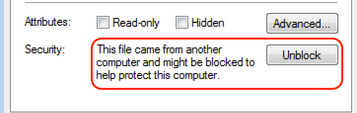

We are aware of this issue on some builds of Windows. Currently we don't see how to avoid this restriction, when having an external script to help during build phase.
In the future we may test a different approach, like dropping the file and then executing it; This will for sure prevent the security flag from windows.
Since we cannot fix this in the moment, I thank you for bringing this to our attention and will let it open to a future fix.
