

 RandyKnapp
Frame Rate performance problems from minimap.cs
The code in minimap.cs function UpdateDynamicPins_Postfix(Minimap __instance) gets executed every time Valheim alters the onscreen HUD window. This can be more than 20 times a second. This function can cause up to 25% frame rate loss if the onscreen HUD map is zoomed out.
The bottleneck seems to be that each time this function is called the code traverses the entire treasure maps and bounties structures, removes all the pins and circles, and adds them back.
For example this part is done hundreds of times per minute:
        var unfoundTreasureChests = adventureSaveData.GetUnfoundTreasureChests();
        var oldPins = TreasureMapPins.Where(pinEntry => !unfoundTreasureChests.Exists(x => x.Interval == pinEntry.Key.Item1 && x.Biome == pinEntry.Key.Item2)).ToList();
        foreach (var pinEntry in oldPins)
        {
            __instance.RemovePin(pinEntry.Value.Pin);
            __instance.RemovePin(pinEntry.Value.Area);
            if (pinEntry.Value.DebugPin != null)
            {
                __instance.RemovePin(pinEntry.Value.DebugPin);
            }
            TreasureMapPins.Remove(pinEntry.Key);
        }

        foreach (var chestInfo in unfoundTreasureChests)
        {
            var key = new Tuple<int, Heightmap.Biome>(chestInfo.Interval, chestInfo.Biome);
            if (!TreasureMapPins.ContainsKey(key))
            {
                var position = chestInfo.Position + chestInfo.MinimapCircleOffset;
                var area = __instance.AddPin(position, Minimap.PinType.EventArea, string.Empty, false, false);
                area.m_worldSize = AdventureDataManager.Config.TreasureMap.MinimapAreaRadius * AreaScale;
                var label = Localization.instance.Localize("$mod_epicloot_treasurechest_minimappin", Localization.instance.Localize($"$biome_{chestInfo.Biome.ToString().ToLowerInvariant()}"), (chestInfo.Interval + 1).ToString());
                var pin = __instance.AddPin(position, EpicLoot.TreasureMapPinType, label, false, false);

                if (DebugMode)
                {
                    var debugPin = __instance.AddPin(chestInfo.Position, Minimap.PinType.Icon3, $"{chestInfo.Position.x:0.0}, {chestInfo.Position.z:0.0}", false, false);
                    TreasureMapPins.Add(key, new AreaPinInfo() { Pin = pin, Area = area, DebugPin = debugPin });
                }
                else
                {
                    TreasureMapPins.Add(key, new AreaPinInfo(){ Pin = pin, Area = area });
                }
            }
        }
I was able to gain >20fps back by gating the traverse, remove, and redraw parts of this function behind InvalidateTreasureMapPins and InvalidateBountyPins booleans. When true, the existing Epic Loot remove-and-replace pin code is executed to update the bounties or treasure map pins on the map. When false, UpdateDynamicPins_Postfix skips the corresponding map pin update.
These variables default to true and are only set to false after all the pins are placed on the map in UpdateDynamicPins_Postfix. Bounties and treasure maps are managed separately because remove and add events for both seldom occur in the same minimap update. The bounty boolean gets set to true when a player accepts a bounty, abandons a bounty, or kills a bounty target. The treasure map boolean is set to true when player buys a treasure map or opens a treasure chest.
This might not be the whole fix. I do not fully understand the data acquiring Where () I might be missing some side effect of not doing a new data traverse unless a pin add or remove is needed.
My player group has been using the change for over a month with happy results, so it seems to be a good improvement suggestion to bring to the mod.


Has there been any progress on this? I seem to be experiencing the same issue. I have EpicLoot running on a dedicated server and it appears the more outstanding bounties and treasure map locations you have on your map, the worse fps and GPU utilization I get.
If my existing character connects to the server that has bounties covering the map (easily 50+ outstanding bounties), I get about 16fps and GPU utilization around 20-30% as measured in Windows Task Manager.
If I create a new character on the same computer and connect to the same server and have no bounties on the map, I get 45-60fps and GPU utilization around 75-85% as measured in Windows Task Manager.
If there's a DLL available with a change to fix this, I'd be happy to test on my server.

Can confirm this is still an issue.
Had literal hundreds of bounties. Started an autoclicker to start deleting them at the trader. FPS and GPU utilization started going up. I don't know if the problem comes from what is stated here, or if it is something else related to bounties, but having too many of them will tank performance.
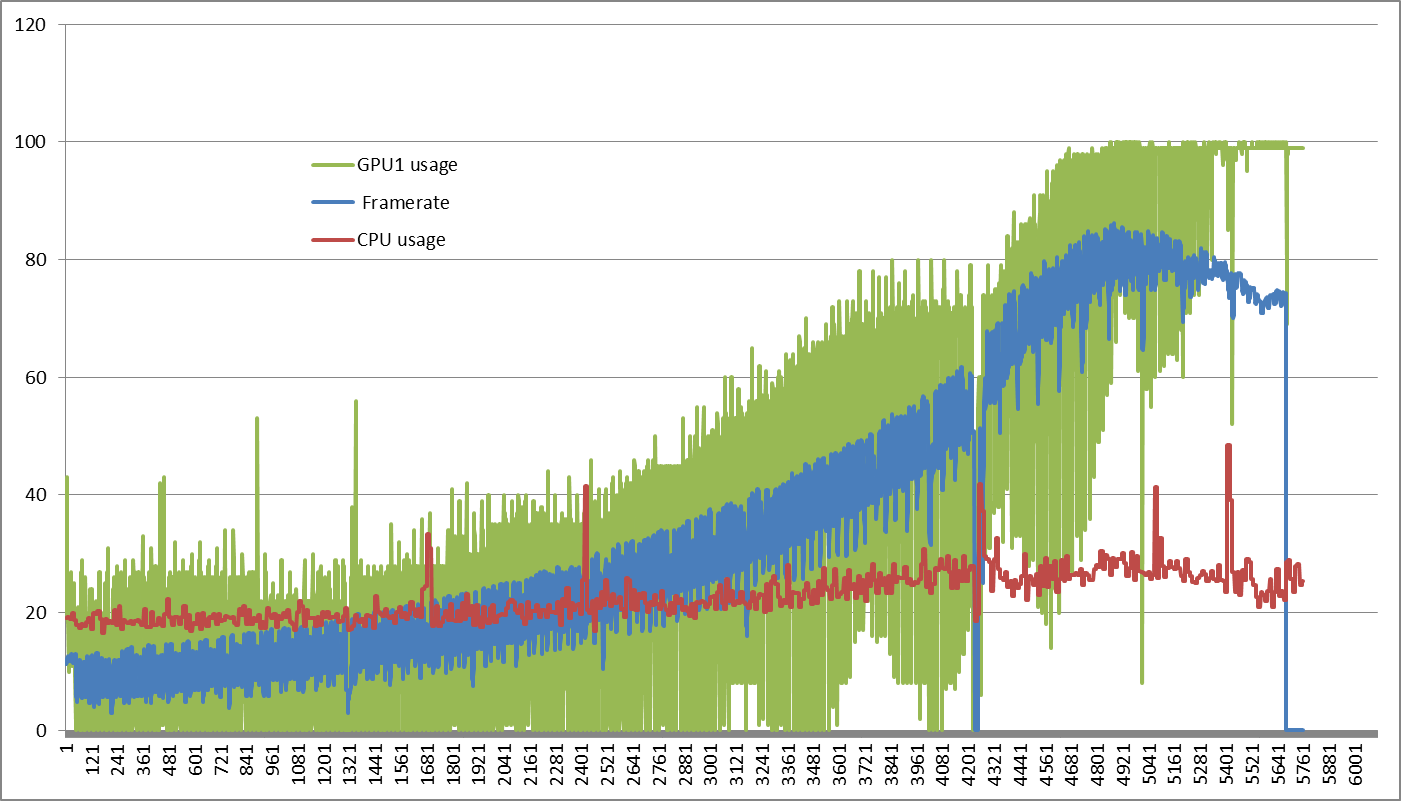 There was almost a nearly linear decrease in frametime while doing this too, implying that the issue was linearly scaling with the amount of bounties active.
