

 RandomEngy
Forgot to tell you...(about Status Bar)
Is your feature request related to a problem? Please describe. Status bar some kinda uncompleted
Describe the solution you'd like
Could you add projectile file size or predicated file size on status bar in your next Beta version or stable version? Also current frame number & current video length will be helpful too! But not so necessary, projectile file size or predicated file size feature mostly required! It's a great feature for encoders.
23GB Bluray Remux movie, CRF 14 without any audio....but I can't guess/predict the final size what'll be. After 1 hour If I see predicated file size is not at on my desire size then I can the increase or decrease the CRF value according to my wish. Without it sometimes wasting of times.
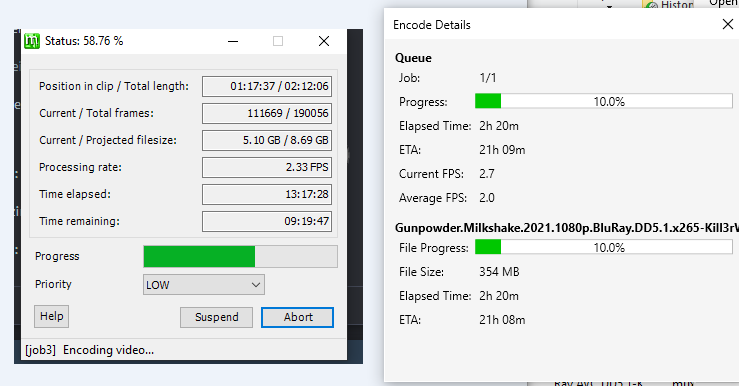 .
I found that you released new stable version 7 days ago, now using it. I'll provide review/feedback/experience later If I face any issue. But not liking the auto delete, I mean If I manually stop the encoding at certain point. There's need to be a warning/confirmation option. After clicking the stop button, " Do you want to delete the so far encoded file ?" Yes or No. I mean something like this...
.
I found that you released new stable version 7 days ago, now using it. I'll provide review/feedback/experience later If I face any issue. But not liking the auto delete, I mean If I manually stop the encoding at certain point. There's need to be a warning/confirmation option. After clicking the stop button, " Do you want to delete the so far encoded file ?" Yes or No. I mean something like this...

Trying to predict the file size has a number of issues. For one, when using quality targeting, the amount of data needed to compress a video changes based on the content. For example scenes with a lot of motion take more data, and scenes with less motion take less data. So something that predicts based on current file size is going to be wrong when this changes, like you get to the credits of a movie. I also don't get "current frame" information, and the actual size of the file lags behind the actual progress because sometimes the data has not yet been flushed to disk.
If you want to keep files from failed or stopped encodes, you can change this setting in Global Options -> Advanced:


Trying to predict the file size has a number of issues. For one, when using quality targeting, the amount of data needed to compress a video changes based on the content. For example scenes with a lot of motion take more data, and scenes with less motion take less data. So something that predicts based on current file size is going to be wrong when this changes, like you get to the credits of a movie. I also don't get "current frame" information, and the actual size of the file lags behind the actual progress because sometimes the data has not yet been flushed to disk.
If you want to keep files from failed or stopped encodes, you can change this setting in Global Options -> Advanced:
So, you are not interested to bring this feature...??
It's a feature that would require a lot of guesswork and maintenance. I'd support it if the HandBrake engine started supporting it.