

 RandomEngy
Unexplained crash - no reason given - error report below
Vidcoder successfully converted all files in queue. When I attempted to right-click and clear the list of successfully completed titles, Vidcoder crashed and provided the error report below.
System.IO.FileNotFoundException: Could not load file or assembly 'Accessibility, Version=4.0.0.0, Culture=neutral, PublicKeyToken=31bf3856ad364e35'. The system cannot find the file specified. File name: 'Accessibility, Version=4.0.0.0, Culture=neutral, PublicKeyToken=31bf3856ad364e35' at System.Windows.Controls.Primitives.Popup.PopupSecurityHelper.ForceMsaaToUiaBridge(PopupRoot popupRoot) at System.Windows.Controls.Primitives.Popup.CreateWindow(Boolean asyncCall) at System.Windows.Controls.Primitives.Popup.OnIsOpenChanged(DependencyObject d, DependencyPropertyChangedEventArgs e) at System.Windows.FrameworkElement.OnPropertyChanged(DependencyPropertyChangedEventArgs e) at System.Windows.DependencyObject.NotifyPropertyChange(DependencyPropertyChangedEventArgs args) at System.Windows.DependencyObject.UpdateEffectiveValue(EntryIndex entryIndex, DependencyProperty dp, PropertyMetadata metadata, EffectiveValueEntry oldEntry, EffectiveValueEntry& newEntry, Boolean coerceWithDeferredReference, Boolean coerceWithCurrentValue, OperationType operationType) at System.Windows.DependencyObject.SetValueCommon(DependencyProperty dp, Object value, PropertyMetadata metadata, Boolean coerceWithDeferredReference, Boolean coerceWithCurrentValue, OperationType operationType, Boolean isInternal) at System.Windows.DependencyObject.SetValue(DependencyProperty dp, Object value) at System.Windows.Data.BindingOperations.SetBinding(DependencyObject target, DependencyProperty dp, BindingBase binding) at System.Windows.Controls.Primitives.Popup.CreateRootPopupInternal(Popup popup, UIElement child, Boolean bindTreatMousePlacementAsBottomProperty) at System.Windows.Controls.ContextMenu.HookupParentPopup() at System.Windows.Controls.ContextMenu.OnIsOpenChanged(DependencyObject d, DependencyPropertyChangedEventArgs e) at System.Windows.FrameworkElement.OnPropertyChanged(DependencyPropertyChangedEventArgs e) at System.Windows.DependencyObject.NotifyPropertyChange(DependencyPropertyChangedEventArgs args) at System.Windows.DependencyObject.UpdateEffectiveValue(EntryIndex entryIndex, DependencyProperty dp, PropertyMetadata metadata, EffectiveValueEntry oldEntry, EffectiveValueEntry& newEntry, Boolean coerceWithDeferredReference, Boolean coerceWithCurrentValue, OperationType operationType) at System.Windows.DependencyObject.SetValueCommon(DependencyProperty dp, Object value, PropertyMetadata metadata, Boolean coerceWithDeferredReference, Boolean coerceWithCurrentValue, OperationType operationType, Boolean isInternal) at System.Windows.DependencyObject.SetCurrentValueInternal(DependencyProperty dp, Object value) at System.Windows.Controls.PopupControlService.RaiseContextMenuOpeningEvent(IInputElement source, Double x, Double y, Boolean userInitiated) at System.Windows.Controls.PopupControlService.ProcessMouseUp(Object sender, MouseButtonEventArgs e) at System.Windows.Controls.PopupControlService.OnPostProcessInput(Object sender, ProcessInputEventArgs e) at System.Windows.Input.InputManager.RaiseProcessInputEventHandlers(ProcessInputEventHandler postProcessInput, ProcessInputEventArgs processInputEventArgs) at System.Windows.Input.InputManager.ProcessStagingArea() at System.Windows.Input.InputProviderSite.ReportInput(InputReport inputReport) at System.Windows.Interop.HwndMouseInputProvider.ReportInput(IntPtr hwnd, InputMode mode, Int32 timestamp, RawMouseActions actions, Int32 x, Int32 y, Int32 wheel) at System.Windows.Interop.HwndMouseInputProvider.FilterMessage(IntPtr hwnd, WindowMessage msg, IntPtr wParam, IntPtr lParam, Boolean& handled) at System.Windows.Interop.HwndSource.InputFilterMessage(IntPtr hwnd, Int32 msg, IntPtr wParam, IntPtr lParam, Boolean& handled) at MS.Win32.HwndWrapper.WndProc(IntPtr hwnd, Int32 msg, IntPtr wParam, IntPtr lParam, Boolean& handled) at MS.Win32.HwndSubclass.DispatcherCallbackOperation(Object o) at System.Windows.Threading.ExceptionWrapper.InternalRealCall(Delegate callback, Object args, Int32 numArgs) at System.Windows.Threading.ExceptionWrapper.TryCatchWhen(Object source, Delegate callback, Object args, Int32 numArgs, Delegate catchHandler)


This was installed using the standard installer. (Since then, it's been upgraded using the automatic upgrade process.) I've never used the portable version.
On Sat, Oct 30, 2021 at 1:43 PM David Rickard @.***> wrote:
Are you using the installer or the portable version?
— You are receiving this because you authored the thread. Reply to this email directly, view it on GitHub https://github.com/RandomEngy/VidCoder/issues/909#issuecomment-955575834, or unsubscribe https://github.com/notifications/unsubscribe-auth/AD5YWHRNYKDWX6NKIVNRLVDUJQ4FPANCNFSM5GSYJ6LA . Triage notifications on the go with GitHub Mobile for iOS https://apps.apple.com/app/apple-store/id1477376905?ct=notification-email&mt=8&pt=524675 or Android https://play.google.com/store/apps/details?id=com.github.android&referrer=utm_campaign%3Dnotification-email%26utm_medium%3Demail%26utm_source%3Dgithub.
Thanks. Does this happen every time you try to right click on the completed queue item?
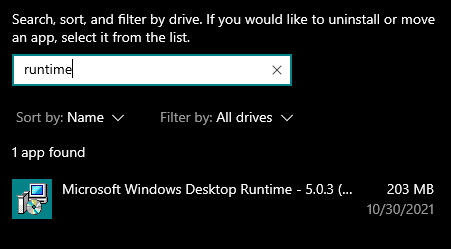
Also, do you have the Desktop runtime installed? Win + X, F, search "runtime"
No, it's random. Sometimes VidCoder works properly, deleting the original file that has successfully completed converting. Sometimes it clears the completed queue but does not delete the original file. And sometimes I get the crashing that is the subject of this e-mail.
On Sat, Oct 30, 2021 at 11:42 PM David Rickard @.***> wrote:
Thanks. Does this happen every time you try to right click on the completed queue item?
— You are receiving this because you authored the thread. Reply to this email directly, view it on GitHub https://github.com/RandomEngy/VidCoder/issues/909#issuecomment-955635867, or unsubscribe https://github.com/notifications/unsubscribe-auth/AD5YWHU5EYGYTM7OAFAUTYTUJTCLNANCNFSM5GSYJ6LA . Triage notifications on the go with GitHub Mobile for iOS https://apps.apple.com/app/apple-store/id1477376905?ct=notification-email&mt=8&pt=524675 or Android https://play.google.com/store/apps/details?id=com.github.android&referrer=utm_campaign%3Dnotification-email%26utm_medium%3Demail%26utm_source%3Dgithub.
[image: 2021-10-31 00_20_05-Settings.png]
On Sat, Oct 30, 2021 at 11:57 PM David Rickard @.***> wrote:
Also, do you have the Desktop runtime installed? Win + X, F, search "runtime"
[image: image] https://user-images.githubusercontent.com/9450861/139568471-34b52818-3307-47fa-b910-9fcd9d6d3a24.png
— You are receiving this because you authored the thread. Reply to this email directly, view it on GitHub https://github.com/RandomEngy/VidCoder/issues/909#issuecomment-955637249, or unsubscribe https://github.com/notifications/unsubscribe-auth/AD5YWHROL2BZLTUBDLGRENTUJTEDDANCNFSM5GSYJ6LA . Triage notifications on the go with GitHub Mobile for iOS https://apps.apple.com/app/apple-store/id1477376905?ct=notification-email&mt=8&pt=524675 or Android https://play.google.com/store/apps/details?id=com.github.android&referrer=utm_campaign%3Dnotification-email%26utm_medium%3Demail%26utm_source%3Dgithub.
Did you try to post a screenshot? It didn't come through, can you try posting directly from the GitHub site?
The screenshot was just the list of runtime versions installed on my computer. I have iSEEK AnswerWorks English Runtime 010.000.0101; Microsoft Edge WebView2 Runtime 95.0.1020.40; and Microsoft Windows Desktop Runtime - 5.0.11 (x64) 5.0.11.30524.
On Sun, Oct 31, 2021 at 12:26 AM David Rickard @.***> wrote:
Did you try to post a screenshot? It didn't come through, can you try posting directly from the GitHub site?
— You are receiving this because you authored the thread. Reply to this email directly, view it on GitHub https://github.com/RandomEngy/VidCoder/issues/909#issuecomment-955639620, or unsubscribe https://github.com/notifications/unsubscribe-auth/AD5YWHT67UP3QUVYMWQKHMDUJTHORANCNFSM5GSYJ6LA . Triage notifications on the go with GitHub Mobile for iOS https://apps.apple.com/app/apple-store/id1477376905?ct=notification-email&mt=8&pt=524675 or Android https://play.google.com/store/apps/details?id=com.github.android&referrer=utm_campaign%3Dnotification-email%26utm_medium%3Demail%26utm_source%3Dgithub.
Thanks. I'm a bit stumped on this one. My app is marked to use the .NET 5 framework, so it should be loading the v5 accessibility DLL. But it's trying to load the v4 version. This is part of the standard .NET SDK and I'm not doing anything special. Also, a DLL load failing intermittently is really odd. Maybe try uninstalling and re-installing the Microsoft Windows Desktop Runtime?