

 RandomEngy
6.35 doesn't properly load system with dual cpu's
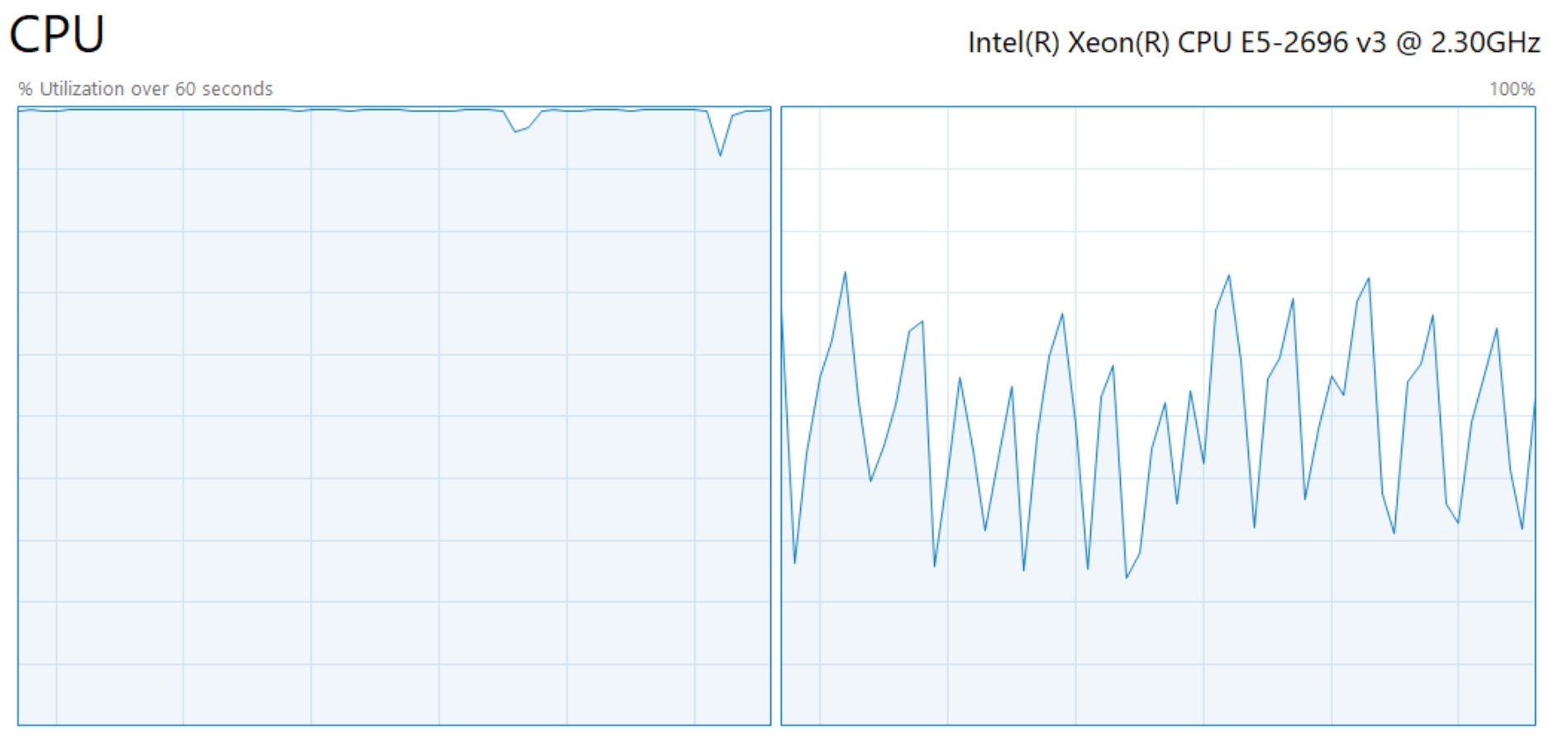
Running 6.35 beta on a dual Xeon 2600v3 system with 16c/32t ea (32c/64t total). Options set for "use worker threads", 100% cpu, 8 simultaneous jobs doing 720p x265 10-bit encodes. Win 10 ver 21H1. It uses 100% of first processor and ~50%avg on second. Ideally it should load them both to 100% so as to not waste processing utilization and time.

8 simultaneous jobs on a 2-core system seems a bit overkill. In your global settings under Processor, do you have CPU throttling enabled?

8 simultaneous jobs on a 2-core system seems a bit overkill. In your global settings under Processor, do you have CPU throttling enabled?
That is 4c/8t per encode, so should easily be able to saturate both processors.. But its not. The way vidcoder is loading the multiple x265 encoders on separate numa nodes must not be optimized
just an update.. I've noticed that if I start encoding with say 4 encodes then while it is running increase it to 8 it then loads both CPUs to 100%..
I released 6.38 Beta, which changes how simultaneous encodes are handled. I'm not sure if it's going to change things for you, but it should be behaving better when hardware encoders are involved.
What encoder were you using? I certainly wouldn't expect it to behave differently when starting with 8 vs increasing to 8 in the middle.