LinuxAcademy-DL

LinuxAcademy-DL copied to clipboard
 RahulShaw
ANSI Escape characters not coloring on CMD terminal on Windows 10
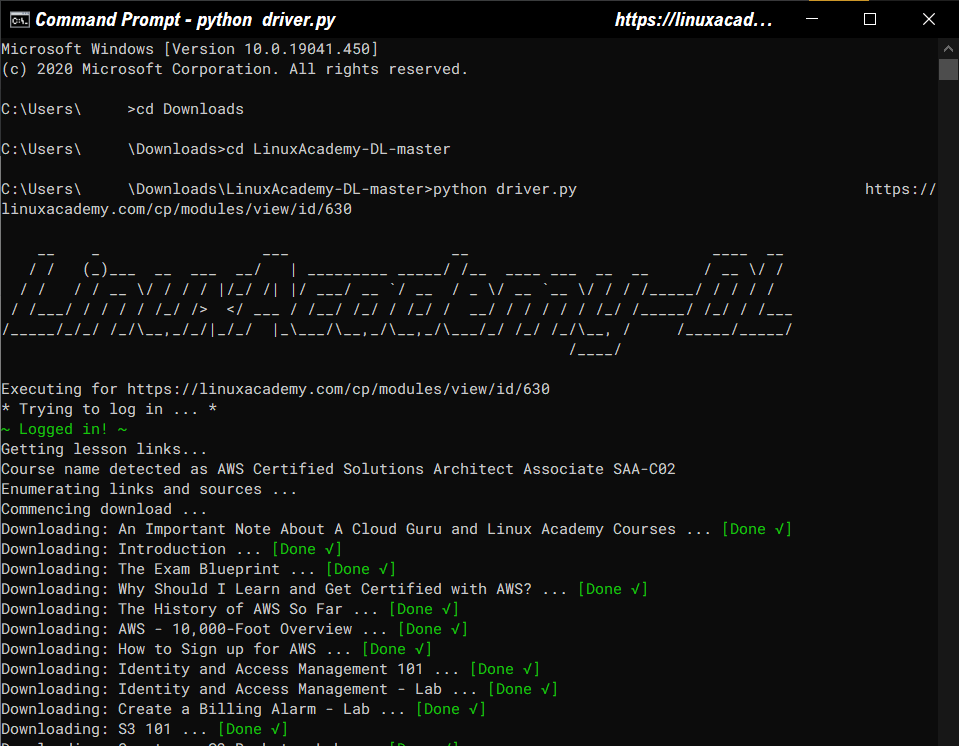
Although Windows 10 TH2 (v1511) added support for ANSI escape sequences, colors still do not show up on the terminal; the reason is that the feature must be enabled/utilized by the program accessing the terminal.
The check mark sign also appears as a question mark within a box.
Here is my solution to the problem:
- For the check mark, I modified the string and entered the sqrt symbol - u"\u221A" OR by holding ALT + 251 (numpad).
- For colored output, I just used this snippet from Stackoverflow.
Rahul, you could make it so that this works if
driver.pydetects if it is a Windows system only.
import ctypes

kernel32 = ctypes.windll.kernel32
kernel32.SetConsoleMode(kernel32.GetStdHandle(-11), 7)
Windows working proof: