

 RadeonOpenCompute
[drm] GPU posting now...
Hi!
We have a ASUS ESC8000 G4 system with 8 AMD Radeon RX Vega56 GPUs installed. The problem is, that even though the GPUs were tested separately in a standalone workstation (and all of them worked properly), the machine fails to boot up with all of the cards. This is the last thing we see while the system boots:
 What can we do to debug the issue?

The best thing to do would be to test the PCIe ports with a single card first, make sure that each one works individually first, since you already tested the cards. Then try just adding one card at a time and see where the issue happens (i.e. After 4, 6, 7, etc). That might also help to narrow down why it's doing that. And if it does happen at a lower number like 4, does it happen with any 4 PCIe ports, or only in certain ones? The board is supposed to have 8 x16 slots so I doubt it's an issue of it dropping them down to x8/x1, but once we check that first, we can ensure that hardware isn't the issue and can go from there. And if you can get the dmesg from the highest supported number, that might give some insight too (so if it dies after 6, try the dmesg from 5 and see if it has anything useful). Keep us posted!

We have tested all PCI ports and all of them work with a single card. Interesting thing is, there is always a GPU0 which is not functioning and we believe it is the ASPEED integrated GPU on the board. With one card installed, this is what we get:
lspci -vnn | grep VGA -A 12
03:00.0 VGA compatible controller [0300]: ASPEED Technology, Inc. ASPEED Graphics Family [1a03:2000] (rev 41) (prog-if 00 [VGA controller])
	Subsystem: ASUSTeK Computer Inc. ASPEED Graphics Family [1043:86ed]
	Flags: bus master, medium devsel, latency 0, IRQ 19, NUMA node 0
	Memory at 98000000 (32-bit, non-prefetchable) [size=64M]
	Memory at 9c000000 (32-bit, non-prefetchable) [size=128K]
	I/O ports at 1000 [size=128]
	[virtual] Expansion ROM at 000c0000 [disabled] [size=128K]
	Capabilities: <access denied>
	Kernel driver in use: ast
	Kernel modules: ast

17:00.0 PCI bridge [0604]: Intel Corporation Sky Lake-E PCI Express Root Port 1A [8086:2030] (rev 04) (prog-if 00 [Normal decode])
	Physical Slot: 0
--
22:00.0 VGA compatible controller [0300]: Advanced Micro Devices, Inc. [AMD/ATI] Vega [Radeon RX Vega] [1002:687f] (rev c3) (prog-if 00 [VGA controller])
	Subsystem: Micro-Star International Co., Ltd. [MSI] Vega 10 XT [Radeon RX Vega 64] [1462:3681]
	Flags: bus master, fast devsel, latency 0, IRQ 53, NUMA node 0
	Memory at 20000000000 (64-bit, prefetchable) [size=8G]
	Memory at 20200000000 (64-bit, prefetchable) [size=2M]
	I/O ports at 9000 [size=256]
	Memory at aab00000 (32-bit, non-prefetchable) [size=512K]
	Expansion ROM at aab80000 [disabled] [size=128K]
	Capabilities: <access denied>
	Kernel driver in use: amdgpu
	Kernel modules: amdgpu
The [1a03:2000] seems like a PCI ID to me which very much resembles the output of rocm-smi for the defunct GPU0.
GPU[0] : GPU ID: 0x2000
Can it be that ROCm/ROCk is trying to configure the integrated GPU?
Also, we noted that things broke when the 3rd GPU was installed. In this case, the machine entered a rolling restart phase with the last systemd message being the one we posted earlier. However, if we do not wait for GRUB to timeout (30 seconds), but press Enter and boot up the system from a hooked up keyboard, the system boots up with 2 cards visible and a systemd message:
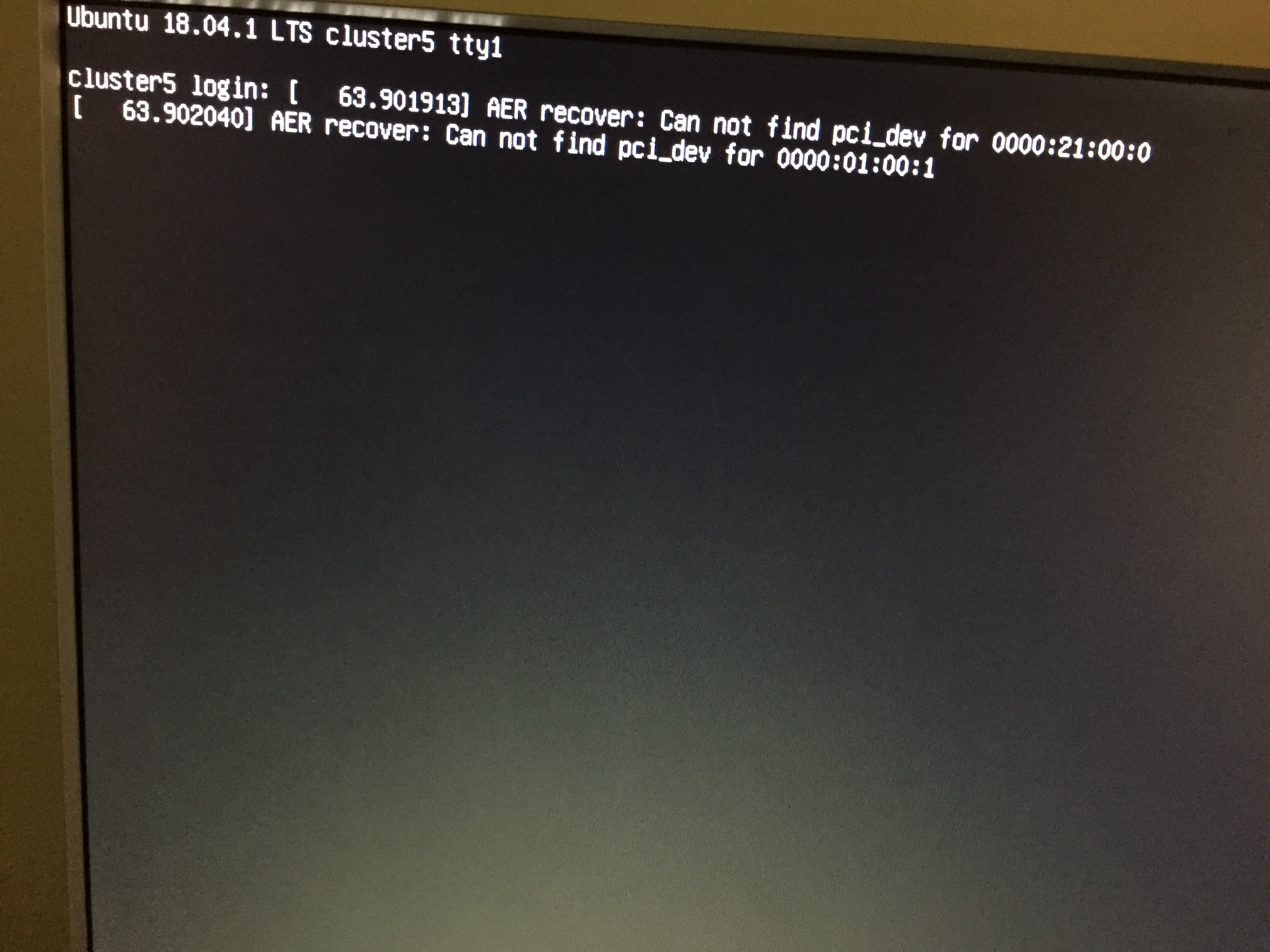
How shall we proceed?
The AER recover message looks like a general PCI device enumeration problem. Maybe your PSU or power circuitry on our mother boards isn't able to supply three cards with enough power.
The error "GPU posting now" appears when a secondary card is initialized that didn't get posted by the BIOS. You can enable more debug messages in the GPU driver with the kernel parameter drm.debug=0xff.

We have borrowed 8 Nvidia GTX 980 cards to test the PSUs, if they are able to provide enough oomph for the cards. Turn out, yes:
Mon Nov 26 14:37:11 2018
+-----------------------------------------------------------------------------+
| NVIDIA-SMI 390.77                 Driver Version: 390.77                    |
|-------------------------------+----------------------+----------------------+
| GPU  Name        Persistence-M| Bus-Id        Disp.A | Volatile Uncorr. ECC |
| Fan  Temp  Perf  Pwr:Usage/Cap|         Memory-Usage | GPU-Util  Compute M. |
|===============================+======================+======================|
|   0  GeForce GTX 980     Off  | 00000000:1D:00.0 Off |                  N/A |
| 55%   75C    P2   229W / 300W |   3649MiB /  4043MiB |    100%      Default |
+-------------------------------+----------------------+----------------------+
|   1  GeForce GTX 980     Off  | 00000000:1E:00.0 Off |                  N/A |
| 59%   80C    P2   226W / 300W |   3649MiB /  4043MiB |    100%      Default |
+-------------------------------+----------------------+----------------------+
|   2  GeForce GTX 980     Off  | 00000000:1F:00.0 Off |                  N/A |
| 57%   78C    P2   272W / 300W |   3649MiB /  4043MiB |    100%      Default |
+-------------------------------+----------------------+----------------------+
|   3  GeForce GTX 980     Off  | 00000000:20:00.0 Off |                  N/A |
| 47%   68C    P2   244W / 300W |   3649MiB /  4043MiB |    100%      Default |
+-------------------------------+----------------------+----------------------+
|   4  GeForce GTX 980     Off  | 00000000:21:00.0 Off |                  N/A |
| 43%   78C    P2   181W / 180W |   3649MiB /  4043MiB |    100%      Default |
+-------------------------------+----------------------+----------------------+
|   5  GeForce GTX 980     Off  | 00000000:22:00.0 Off |                  N/A |
| 49%   71C    P2   235W / 300W |   3649MiB /  4043MiB |    100%      Default |
+-------------------------------+----------------------+----------------------+
|   6  GeForce GTX 980     Off  | 00000000:23:00.0 Off |                  N/A |
| 54%   75C    P2   270W / 300W |   3649MiB /  4043MiB |    100%      Default |
+-------------------------------+----------------------+----------------------+
|   7  GeForce GTX 980     Off  | 00000000:24:00.0 Off |                  N/A |
| 52%   72C    P2   278W / 300W |   3649MiB /  4043MiB |    100%      Default |
+-------------------------------+----------------------+----------------------+

+-----------------------------------------------------------------------------+
| Processes:                                                       GPU Memory |
|  GPU       PID   Type   Process name                             Usage      |
|=============================================================================|
|    0      3021      C   ./gpu_burn                                  3638MiB |
|    1      3040      C   ./gpu_burn                                  3638MiB |
|    2      3041      C   ./gpu_burn                                  3638MiB |
|    3      3042      C   ./gpu_burn                                  3638MiB |
|    4      3043      C   ./gpu_burn                                  3638MiB |
|    5      3044      C   ./gpu_burn                                  3638MiB |
|    6      3045      C   ./gpu_burn                                  3638MiB |
|    7      3046      C   ./gpu_burn                                  3638MiB |
+-----------------------------------------------------------------------------+
So, if it's not a PSU issue, how can I save whatever debug messages come out after passing drm.debug=0xff? (Sorry, I'm not that good with debugging boot-time issues.)
After switching back incrementally to the Vega cards, we noticed that with a single card installed the machine boots properly, but rocm-smi picks up the integrated 03:00.0 VGA compatible controller [0300]: ASPEED Technology, Inc. ASPEED Graphics Family [1a03:2000] (rev 41) (prog-if 00 [VGA controller]). Issuing rocm-smi gives
mnagy@cluster5:~$ sudo /opt/rocm/bin/rocm-smi -i


====================    ROCm System Management Interface    ====================
================================================================================
GPU[0]          : GPU ID: 0x2000
GPU[1]          : GPU ID: 0x687f
================================================================================
====================           End of ROCm SMI Log          ====================
And naturally no meaningful info can rocm retrieve from this device. This is definitely a problem. I don't know if it's the root cause, but it's an issue. Also, it cannot tell the VBIOS version of the installed dGPU:
mnagy@cluster5:~$ sudo /opt/rocm/bin/rocm-smi -v


====================    ROCm System Management Interface    ====================
================================================================================
GPU[0]          : Cannot get VBIOS version
GPU[1]          : VBIOS version: xxx-xxx-xxx
================================================================================
====================           End of ROCm SMI Log          ====================
Investigating further...
You could blacklist the aspeed controller driver module, and test using ssh.

We've blacklisted the Aspeed controller and rocm-smi finally did not pick up the device. Inserting just 4 cards still renders the machine unable to boot.
Images from the relevant BIOS options don't really help. I've fiddled with the settings, trying to get it to work, without any luck so far. This is the latest BIOS which doesn't even resemble the manual anymore, it has way more options, so popping open the manual to check what each option actually does is of no help either.
After switching back incrementally to the Vega cards, we noticed that with a single card installed the machine boots properly, but rocm-smi picks up the integrated
03:00.0 VGA compatible controller [0300]: ASPEED Technology, Inc. ASPEED Graphics Family [1a03:2000] (rev 41) (prog-if 00 [VGA controller]). Issuing rocm-smi gives ... And naturally no meaningful info can rocm retrieve from this device. This is definitely a problem. I don't know if it's the root cause, but it's an issue.
Hi @MathiasMagnus -- You can find out more information about why this is the case from this issue.

I ran a debug logged boot on an Ubuntu 18.10 install with rocm-dkms. There are currently 3 cards installed but only one is functional. lspci sees all the cards, but rocm-smi only presents one. I obtained the boot log via journalctl -l -b 0 > last_boot.log which can be found here.
I don't know why 1 would post but 2 would have issues resizing the bar:
febr 08 12:57:43 cluster5 kernel: [drm:amdgpu_device_resize_fb_bar [amdgpu]] ERROR Problem resizing BAR0 (-16). febr 08 12:57:43 cluster5 kernel: [drm:amdgpu_device_init.cold.33 [amdgpu]] ERROR sw_init of IP block <gmc_v9_0> failed -19
Do they all have the latest VBIOS installed? And are they all identical (manufacturer/model)?
BAR resizing can fail due to lack of PCI resources available to the bridge that the GPU is connected to. But AFAIK the driver should then continue with the original BAR size. I see only one condition in the code where BAR resizing would lead to an initialization failure. That's if it fails to initialize doorbells after the (failed) resize. It would be interesting to see the output of "lspci -v -d 1002:" to see the BARs of all the AMD GPUs in the system.
$ sudo lspci -v -d 1002:
1f:00.0 VGA compatible controller: Advanced Micro Devices, Inc. [AMD/ATI] Vega 10 XT [Radeon RX Vega 64] (rev c3) (prog-if 00 [VGA controller])
        Subsystem: Micro-Star International Co., Ltd. [MSI] Vega 10 XT [Radeon RX Vega 64]
        Flags: bus master, fast devsel, latency 0, IRQ 51, NUMA node 0
        Memory at 20000000000 (64-bit, prefetchable) [size=8G]
        Memory at 20200000000 (64-bit, prefetchable) [size=2M]
        I/O ports at a000 [size=256]
        Memory at b0300000 (32-bit, non-prefetchable) [size=512K]
        Expansion ROM at 000c0000 [disabled] [size=128K]
        Capabilities: [48] Vendor Specific Information: Len=08 <?>
        Capabilities: [50] Power Management version 3
        Capabilities: [64] Express Legacy Endpoint, MSI 00
        Capabilities: [a0] MSI: Enable+ Count=1/1 Maskable- 64bit+
        Capabilities: [100] Vendor Specific Information: ID=0001 Rev=1 Len=010 <?>
        Capabilities: [150] Advanced Error Reporting
        Capabilities: [200] #15
        Capabilities: [270] #19
        Capabilities: [2a0] Access Control Services
        Capabilities: [2b0] Address Translation Service (ATS)
        Capabilities: [2c0] Page Request Interface (PRI)
        Capabilities: [2d0] Process Address Space ID (PASID)
        Capabilities: [320] Latency Tolerance Reporting
        Kernel driver in use: amdgpu
        Kernel modules: amdgpu

1f:00.1 Audio device: Advanced Micro Devices, Inc. [AMD/ATI] Device aaf8
        Subsystem: Advanced Micro Devices, Inc. [AMD/ATI] Device aaf8
        Flags: bus master, fast devsel, latency 0, IRQ 59, NUMA node 0
        Memory at b03a0000 (32-bit, non-prefetchable) [size=16K]
        Capabilities: [48] Vendor Specific Information: Len=08 <?>
        Capabilities: [50] Power Management version 3
        Capabilities: [64] Express Endpoint, MSI 00
        Capabilities: [a0] MSI: Enable+ Count=1/1 Maskable- 64bit+
        Capabilities: [100] Vendor Specific Information: ID=0001 Rev=1 Len=010 <?>
        Capabilities: [150] Advanced Error Reporting
        Capabilities: [2a0] Access Control Services
        Kernel driver in use: snd_hda_intel
        Kernel modules: snd_hda_intel

25:00.0 VGA compatible controller: Advanced Micro Devices, Inc. [AMD/ATI] Vega 10 XT [Radeon RX Vega 64] (rev c3) (prog-if 00 [VGA controller])
        Subsystem: Micro-Star International Co., Ltd. [MSI] Vega 10 XT [Radeon RX Vega 64]
        Flags: fast devsel, IRQ 26, NUMA node 0
        Memory at <ignored> (64-bit, prefetchable) [disabled]
        Memory at <ignored> (64-bit, prefetchable) [disabled]
        I/O ports at 9000 [size=256]
        Memory at b0800000 (32-bit, non-prefetchable) [disabled] [size=512K]
        Expansion ROM at b0880000 [disabled] [size=128K]
        Capabilities: [48] Vendor Specific Information: Len=08 <?>
        Capabilities: [50] Power Management version 3
        Capabilities: [64] Express Legacy Endpoint, MSI 00
        Capabilities: [a0] MSI: Enable- Count=1/1 Maskable- 64bit+
        Capabilities: [100] Vendor Specific Information: ID=0001 Rev=1 Len=010 <?>
        Capabilities: [150] Advanced Error Reporting
        Capabilities: [200] #15
        Capabilities: [270] #19
        Capabilities: [2a0] Access Control Services
        Capabilities: [2b0] Address Translation Service (ATS)
        Capabilities: [2c0] Page Request Interface (PRI)
        Capabilities: [2d0] Process Address Space ID (PASID)
        Capabilities: [320] Latency Tolerance Reporting
        Kernel modules: amdgpu

25:00.1 Audio device: Advanced Micro Devices, Inc. [AMD/ATI] Device aaf8
        Subsystem: Advanced Micro Devices, Inc. [AMD/ATI] Device aaf8
        Flags: bus master, fast devsel, latency 0, IRQ 61, NUMA node 0
        Memory at b08a0000 (32-bit, non-prefetchable) [size=16K]
        Capabilities: [48] Vendor Specific Information: Len=08 <?>
        Capabilities: [50] Power Management version 3
        Capabilities: [64] Express Endpoint, MSI 00
        Capabilities: [a0] MSI: Enable+ Count=1/1 Maskable- 64bit+
        Capabilities: [100] Vendor Specific Information: ID=0001 Rev=1 Len=010 <?>
        Capabilities: [150] Advanced Error Reporting
        Capabilities: [2a0] Access Control Services
        Kernel driver in use: snd_hda_intel
        Kernel modules: snd_hda_intel

2a:00.0 VGA compatible controller: Advanced Micro Devices, Inc. [AMD/ATI] Vega 10 XT [Radeon RX Vega 64] (rev c3) (prog-if 00 [VGA controller])
        Subsystem: Micro-Star International Co., Ltd. [MSI] Vega 10 XT [Radeon RX Vega 64]
        Flags: fast devsel, IRQ 26, NUMA node 0
        Memory at <ignored> (64-bit, prefetchable) [disabled]
        Memory at <ignored> (64-bit, prefetchable) [disabled]
        I/O ports at 8000 [size=256]
        Memory at b0600000 (32-bit, non-prefetchable) [disabled] [size=512K]
        Expansion ROM at b0680000 [disabled] [size=128K]
        Capabilities: [48] Vendor Specific Information: Len=08 <?>
        Capabilities: [50] Power Management version 3
        Capabilities: [64] Express Legacy Endpoint, MSI 00
        Capabilities: [a0] MSI: Enable- Count=1/1 Maskable- 64bit+
        Capabilities: [100] Vendor Specific Information: ID=0001 Rev=1 Len=010 <?>
        Capabilities: [150] Advanced Error Reporting
        Capabilities: [200] #15
        Capabilities: [270] #19
        Capabilities: [2a0] Access Control Services
        Capabilities: [2b0] Address Translation Service (ATS)
        Capabilities: [2c0] Page Request Interface (PRI)
        Capabilities: [2d0] Process Address Space ID (PASID)
        Capabilities: [320] Latency Tolerance Reporting
        Kernel modules: amdgpu

2a:00.1 Audio device: Advanced Micro Devices, Inc. [AMD/ATI] Device aaf8
        Subsystem: Advanced Micro Devices, Inc. [AMD/ATI] Device aaf8
        Flags: bus master, fast devsel, latency 0, IRQ 63, NUMA node 0
        Memory at b06a0000 (32-bit, non-prefetchable) [size=16K]
        Capabilities: [48] Vendor Specific Information: Len=08 <?>
        Capabilities: [50] Power Management version 3
        Capabilities: [64] Express Endpoint, MSI 00
        Capabilities: [a0] MSI: Enable+ Count=1/1 Maskable- 64bit+
        Capabilities: [100] Vendor Specific Information: ID=0001 Rev=1 Len=010 <?>
        Capabilities: [150] Advanced Error Reporting
        Capabilities: [2a0] Access Control Services
        Kernel driver in use: snd_hda_intel
        Kernel modules: snd_hda_intel

$ free -m
              total        used        free      shared  buff/cache   available
Mem:          31802         305       30045           2        1451       31061
Swap:             0           0           0
This shows that the VRAM and doorbell BARs don't have valid addresses on GPUs 25:00.0 and 2a:00.0. All their BARs are disabled. The next question is, whether this is caused by failed BAR resizing, or whether the BARs are already disabled before the driver tries to resize them. You should be able to boot with the GPU driver disabled either blacklisting amdgpu in the modprobe configuration:
$ echo "blacklist amdgpu" | sudo tee /etc/modprobe.d/blacklist-amdgpu.conf $ sudo update-initramfs -u -k all
Reboot and lets see the "lspci -v -d 1002:" output without the driver trying to resize the BARs.
The output for the most part (IRQ numbers aside) is the same. It seems it is disabled before BAR resize.
Is there anything more we can do on our part? (Apart from becoming kernel developers?) The RMA has already expired, so we cannot return any of the parts. I'm not convinced though that any other AMD HW (Radeon VII) would work, so there's not many options left.
This seems a bit like the problems we used to see when SBIOS was configuring PCI resources based on physical addressing restrictions for NVidia rather than AMD GPUs. I looked at the SBIOS revision history on the ASUS site but they only have change details for the most recent version. How recent is the SBIOS on your server ?

I'll try to find it in my Slack log cause the machine is in the office on my desk for the moment. (a 3-month long moment that is.)
Darn, I thought I sent my update yesterday... :(
So I updated the BIOS to the newest version (Version 5102 2019/03/06) which got us a little further. Now rocm-smi shows all three devices, but rocminfo and clinfo both say
malloc(): memory corruption
Aborted
I'm also seeing Bad DLLP errors similar to another report.
Journalctl output of last boot. last_boot_with_amdgpu.txt
Does the multiple PCI domains part concern the ESC8000 G4?
https://www.phoronix.com/scan.php?page=news_item&px=AMDKFD-Vega-M-Plus-More
As far as I can gather from this thread, there is nothing ROCm-specific about the problem. The BARs are disabled even without the ROCm kernel driver loaded.
I looked up ESC8000 G4. It's a server meant for multi-GPU configurations. There is supposed to be certified with RedHat support. If you install a stock RedHat, you should be able to get RedHat and/or ASUS customer support to help you out and look into potential SBIOS problems.
At this point, I don't see a ROCm software problem here, so this is probably not the right forum to pursue this issue further.