

 RPTools
[Feature]: Show Notes/GM Notes on mouseover
Feature Request
I propose a new feature with gui elements to allow consistent behavior throughout different layers/elements of Maptools Currently, you need to click on an object token to get it to show its notes. Adding this new feature would make behavior consistent between Tokens and Objects and the various layers allow for further customization in how maptools displays user input.
The Solution you'd like
The feature would provide a new checkbox in preferences window, that when checked would allow objects to show their notes/gm notes on mouse over. This works similarly to the Show statsheet on mouseover for Tokens, but this would work for Objects instead. The functionality would retain the behavior it has now for when you mouse-click on a object, but would apply it to Mouseover, (if GM, display both Notes and GM notes; if Non-GM display only Notes).
Please see attached image below in Additional context and please excuse my lack of photo-shop skills in matching the fonts for the gui elements.
Alternatives that you've considered.
While I feel that making this the default behavior in maptools would fulfill my request, I suspect it would be a change in functionality/behavior that long time users would not appreciate.
I am unsure as to what alternative methods or changes could satisfy my request as I am not a developer, but merely a user, but I do wish to thank you in advance for any time and efforts made to accommodate my request.
Additional Context


Just a small workaround. You can create a token property that exposes the Notes or GM notes on mouseover. I use the following token property (Campaign Properties - Token Type - Monster)
*#GMNote:{getGMNotes()}
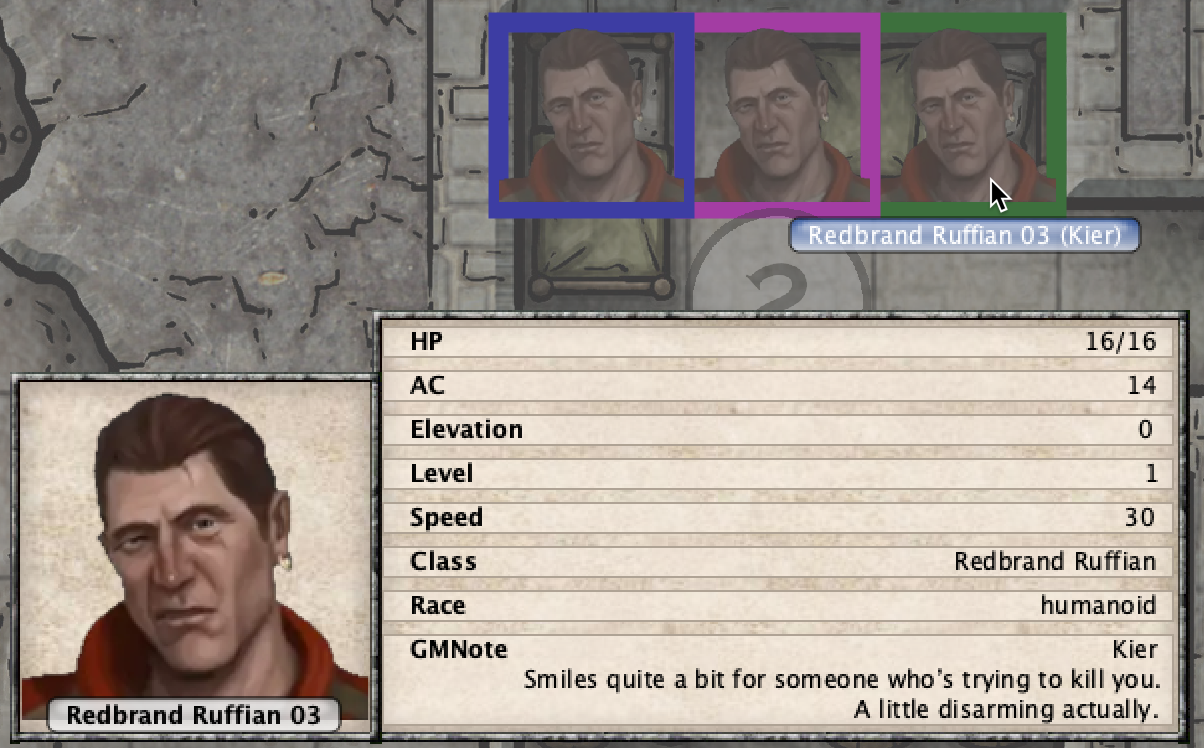

thank you for the help, and this is handy to know, and useful in some regards, but doesn't ..quite.. solve the issue. If you change this token to the Object layer, then you don't get any kind of mouse-over at all.
Traps, Doors, Secrets Doors, 'Notes tokens', and etc should all be able to put on the Object Layer, and have their information easily and readily available. As of right now, you have to click each individual object token to get the notes to display and while that is coinvent, its very inconsistent (and even confusing) behavior.
How would you propose to handle overlapping objects? Say a table (with a note) has a stack of four books on it (each with notes), then there's a lamp nearby that overhangs the table (and it has a note). Seems like it'd be quite a mess...?

I think you misunderstood something along the way. Perhaps your making what I am asking for more complicated than it is?
To answer your question, Maptools already handles this. I am just proposing porting the functionally that is already there, to the Object Tokens on the Object Layer.
I am not suggesting you open a separate frame/window/whatever each time you mouse-over something (or whatever?) There is one single frame/window/thing in the lower right corner that appears when you mouseover a token on the token layer, and that frame, instead of showing the Statsheet or whatever, it instead has the Notes. (There is no mess to be had, nor am I proposing one.)
That 'Notes frame' already exist. It appears when you click on an token in the object layer, if you have text in the Notes field. I am no coder and I from what limited experience I have about scripting, is that things are often more complicated than it seems, but what I am asking for is that you change one feature from 'on mouse click' to 'on mouseover' and to but a checkbox in there that can turn it on and off.
I think in general a more flexible configuration of the mouse actions of the pointer tool would be nice. I for example changed the Doubleclick to always show the Markerpopup (even for token) for the GM and to "Show Handout" for players. In "Gm-Notes" I keep an html stat block.
