

 REditorSupport
Help files are not viewable when working with remote connection
I'm not entirely convinced this is a vscode-R problem, so apologies in advanced if it isn't.
When working on a remote connection (ssh into a Linux env), if I use devtools::load_all("pkg"), and I try to view the development help file, I am faced with the following:
Using development documentation for MyFunction
VSCode WebView has restricted access to local file.
Opening in external browser...
Browsing file:///tmp/RtmpM6oemu/Rtxtf8e36c15798a.html
As well as the following pop up box
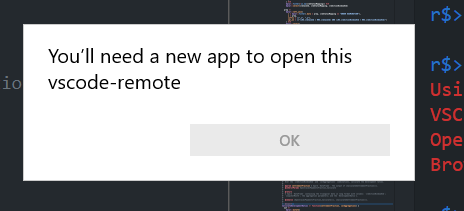
My default for getOption("help_type") is "html". If I change this to "text" then everything works fine and I see my help file in the console. I can open the html file (file:///tmp/RtmpM6oemu/Rtxtf8e36c15798a.html) perfectly fine although it of course doesn't render. I am not certain how I give WebView access to development docs?
FWIW:
    "r.rterm.windows": "C://location//to//R.exe",
    "r.rterm.linux": "location/to/radian",
    "r.rterm.option": [""],
    "r.bracketedPaste": true,
    "r.lsp.debug": false,
    "r.lsp.diagnostics": false,
    "r.alwaysUseActiveTerminal": true,
    "r.sessionWatcher": true,
vscode-R 1.6.1 VSCode 1.51.1


If I understood things correctly, the help function from as.environment('devtools_shims') (attached after using load_all) generates an object with class dev_topic, which is printed by print.dev_topic.
In that print function, a temporary html help file is generated and passed to utils::browseURL(), which the browser from init.R cannot show in a webivew, since vscode webviews cannot access arbitrary files.
Instead the filename is passed to the vscode-R extension, which tries to open the file in an external browser but fails, since the file is located on the remote machine.
I guess fixing this problem would be possible by modifying/overwriting any of the functions involved in that chain, but I'm not really sure, what the best approach would be to do this.

@ManuelHentschel You are right, this is largely due to the limitation of WebView security policies and how it is managed to access allowed resources.
This apparently also affects package development in dev containers.
I don't know much about this (great!) plugin, but there is an rstudioapi emulation layer, right? It may also be possible to overload the previewRd function, see here

Hi, just wanted to contribute some details (Remote SSH from Win to Linux)
- I develop a package that is already installed
- run
devtools::document - run
?my_func
that returns (as described above):
ℹ Rendering development documentation for "my_function"
VSCode WebView has restricted access to local file.
Opening in external browser...
Browsing file:///tmp/RtmpEhDFQJ/Rtxt5a0a5d3d65d9.html
If I use the recommended F1 keybinding the "old" docs are shown as expected but not the most recent ones generated by devtools::document
{
    "key": "f1",
    "command": "r.helpPanel.openForSelection",
    "when": "editorTextFocus && editorLangId == 'r' || editorTextFocus && editorLangId == 'rmd'"
}
Same thing happens when I use the extension buttons (HELP PAGES > Help Topics ... > my_package > my_func) - the old docs are loaded instead of the most current ones.

This issue is stale because it has been open for 365 days with no activity.
![github-actions[bot] avatar](https://avatars.githubusercontent.com/in/15368?v=4 "Published by a pub.dev verified publisher")
This issue was closed because it has been inactive for 14 days since being marked as stale.