

 REditorSupport
`r.lsp.diagnostics` setting does not work
I turned off the r.lsp.diagnostics, but the warnings didn't disappear.
Screenshots


Environment
- OS: macOS
- VSCode Version: 1.71.0 (Universal)
- R Version: 4.0.5
- vscode-R version: 2.5.3

I have the same issue, see also https://github.com/REditorSupport/vscode-R/issues/1191#issuecomment-1242647516 ff.
As a workaround you can disable diagnostics by putting options(languageserver.diagnostics = FALSE) in your .Rprofile.

Cannot reproduce it on macOS and Linux. Maybe it is a Windows-specific issue regarding vscode-languageclient v8.0.2?

Cannot reproduce it on macOS and Linux. Maybe it is a Windows-specific issue regarding vscode-languageclient v8.0.2?
That seems to be correct, downgrading to vscode-R v2.5.2 solves the issue for me.
How could I downgrade it? I clinck Install another version.., but no reaction. By the way, I used macOS and Linux, so it's probably not a Windows-specific issue.
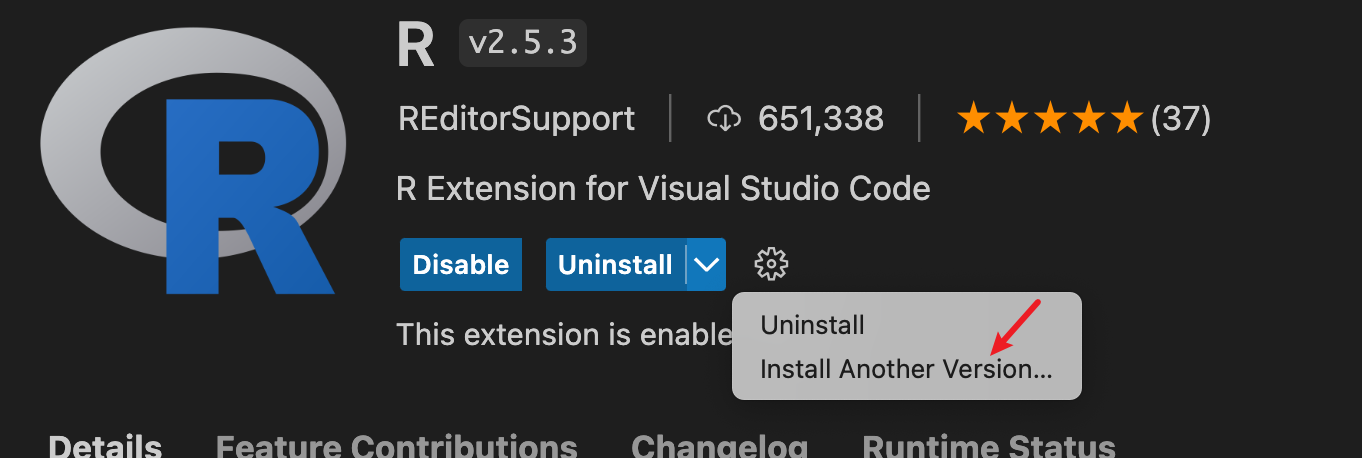
@ManuelHentschel @qizhengyang2017 Would you like to install the latest development version of languageserver, enable r.lsp.debug in vscode settings and take a look at the log of "R Language Server" channel in vscode output pane?
On languageserver startup, it should receive settings from vscode-R language client like the following:
[2022-09-13 15:03:14.759] settings  {
  "enabled": true,
  "args": [],
  "promptToInstall": true,
  "debug": true,
  "diagnostics": true,
  "lang": "",
  "use_stdio": false
}
If you disable r.lsp.diagnostics, languageserver should also receive a notification of changed configuration in the same format:
[2022-09-13 15:05:21.493] settings  {
  "enabled": true,
  "args": [],
  "promptToInstall": true,
  "debug": true,
  "diagnostics": false,
  "lang": "",
  "use_stdio": false
}
Could you confirm whether the languageserver shows such log?
With diagnostics enabled I get
[2022-09-14 09:33:25.154] settings  {
  "enabled": true,
  "args": [],
  "promptToInstall": true,
  "debug": true,
  "diagnostics": true,
  "lang": "",
  "use_stdio": false
}
With diagnostics disabled I get
[2022-09-14 09:32:22.208] settings  {
  "enabled": true,
  "args": [],
  "promptToInstall": true,
  "debug": true,
  "diagnostics": false,
  "lang": "",
  "use_stdio": false
}
In both cases I get the following linter message in an empty file:
Trailing blank lines are superfluous.
[{
	"resource": "XXXXXX/temp/test.R",
	"owner": "_generated_diagnostic_collection_name_#0",
	"severity": 2,
	"message": "Trailing blank lines are superfluous.",
	"source": "trailing_blank_lines_linter",
	"startLineNumber": 1,
	"startColumn": 1,
	"endLineNumber": 1,
	"endColumn": 2
}]
(namespaces from the log)
  "namespaces": {
    "processx": "3.5.2",
    "compiler": "4.1.0",
    "R6": "2.5.1",
    "graphics": "4.1.0",
    "parallel": "4.1.0",
    "tools": "4.1.0",
    "collections": "0.3.5",
    "utils": "4.1.0",
    "grDevices": "4.1.0",
    "stats": "4.1.0",
    "datasets": "4.1.0",
    "xml2": "1.3.2",
    "stringi": "1.7.5",
    "callr": "3.7.0",
    "methods": "4.1.0",
    "jsonlite": "1.7.3",
    "ps": "1.6.0",
    "base": "4.1.0",
    "languageserver": "0.3.13"
  },
However, I can disable the linter using options(languageserver.diagnostics = FALSE). This does not show up in the log (i.e. it still shows "diagnostics": true, but disables the linter.
Same problem here for MacOS. Also, I'm wondering if there is a way to disable all styling linters but keep the syntax errors.

Even trough r.lsp.diagnostics has been disabled, in the workspace setting r.lsp.diagnostics default is true.


@ManuelHentschel From your languageserver log, it looks like it did receive r.lsp.diagnostics: false but it still publishes diagnostics on document open/save/modify?
Same problem here for MacOS. Also, I'm wondering if there is a way to disable all styling linters but keep the syntax errors.
You could modify your global ~/.lintr or workspace {workspaceFolder}/.lintr to specify linters to be used. If you want to get notified by parse-errors only, you might want to put the following in your lintr config:
linters: list()
Even trough
r.lsp.diagnosticshas been disabled, in the workspace settingr.lsp.diagnosticsdefault is true.
Do you mean VS Code workspace settings in {workspaceFolder}/.vscode/settings.json? If you don't have this file, then VS Code will follow the global settings.
Same here on MacOS. v.2.5.3.
Would you like to confirm that languageserver does receive the settings update to disable diagnostics by taking a look at https://github.com/REditorSupport/vscode-R/issues/1196#issuecomment-1244990357?
Hi, same issue on MacOS v2.6.0.
With the latest development version of languageserver, it seems that it does receive the setting:
- diagnostics enabled:
settings  {
  "enabled": true,
  "args": [],
  "promptToInstall": true,
  "debug": true,
  "diagnostics": true,
  "lang": "",
  "use_stdio": false
}
- disabled:
settings  {
  "enabled": true,
  "args": [],
  "promptToInstall": true,
  "debug": true,
  "diagnostics": false,
  "lang": "",
  "use_stdio": false
}
Actually unticking the "enable diagnostics" setting works but the diagnostics appear again when VS code is restarted (and I have to check / uncheck the setting again to make them disappear).

It seems related to https://github.com/REditorSupport/languageserver/issues/570. So far, I've been following @renkun-ken's suggestion in https://github.com/REditorSupport/vscode-R/issues/1196#issuecomment-1264852007 or using v2.5.2 as workarounds.

Now I can reproduce the problem. Let me take a closer look. Looks like the diagnostics are triggered before the settings are received.
[2022-10-13 17:31:12.688] did open: {
  "uri": "file:///home/ken/Workspaces/languageserver/R/diagnostics.R",
  "version": 1
}

[2022-10-13 17:31:12.902] diagnostics session acquired session_id = 1 remain pool size = 2

[2022-10-13 17:31:12.904] diagnostics session ready 1 2022-10-13 17:31:12

[2022-10-13 17:31:13.025] parse session released session_id = 2 remain pool size = 1

[2022-10-13 17:31:13.025] parse_callback called: {
  "uri": "file:///home/ken/Workspaces/languageserver/R/capabilities.R",
  "version": null
}

[2022-10-13 17:31:13.053] parse task timing: 0.703200817108154   file:///home/ken/Workspaces/languageserver/R/capabilities.R

[2022-10-13 17:31:13.102] received:  Content-Length: 208

[2022-10-13 17:31:13.113] received payload.

[2022-10-13 17:31:13.113] handling notification:  workspace/didChangeConfiguration

[2022-10-13 17:31:13.114] settings  {
  "enabled": true,
  "args": [],
  "promptToInstall": true,
  "debug": true,
  "diagnostics": false,
  "lang": "",
  "use_stdio": false
}
Should be fixed via https://github.com/REditorSupport/languageserver/pull/577.
Thanks, @renkun-ken! I checked via remotes::install_github("renkun-ken/languageserver@drop-diagnostics") and it works as expected!