REditorSupport
Option to put plot pane below script by default
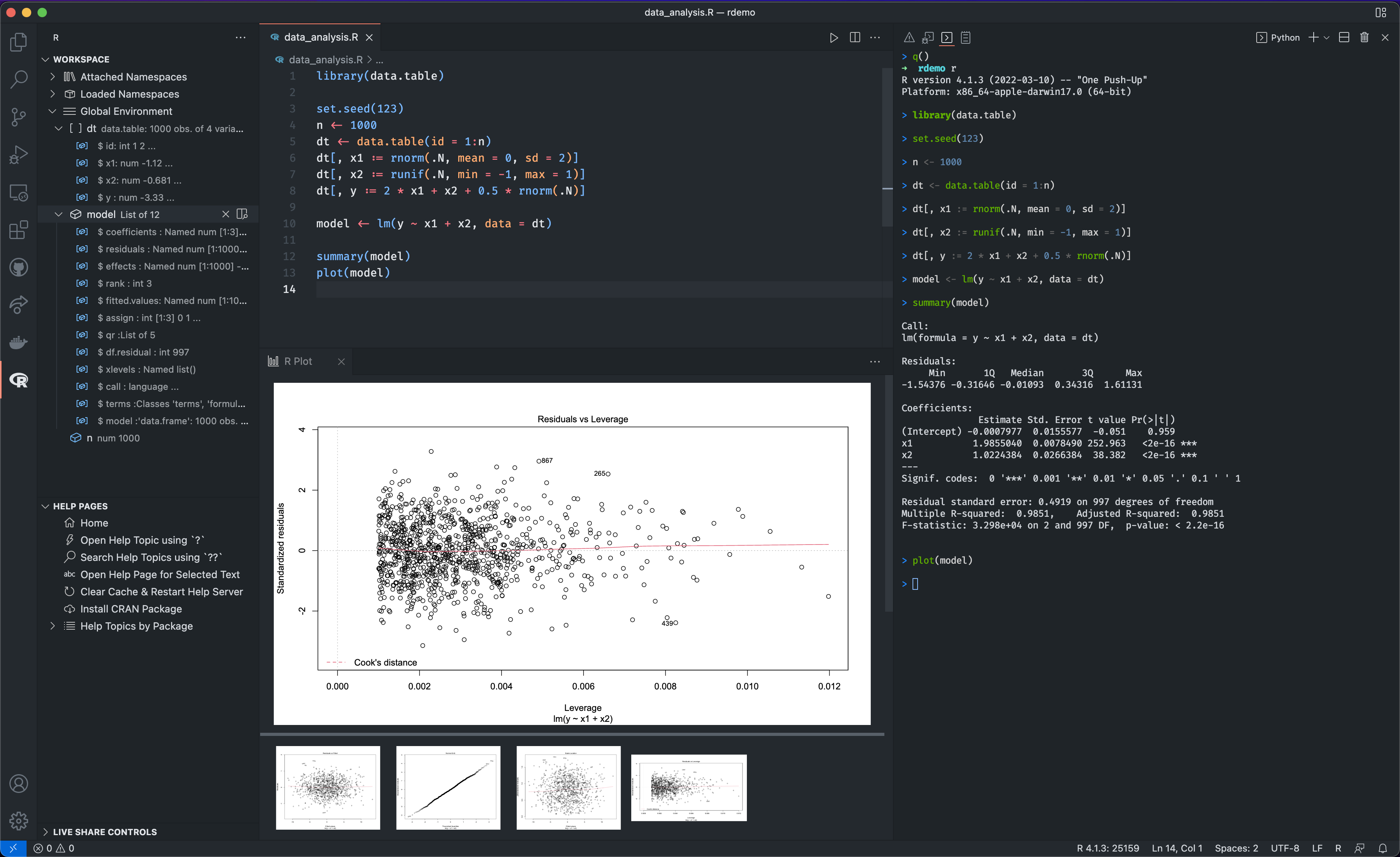
Is your feature request related to a problem? Please describe. The desired layout is like this:
|--------|--------|
| script |        |
|--------|terminal|
|  plot  |        |
|--------|--------|
AFAIK, this cannot be achieved without manual adjustment "View > Editor Layout > Two Rows" after plot() because the plot pane always shows up in two-column editor layout like this:
|--------|--------|
|scr |pl |        |
|ipt |ot |terminal|
|    |   |        |
|--------|--------|
Describe the solution you'd like
If there is a way to achieve the desired layout at once, it should be documented. If not, this extension should get a new option like r.plot.layout = "TwoRows".
Describe alternatives you've considered Do "View > Editor Layout > Two Rows" every time I plot.
This is not a duplicate of #848 because the output pane is irrelevant here.
"Terminals in editor area" is not the solution because it is more time-consuming than "View > Editor Layout > Two Rows".
Additional context
The layout is demonstrated in the official doc https://code.visualstudio.com/docs/languages/r.