

 REditorSupport
Clear cache & restart help server doesn't appear to work
Describe the bug
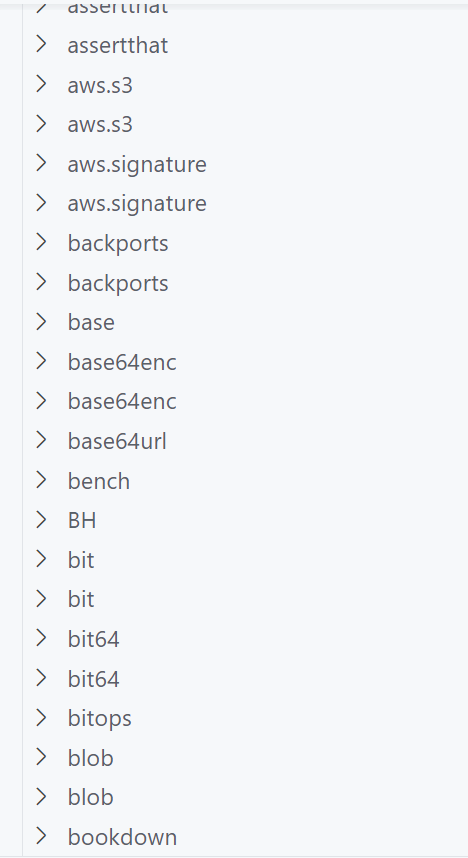
No matter how many times I click on "Clear Cache & Restart Help Server", I cannot seem to get the help pages to load for my latest installed packages. These packages do not appear in the list of "Help Topics by Package" either. Looking at my .libPaths(), there is nothing strange going on, I have the standard locations
r$> .libPaths()
[1] "C:/Users/EHYLM/R/win-library/4.1" "C:/R/R-4.1.2/library"
My vscode-R based settings are
    "r.alwaysUseActiveTerminal": true,
    "r.bracketedPaste": true,
    "r.rterm.windows": "C:\\Users\\EHYLM\\AppData\\Local\\Programs\\Python\\Python310\\Scripts\\radian.exe",
    "r.sessionWatcher": true,
    "r.helpPanel.cacheIndexFiles": "None"
For what it's worth, I only added "r.helpPanel.cacheIndexFiles": "None" as a test and it didn't work before I added it or after.
To Reproduce
In the R sidebar, click on "Clear Cache & Restart Help Server". Try typing ?targets::tar_make in an R session, or by highlighting the function and clicking "Open Help Page for Selected Text". (Hover help still works thanks to languageserver).
If I type ?targets::tar_make then I get a "httpd error" page stating "No package named targets could be found".
Expected behavior It should open the help page.
Environment (please complete the following information):
- OS: Windows
- VSCode Version: [e.g. 1.67.1]
- R Version: [e.g. 4.1.2]
- vscode-R version: [e.g. 2.4.0]
Additional Information
I have tried uninstalling all vscode-R related software and reinstalling with no luck.

I seem to have got somewhere with this @renkun-ken. I decided to change my r.libPaths setting and all of a sudden the "Clear Cache & Restart Help Server" button found all of my installed packages. I am not too sure what the default value is but it didn't work for me. I can now finally view all of my help files!! FWIW, here are my R settings
    "r.alwaysUseActiveTerminal": true,
    "r.bracketedPaste": true,
    "r.helpPanel.cacheIndexFiles": "Global",
    "r.plot.useHttpgd": true,
    "r.rpath.windows": "C:\\R\\R-4.1.2\\bin\\R.exe",
    "r.rterm.windows": "C:\\Users\\EHYLM\\AppData\\Local\\Programs\\Python\\Python310\\Scripts\\radian.exe",
    "r.libPaths": ["C:\\Users\\EHYLM\\R\\win-library\\4.1", "C:\\R\\R-4.1.2\\library"],
    "r.sessionWatcher": true,
Some packages appear to be doubled up in the cache but that's a minor inconvenience.
+1 Just experienced this and @nathaneastwood's answer was a fix. In my case, I'm using renv for environment management, and when I have the default argument to .libPaths() in VSCode settings, I get the error. If I hit .libPaths() in the current R session, and add in the default path with Frameworks etc., I still get the error. But when I instead add in the full path to my renv lib path, it works. What I added, in my case, was
r$> .libPaths()
[1] "/Users/tinashetapera/projects/textbooks_notes-exercises-and-tutorials/TMwR/renv/library/R-4.2/aarch64-apple-darwin20" ## add this
[2] "/Library/Frameworks/R.framework/Versions/4.2-arm64/Resources/library"       ## not this

This issue is stale because it has been open for 365 days with no activity.
![github-actions[bot] avatar](https://avatars.githubusercontent.com/in/15368?v=4 "Published by a pub.dev verified publisher")
This issue was closed because it has been inactive for 14 days since being marked as stale.