

 QuestPDF
Pdf bookmarks
Hi,
Is it possible to create invisible bookmarks with QuestPDF? I.e.: A page without a title but with a bookmark link to it.
Thanks.

Hello 😁 You most likely want to use the Section element to create invisible document locations, and then SectionLink to create hyperlinks.

Hi, Could be the solution but this isn't for links inside the pages, like jumping from page 100 to the section "xpto" in page 10? Because what I want is the left side bookmarks (in adobe reader) to jump to the section. Something like this: https://stackoverflow.com/questions/30049649/how-to-convert-html-to-pdf-with-bookmark
If the solution that you gave me works also like this I was not able to understand how.
Hmmm, the Section element generates named destination and SectionLink redirects the user that destination. QuestPDF does not user page numbers intenrally, just location name. It is possible that you are looking for some other functionality. If this is a case, I am afraid it might be not available just yet 😥
Section element it's perfect and I think it be used for bookmarks. However, actually, I don't see nothing related with pdf boomarks. This is something very used in big PDF's. It's like a pdf index but it's not related with page numbers. The relation, normally, is made by the title or subtitle or in this case section element.
Do you think that it's possible to do this functionality?
I don't believe QuestPDF has this functionality yet, though implementing it using the Section element would make the most sense imho.
For an example output, many PDF viewers have a side bar next to the main PDF preview titled "Contents", "Bookmarks", or similar, which lists defined locations within the PDFs. This is often used to replicate a table of contents, for example:
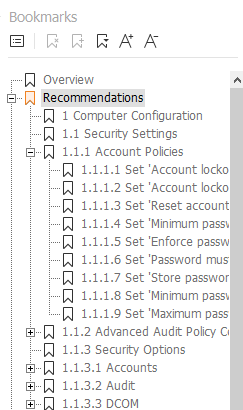

I don't believe QuestPDF has this functionality yet, though implementing it using the Section element would make the most sense imho.
I agree. We may want to investigate the low-level Skia API. I have tried to understand the C++ implementation and I think it should be possible to generate tags, even though they are not natively supported in Skia. At this moment, I am just not sure how.
P.S. I am very sorry for replying so late. There is just a lot of going on in my personal life, very positive yet time-consuming events. I hope tha you understand 😁
Hi @MarcinZiabek . No problem, I was out of office these days. What @girlpunk explained is exactly what I want. I would appreciate (a lot) if you could implement it on questPDF :D
@MarcinZiabek I'm also looking for this feature. It appears the capability was added to Skia back in 2018. I tried to look at SkiaSharp, but I didn't really know where to look for it. I couldn't find anything there related to this.
I think #202 and #193 are duplicates of this.

FYI - I posted a feature request on SkiaSharp: https://github.com/mono/SkiaSharp/issues/2046
From the SkiaSharp issue linked above, it's been associated to a milestone that appears to be in progress. I don't know when that will complete and I believe QuestPDF will be dependent on this enhancement before it can support this.
In the meantime my workaround was:
- Using my data, I generate a set of unique pdf "destinations" (strings) in a tree that represents the outline/bookmarks.
- I pass those destinations into the QuestPDF components and use the
.Section(destination)as normal - Then I generate the PDF using
.GeneratePdf()which gives me a byte[] - Then I use
PDFSharpto load the PDF in modify mode using the byte[] - Then using the PDF spec, I grab the global 'Dests' object which contains an array of destinations (see code below)
- Then I use PDFSharp's
document.Outlinesproperty andPdfOutlineclass to build the bookmark tree based on the data found in the previous step and the tree built in the first step - Then I use PDFSharp to save the PDF
Here's the relevant code:
// load the PDF in PDFSharp
PdfDocument document = PdfReader.Open(new MemoryStream(pdf), PdfDocumentOpenMode.Modify);

// build the destination mapping
List<PdfPageReference> pageLinks = new List<PdfPageReference>();

// examine all the defined destinations in the PDF
var destinationsReference = document.Internals.Catalog.Elements["/Dests"] as PdfReference;
var destinationsMap = destinationsReference.Value as PdfDictionary;
foreach (var element in destinationsMap.Elements)
{
    PdfPageReference pageLink = new PdfPageReference();

    // element.Key is the link name
    pageLink.Destination = element.Key;

    // element.Value is the link value which is always an array
    // see section 8.2.1 Destinations for all the possibilities
    // NOTE: we're only handling the situations that we generate via QuestPDF
    //   [page type ... ] for example: [page /XYZ left top zoom]
    var arr = element.Value as PdfArray;

    // find the reference page (it's always the first element in the array
    // and should always exist)
    var pageReference = arr.Elements.Items[0] as PdfReference;
    for (int i = 0; i < document.PageCount; i++)
    {
        PdfPage page = document.Pages[i];
        if (page.Reference.ObjectID == pageReference.ObjectID)
        {
            pageLink.Page = page;
            pageLink.PageNumber = i;
            break;
        }
    }

    // get the destination type
    var destinationType = arr.Elements.Items[1] as PdfName;
    pageLink.Type = destinationType.Value;

    // QuestPdf generates XYZ destinations
    // so we only handle those right now
    if (destinationType.Value == "/XYZ")
    {
        pageLink.Left = GetNumericValue(arr.Elements.Items[2]);
        pageLink.Top = GetNumericValue(arr.Elements.Items[3]);
        pageLink.Zoom = GetNumericValue(arr.Elements.Items[4]);
    }

    pageLinks.Add(pageLink);
}

public class PdfPageReference
{
    public string Destination { get; set; }
    public int PageNumber { get; set; }
    public PdfPage Page { get; set; }
    public string Type { get; set; }

    // Top is used for Top and Y
    public double Top { get; set; }
    // Top is used for Left and X
    public double Left { get; set; }
    public double Bottom { get; set; }
    public double Right { get; set; }
    public double Zoom { get; set; }
}

private static double GetNumericValue(PdfItem item)
{
    if (item is PdfInteger)
    {
        return ((PdfInteger)item).Value;
    }
    else if (item is PdfReal)
    {
        return ((PdfReal)item).Value;
    }
    return 0;
}

@wbittlehsl Thank you for your answer. Unfortunately my company does not allow me to use another PDF library in order to do this workaround :(
@wbittlehsl Looks like you have been successfull with your feature request!
The bookmark support is planned to be release within the SkiaSharp 2.88.1 release. This should allow QuestPDF to incorporate this feature as well! Can't wait to make this happen 😁
Hi @MarcinZiabek . Any news about this? From what I saw SkiaSharp didn't release this feature :( Am I right?
Then I use PDFSharp's document.Outlines property and PdfOutline class to build the bookmark tree based on the data found in the previous step and the tree built in the first step
This part was missing from the workaround example code, the following snip completes it and works for me, thanks!
foreach (var pageLink in pageLinks) {
	document.Outlines.Add(new PdfOutline {
		Title = pageLink.Destination,
		PageDestinationType = PdfPageDestinationType.Xyz,
		DestinationPage = document.Pages[pageLink.PageNumber],
		Top = pageLink.Top,
	});
}
