
PySimpleGUI




PySimpleGUI
> I dislike inserting a timed sleep (even if it is short) I'm with you on this. Rather than sleep, if it's the mainthread, then I use a `window.read` with...
I really appreciate you pushing all this forward Bob! I'll be returning to this project shortly. I tooks a bit of a detour with the new scrollbar work. Sometimes the...
Columns are special and will need some additional code done in order to manipulate their scrollbars. Didn't think to document / handle this element. The code operates on the "Widget"...
It was originally added, not long ago, for the Table element https://github.com/PySimpleGUI/PySimpleGUI/issues/1878 1. Manipulate using tkinter calls... you'll find a number of workarounds in the Issues that use the Widget...
I'm sorry I don't have the ability to step you through adding this feature.
I'll take a look. You should upgrade to a newer version of PySimpleGUI. 4.45.0 is from June 2021. 4.57.0 is the latest.
## Custom Titlebar Oooooo..... I like the `Sizegrip` idea! A `VPush` will do the same as the `expand_y` and may be easier for beginners? If a custom titlebar is specified...
### Icon in Titlebar I misread the icon question... you wanted it in the Titlebar, not taskbar.... You can specify the icon in the `Titlebar` element 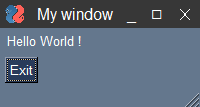 ```python import PySimpleGUI...
### `psgresizer` for your icon I used the `psgresizer` utility to make the Base64 string in the last example. You can pip install it. It will resize your images and...
The "default" for Titlebar Elements is the constant `DEFAULT_BASE64_ICON_16_BY_16`. I had to look to get you the size. I used 20x20 when I made the one in the earlier comment....