

 PySimpleGUI
[Enhancement] PySimpleGUIQt Browse-type buttons would benefit from having the `size_px` parameter
Type of Issue (Enhancement, Error, Bug, Question)
The FileBrowse object has no size_px parameter
Operating System
Windows 10 Enterprise version 10.0.19044
PySimpleGUI Port (tkinter, Qt, Wx, Web)
PysimpleGUIQt (Qt Port)
Versions
Python version
Python 3.10.6
PySimpleGUI Version
PySimpleGUIQt v0.35.0
Your Experience In Months or Years (optional)
4 Years Python programming experience
5 Years Programming experience overall
Have used another Python GUI Framework? No
Troubleshooting
These items may solve your problem. Please check those you've done by changing - [ ] to - [X]
- [x] Searched main docs for your problem www.PySimpleGUI.org
- [x] Looked for Demo Programs that are similar to your goal. It is recommend you use the Demo Browser! Demos.PySimpleGUI.org
- [ ] If not tkinter - looked for Demo Programs for specific port
- [ ] For non tkinter - Looked at readme for your specific port if not PySimpleGUI (Qt, WX, Remi)
- [x] Run your program outside of your debugger (from a command line)
- [x] Searched through Issues (open and closed) to see if already reported Issues.PySimpleGUI.org
- [x] Have upgraded to the latest release of PySimpleGUI on PyPI (lastest official version)
- [ ] Tried using the PySimpleGUI.py file on GitHub. Your problem may have already been fixed but not released
Detailed Description
I am currently writing a program for which I for once must make it look somewhat Professional. To achieve this, wanted to have uniform Buttons. I used the "size_px" argument to set the size of my buttons to a fix and reproducible value. The FileBrowse Object however does not support "size_px", only "size".
Code To Duplicate
A short program that isolates and demonstrates the problem (Do not paste your massive program, but instead 10-20 lines that clearly show the problem)
This pre-formatted code block is all set for you to paste in your bit of code:
import PySimpleGUIQt as sg

#layout = [[sg.Button("Button", size_px=(100, 100))]]
layout = [[sg.FileBrowse("Browse Devices", file_types=(("Device Configs", "*txt"),), key="BROWSEDEVICEBUTTON", pad=(0, 15), size_px=(100, 100))]]
window = sg.Window("title", layout)

while True:
    event, value = window.read()
    if event == sg.WIN_CLOSED: break
if you comment out the layout with the FileBrowse and instead use the normal Button, you can compare the two with each other.
Watcha Makin?
Im a Student working in a company between semesters and have been tasked with creating a program to write certain Tables to the EEPROM of the devices we are selling. Since this is my first program to be used via a GUI, i chose PySimpleGUI as it is easy to start with.

Qt port is still under revision, so issues about Qt port maybe replied after new version ready.
Option size_px maybe missed for FileBrowse button, anyway, you can do it by adding it by yourself.
import PySimpleGUIQt as sg

def FileBrowse(button_text='Browse', target=(sg.ThisRow, -1),
        file_types=(("ALL Files", "*"),), initial_folder=None, tooltip=None,
        size=(None, None), size_px=(None, None), auto_size_button=None,
        button_color=None, change_submits=False, enable_events=False,
        font=None, disabled=False, pad=None, key=None, metadata=None):
    return sg.Button(button_text=button_text, button_type=sg.BUTTON_TYPE_BROWSE_FILE,
        target=target, file_types=file_types, initial_folder=initial_folder,
        tooltip=tooltip, size=size, size_px=size_px,
        auto_size_button=auto_size_button, change_submits=change_submits,
        enable_events=enable_events, disabled=disabled, font=font, pad=pad,
        button_color=button_color, metadata=metadata, key=key)

layout = [
    [FileBrowse("Browse 1", size_px=(100, 100)),
     FileBrowse("Browse 2", size_px=(200, 200))],
]
window = sg.Window("title", layout, finalize=True)

while True:
    event, value = window.read()
    if event == sg.WIN_CLOSED:
        break

window.close()
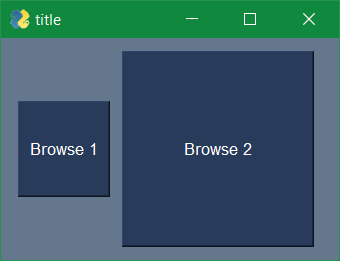

Thanks for the quick reply.
While the snippet you posted works great as a workaround, it would still be nice to see this implemented. I would try to do it myself, however between job, uni and exams there is little time left for Contributions.