

 PySimpleGUI
[Bug] MacOS - Clicking on the window's X button does not close the window if enable_close_attempted_event
Type of Issue (Enhancement, Error, Bug, Question)
Bug
Operating System
MacOS
PySimpleGUI Port (tkinter, Qt, Wx, Web)
Tkinter
Versions
Python version: 3.10.0 (v3.10.0:b494f5935c, Oct 4 2021, 14:59:20) [Clang 12.0.5 (clang-1205.0.22.11)] port: tkinter tkinter version: 8.6.11 PySimpleGUI version: 4.53.0 PySimpleGUI filename: /Users/Nacho/PycharmProjects/test/venv-3.10/lib/python3.10/site-packages/PySimpleGUI/PySimpleGUI.py
Your Experience In Months or Years (optional)
Years Python programming experience: 3 years
Years Programming experience overall: 20+ years
Have used another Python GUI Framework? (tkinter, Qt, etc) (yes/no is fine): Qt
Anything else you think would be helpful?
Troubleshooting
These items may solve your problem. Please check those you've done by changing - [ ] to - [X]
- [X] Searched main docs for your problem www.PySimpleGUI.org
- [X] Looked for Demo Programs that are similar to your goal Demos.PySimpleGUI.org
- [ ] If not tkinter - looked for Demo Programs for specific port
- [ ] For non tkinter - Looked at readme for your specific port if not PySimpleGUI (Qt, WX, Remi)
- [ ] Run your program outside of your debugger (from a command line)
- [X] Searched through Issues (open and closed) to see if already reported Issues.PySimpleGUI.org
- [ ] Tried using the PySimpleGUI.py file on GitHub. Your problem may have already been fixed but not released
Detailed Description
A sg.Window created with enable_close_attempted_event=True and that uses a timeout upon read like sg.Window.read(timeout=100), does not close when clicking the standard window X button.
This happens ONLY on tkinter 8.6.11 bundled with Python 3.10. If I switch to Python 3.9 (tkinter 8.6.8) the window closes fine. I also tested this behavior on Windows and could not reproduce it on the latest tkinter on Python 3.10, but the latest there is < 8.6.11.
If I remove the timeout on the sg.Windows.read call, then the window closes fine. It is the combination of using sg.Window.read(timeout=100) and sg.Window(enable_close_attempted_event=True) and tkinter 8.6.11 what sees to cause this strange behavior.
Code To Duplicate
A short program that isolates and demonstrates the problem (Do not paste your massive program, but instead 10-20 lines that clearly show the problem)
This pre-formatted code block is all set for you to paste in your bit of code:
import PySimpleGUI as sg

window = sg.Window(title='Window',
                   enable_close_attempted_event=True,
                   layout=[[sg.Text(text='Test')],
                           [sg.CloseButton(button_text='Close')]])
while True:
    event, values = window.read(timeout=100)
    if event in ('Close', sg.WIN_CLOSED):
        break
    if event == sg.WINDOW_CLOSE_ATTEMPTED_EVENT:
        break
window.close()
Screenshot, Sketch, or Drawing
This is on Python 3.10 (tkinter 8.6.11):
https://user-images.githubusercontent.com/7527257/138787863-9262e42f-ef68-452d-b40a-b5bb4c3877e1.mov
This is on Python 3.9 (tkinter 8.6.8):
https://user-images.githubusercontent.com/7527257/138787938-63ffd69f-4861-423e-a8cc-a3fe05c1b1ec.mov
Watcha Makin?
If you care to share something about your project, it would be awesome to hear what you're building.

Just use normal buttons. Don't use the CloseButton. I don't think it's related, but just in general I would stick with what you see in the Demo Programs.
If you look in the Call Reference doc, you'll find CloseButton under this section:

I'll add something to the docstring to reinforce the message.

8.6.10 is barely available on Windows. It was only available on 3.10 during the Beta, etc. I've never seen 8.6.11 yet so I've got no experience running on it. The Mac somehow gets ahead, which is really odd.
Thanks for pointing out another Mac combination that's unusual.

Flagging this with a "Documentation" label too as the CloseButton needs to get taken out of the primary documentation and the docstring should be changed to match as well. It's a good thing to get consistent.
Just use normal buttons. Don't use the CloseButton. I don't think it's related, but just in general I would stick with what you see in the Demo Programs.
If you look in the Call Reference doc, you'll find CloseButton under this section:
I'll add something to the docstring to reinforce the message.
I was not aware of that and haven't seen any problems with CloseButton it works as expected.
But I will move away from it.
Not related whatsoever with this issue though.
8.6.10 is barely available on Windows. It was only available on 3.10 during the Beta, etc. I've never seen 8.6.11 yet so I've got no experience running on it. The Mac somehow gets ahead, which is really odd.
Thanks for pointing out another Mac combination that's unusual.
Yes that's what I noted when testing on Windows, I tested with 8.6.10 I think and it worked. So not sure if this issue will also be present on Windows when it gets 8.6.11, or if this is a MacOS only thing.
Oh I forgot to add that I tested on 8.6.11 a plain tkinter window and it closes as expected. I made that test before testing the sg.Window.read call without timeout. So there is something related to the timeout + enable_close_attempted_event combination.
I tested on 8.6.11 a plain tkinter window and it closes as expected.
I was thinking about the tkinter test you ran. I assume it's basically the same as a PySimpleGUI read with no timeout, which you said works.
See if your tkinter code mirrors this kind of interaction.
import PySimpleGUI as sg

window = sg.Window('Window Title', [[sg.Exit()]])
window.read()
window.close()
Or the 1-line version
sg.Window('Window Title', [[sg.Exit()]]).read(close=True)
I tested on 8.6.11 a plain tkinter window and it closes as expected.
I was thinking about the tkinter test you ran. I assume it's basically the same as a PySimpleGUI read with no timeout, which you said works.
See if your tkinter code mirrors this kind of interaction.
import PySimpleGUI as sg

window = sg.Window('Window Title', [[sg.Exit()]])
window.read()
window.close()
Or the 1-line version
sg.Window('Window Title', [[sg.Exit()]]).read(close=True)
Yes, this code works as expected on tkinter 8.6.11, and it does because it is not using the timeout + enable_close_attempted_event combination.
Can you add a print(event, values) after your read?
I would like to get a log of what's coming back and what isn't.
You're getting the close attempted event (WINDOW_CLOSE_ATTEMPTED_EVENT)? But the window.close() call isn't working? Want to understand what I'm looking for ultimately.
The confusing part is:
does not close when clicking the standard window X button
That could mean a couple of things in this scenario.
Can you add a print(event, values) after your read?
I would like to get a log of what's coming back and what isn't.
You're getting the close attempted event (
WINDOW_CLOSE_ATTEMPTED_EVENT)? But thewindow.close()call isn't working? Want to understand what I'm looking for ultimately.The confusing part is:
does not close when clicking the standard window X buttonThat could mean a couple of things in this scenario.
OK I ran the following code:
import PySimpleGUI as sg


window = sg.Window(title='Window',
                   enable_close_attempted_event=True,
                   layout=[[sg.Text(text='Test')],
                           [sg.CloseButton(button_text='Close')]])
while True:
    event, values = window.read(timeout=100)
    print(event, values)
    if event in ('Close', sg.WIN_CLOSED):
        print(event)
        break
    if event == sg.WINDOW_CLOSE_ATTEMPTED_EVENT:
        print(event)
        break
window.close()
and this is the output I got:
__TIMEOUT__ {}
__TIMEOUT__ {}
__TIMEOUT__ {}
__TIMEOUT__ {}
__TIMEOUT__ {}
__TIMEOUT__ {}
__TIMEOUT__ {}
__TIMEOUT__ {}
__TIMEOUT__ {}
__TIMEOUT__ {}
__TIMEOUT__ {}
__TIMEOUT__ {}
__TIMEOUT__ {}
__TIMEOUT__ {}
__TIMEOUT__ {}
__TIMEOUT__ {}
__TIMEOUT__ {}
__TIMEOUT__ {}
__TIMEOUT__ {}
__TIMEOUT__ {}
__TIMEOUT__ {}
__TIMEOUT__ {}
__TIMEOUT__ {}
__TIMEOUT__ {}
__TIMEOUT__ {}
__TIMEOUT__ {}
__TIMEOUT__ {}
__TIMEOUT__ {}
__TIMEOUT__ {}
__TIMEOUT__ {}
__TIMEOUT__ {}
__TIMEOUT__ {}
__TIMEOUT__ {}
__TIMEOUT__ {}
__TIMEOUT__ {}
__TIMEOUT__ {}
__TIMEOUT__ {}
__TIMEOUT__ {}
__TIMEOUT__ {}
__TIMEOUT__ {}
__TIMEOUT__ {}
__TIMEOUT__ {}
__TIMEOUT__ {}
__TIMEOUT__ {}
__TIMEOUT__ {}
__TIMEOUT__ {}
__TIMEOUT__ {}
__TIMEOUT__ {}
None None
None
The window.close() call is working when I click the Close button, but when I click the standard X window button (you can watch the video I recorded in the original issue) it looks like the sg.WINDOW_CLOSE_ATTEMPTED_EVENT is not being fired. I think the _OnClosingCallback is not being called at all.

Thank you very much!
Yea, I can see now that it's the None, None coming back that exits (since it also printed None too) and nothing else. Didn't doubt you for a moment... I wanted to make sure I was hearing what you were saying correctly. I was able to read it 2 different ways and wanted to be sure it was the way you intended. The little test program could exit in 2 ways and wasn't able to tell which it was.
You're correct that the callback is likely not happening, or, I'm not able to get the event loop to exist as a result of the callback. I'm doing some really unusual things with tkinter in order to make the PySimpleGUI architecture work the way it does. It's "unnatural" to say the least. I'm surprised that all of the ports have worked despite using the frameworks in unintended ways. 🤞 Hoping that someday there's not a change that will really mess things up.
Thank you for taking the time to log this, perform tests, post data. It's so helpful.
Thank you very much!
Yea, I can see now that it's the None, None coming back that exits (since it also printed None too) and nothing else. Didn't doubt you for a moment... I wanted to make sure I was hearing what you were saying correctly. I was able to read it 2 different ways and wanted to be sure it was the way you intended. The little test program could exit in 2 ways and wasn't able to tell which it was.
You're correct that the callback is likely not happening, or, I'm not able to get the event loop to exist as a result of the callback. I'm doing some really unusual things with tkinter in order to make the PySimpleGUI architecture work the way it does. It's "unnatural" to say the least. I'm surprised that all of the ports have worked despite using the frameworks in unintended ways. 🤞 Hoping that someday there's not a change that will really mess things up.
Thank you for taking the time to log this, perform tests, post data. It's so helpful.
You are welcome, and please ask me if you need me to try something.
I took a quick look to the code that uses the _OnClosingCallback and did not find any clues about this problem.
I installed 3.11A over the weekend to test 4.55.1 to make sure it worked with 3.11 before adding the indicator in PyPI

I noted that 3.11A includes tkinter 8.6.11. I just added the enable_close_attempted_event=True to the Window's creation. The PySimpleGUI Test Harness runs the event loop with a timeout.
To make sure it was running the new code, I added a print of the event just prior to closing the Window. That's why you see the close attempted event printed twice.
I was able to exit the window running both python and pythonw. It seems to function fine on Windows. I've not tried Linux.
Starting up PySimpleGUI Diagnostic & Help System
PySimpleGUI long version =  4.55.1 Released 7-Nov-2021
PySimpleGUI Version  4.55.1
tcl ver = 8.6 tkinter version = 8.6
Python Version 3.11.0a2 (tags/v3.11.0a2:e2b4e4b, Nov  5 2021, 20:00:05) [MSC v.1929 64 bit (AMD64)]
tcl detailed version = 8.6.11
PySimpleGUI.py location C:\Python\PycharmProjects\PSG\PySimpleGUI.py
-WINDOW CLOSE ATTEMPTED- {'_MENU_': None, '+GRAPH+': (None, None), 1: [], '_COMBO1_': 'Combo item 2', '_COMBO2_': 'Combo item 2', 2: 'a', 3: True, 4: False, 5: False, 6: True, '_table_': [], '_TREE_': [], '-SLIDER1-': 40.0, '-SLIDER2-': 40.0, 8: 'Input Text', 9: 'Multiline Input', 11: "{'-editor format string-': '<editor> --line <line> <file>',\n '-editor program-': 'C:\\\\Program Files\\\\JetBrains\\\\PyCharm '\n                     '2020.2.5\\\\bin\\\\pycharm.bat',\n '-explorer program-': 'explorer',\n '-mac disable modal windows-': True,\n '-mac feature disable grab anywhere with titlebar-': True,\n '-mac feature disable modal windows-': True,\n '-mac feature enable no titlebar patch-': True,\n '-python command-': '',\n '-theme-': 'Dark Blue 3',\n 'Disable Modal Windows': True,\n 'false': 'Disable Modal Windows',\n 'true': 'Disable Modal Windows'}", '_TAB_GROUP_': 'Graph\n', '-BMENU-': None}
event =  -WINDOW CLOSE ATTEMPTED-
I installed 3.11A over the weekend to test 4.55.1 to make sure it worked with 3.11 before adding the indicator in PyPI
I noted that 3.11A includes tkinter 8.6.11. I just added the
enable_close_attempted_event=Trueto the Window's creation. The PySimpleGUI Test Harness runs the event loop with a timeout.To make sure it was running the new code, I added a print of the event just prior to closing the Window. That's why you see the close attempted event printed twice.
I was able to exit the window running both python and pythonw. It seems to function fine on Windows. I've not tried Linux.
Starting up PySimpleGUI Diagnostic & Help System
PySimpleGUI long version =  4.55.1 Released 7-Nov-2021
PySimpleGUI Version  4.55.1
tcl ver = 8.6 tkinter version = 8.6
Python Version 3.11.0a2 (tags/v3.11.0a2:e2b4e4b, Nov  5 2021, 20:00:05) [MSC v.1929 64 bit (AMD64)]
tcl detailed version = 8.6.11
PySimpleGUI.py location C:\Python\PycharmProjects\PSG\PySimpleGUI.py
-WINDOW CLOSE ATTEMPTED- {'_MENU_': None, '+GRAPH+': (None, None), 1: [], '_COMBO1_': 'Combo item 2', '_COMBO2_': 'Combo item 2', 2: 'a', 3: True, 4: False, 5: False, 6: True, '_table_': [], '_TREE_': [], '-SLIDER1-': 40.0, '-SLIDER2-': 40.0, 8: 'Input Text', 9: 'Multiline Input', 11: "{'-editor format string-': '<editor> --line <line> <file>',\n '-editor program-': 'C:\\\\Program Files\\\\JetBrains\\\\PyCharm '\n                     '2020.2.5\\\\bin\\\\pycharm.bat',\n '-explorer program-': 'explorer',\n '-mac disable modal windows-': True,\n '-mac feature disable grab anywhere with titlebar-': True,\n '-mac feature disable modal windows-': True,\n '-mac feature enable no titlebar patch-': True,\n '-python command-': '',\n '-theme-': 'Dark Blue 3',\n 'Disable Modal Windows': True,\n 'false': 'Disable Modal Windows',\n 'true': 'Disable Modal Windows'}", '_TAB_GROUP_': 'Graph\n', '-BMENU-': None}
event =  -WINDOW CLOSE ATTEMPTED-
Oh bummer, this seems to be another macOS specific bug :(
I've not yet tested it on Linux.... I hate to say "I hope it's a macOS specific bug", but, "I hope it's macOS specific bug"
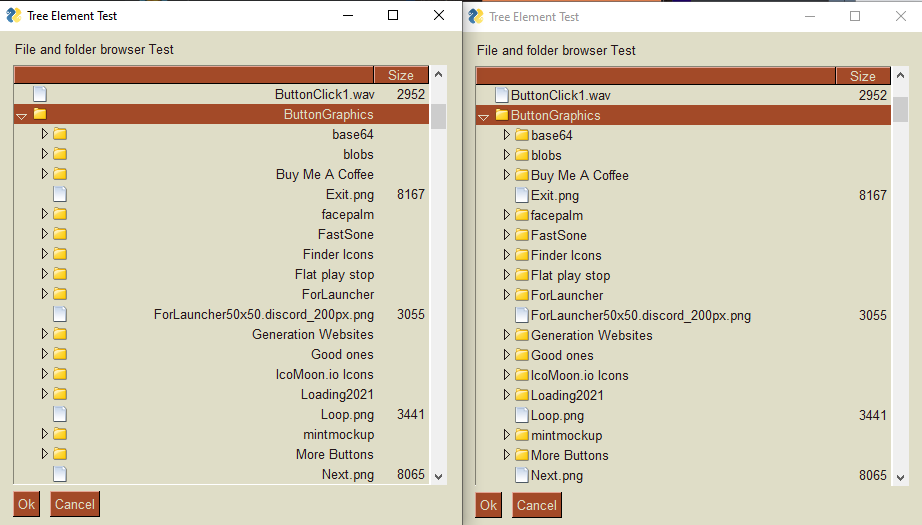
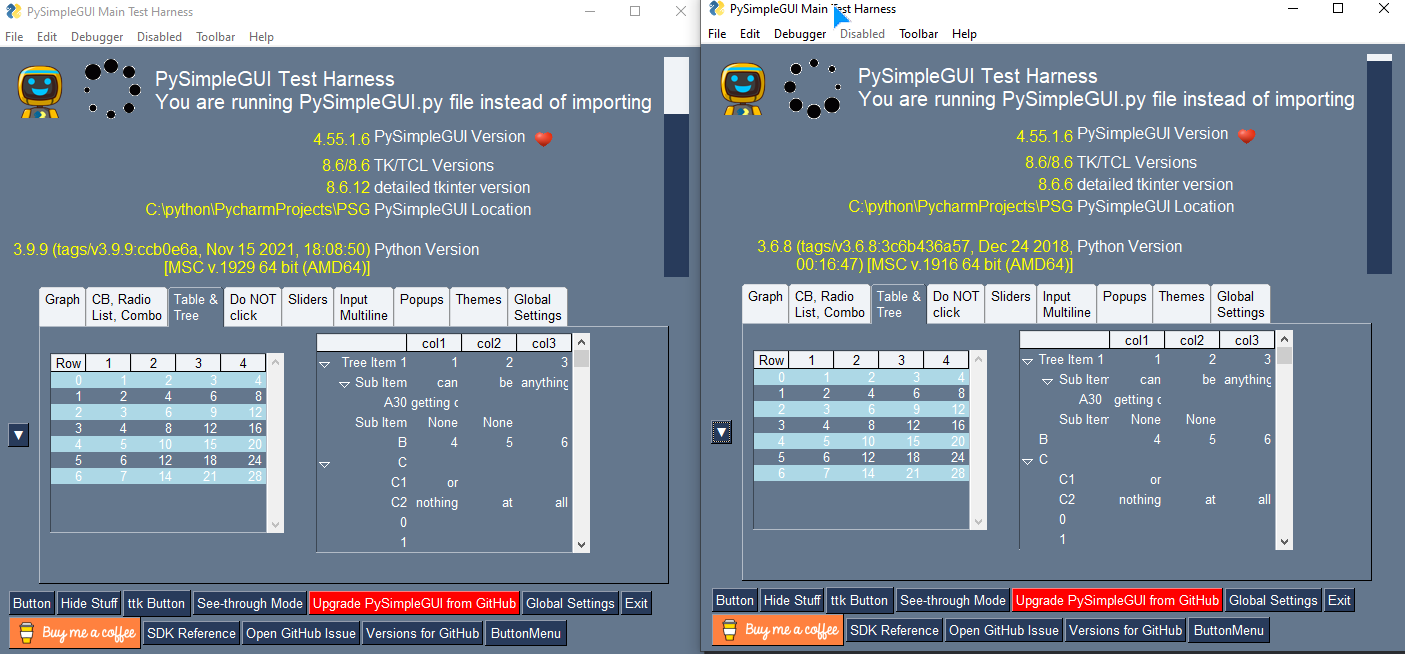
Hi @nachocho (our resident Mac expert!).... Jason learned a fascinating and for me terrifying thing this week. Python 3.9 is shipping with tkinter 8.6.12 on Windows. So far Jason discovered a behavioral change with Trees. The text is right justified instead of left. I think it's only for the first item. I haven't gotten into this yet.
Can you try the latest 3.9.9 on the Mac and see if you too get 8.6.12..... and then see if it has an impact on the issue you've reported here?? That would be massively helpful!
Here are a couple of images that show this difference.
Hi @PySimpleGUI, I can gladly test this... about the TreeData, I do see the same behavior on MacOS.
This is Python 3.8.3 / tkinter 8.6.8 where the TreeData renders text aligned to the left as expected:
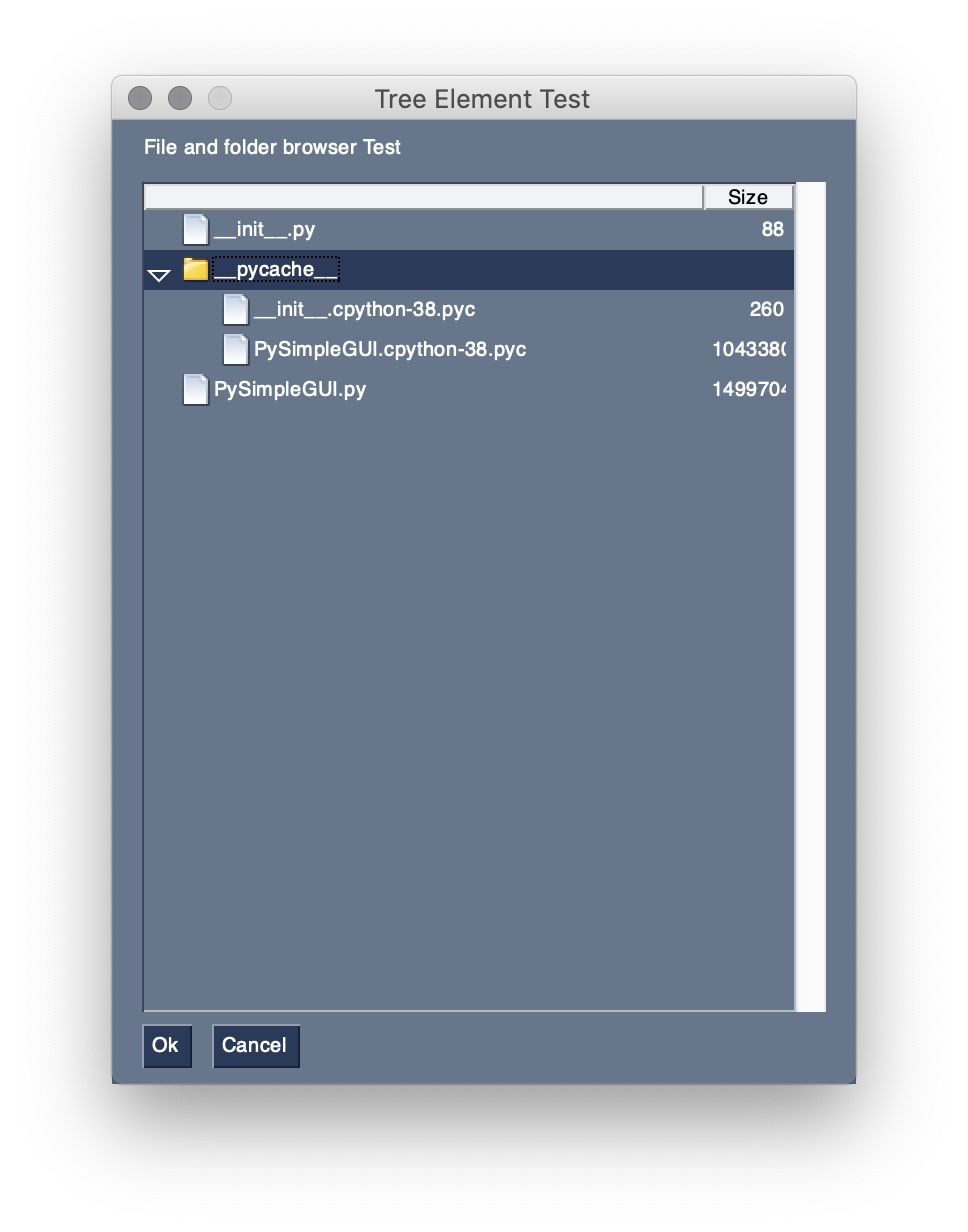
Python version: 3.8.3 (v3.8.3:6f8c8320e9, May 13 2020, 16:29:34)
[Clang 6.0 (clang-600.0.57)]
        port: tkinter
        tkinter version: 8.6.8
        PySimpleGUI version: 4.55.1
        PySimpleGUI filename: /Users/Nacho/PycharmProjects/test/venv/lib/python3.8/site-packages/PySimpleGUI/PySimpleGUI.py
This is Python 3.9.9 / tkinter 8.6.11 and the text of the TreeData is aligned to the right as you see it on Windows. The only difference I see is that I get tkinter 8.6.11 where you got 8.6.12:

Python version: 3.9.9 (v3.9.9:ccb0e6a345, Nov 15 2021, 13:06:05)
[Clang 13.0.0 (clang-1300.0.29.3)]
        port: tkinter
        tkinter version: 8.6.11
        PySimpleGUI version: 4.55.1
        PySimpleGUI filename: /Users/Nacho/PycharmProjects/test/venv-3.9/lib/python3.9/site-packages/PySimpleGUI/PySimpleGUI.py
And as you can guess, the source code of this test is exactly the tree element test here: https://github.com/PySimpleGUI/PySimpleGUI/blob/master/DemoPrograms/Demo_Tree_Element.py.
Can you try the latest 3.9.9 on the Mac and see if you too get 8.6.12..... and then see if it has an impact on the issue you've reported here?? That would be massively helpful!
@PySimpleGUI about exactly this issue (clicking the X button on the window titlebar), I see the exact same behavior since I got tkinter 8.6.11 with Python 3.9.9, which is the same version shipped with Python 3.10 for MacOS.
I also tested with Python 3.11A which does install tkinter 8.6.12, same result, clicking on the X button does not close the window as it should.
Python version: 3.11.0a2 (v3.11.0a2:e2b4e4bab9, Nov  5 2021, 15:54:35) [Clang 13.0.0 (clang-1300.0.29.3)]
        port: tkinter
        tkinter version: 8.6.12
        PySimpleGUI version: 4.55.1
        PySimpleGUI filename: /Users/Nacho/PycharmProjects/test/venv-3.11/lib/python3.11/site-packages/PySimpleGUI/PySimpleGUI.py
Thanks @PySimpleGUI for keeping this bug open, and YES you are right, this bug and #5495 are indeed related.
I am also using a timeout of 100ms for the Window.read method, and I just noticed that if I repeatedly click very quickly the window's close (X) icon, the window randomly closes.
If I raise the timeout value to 500 for example, the window closes if I click the X icon several times and I do not need to click as frequently and rapidly as with a 100ms timeout, so... this is definitely related to the timeout.