

 PyAr
PyAr
SQL activecode approach
Summary
This PR may close: angelasofiaremolinagutierrez#48
I use an activecode block with SQL language to read the file surf.db. That file contains the original database from the course converted from sqlite3 to regular SQLite database.
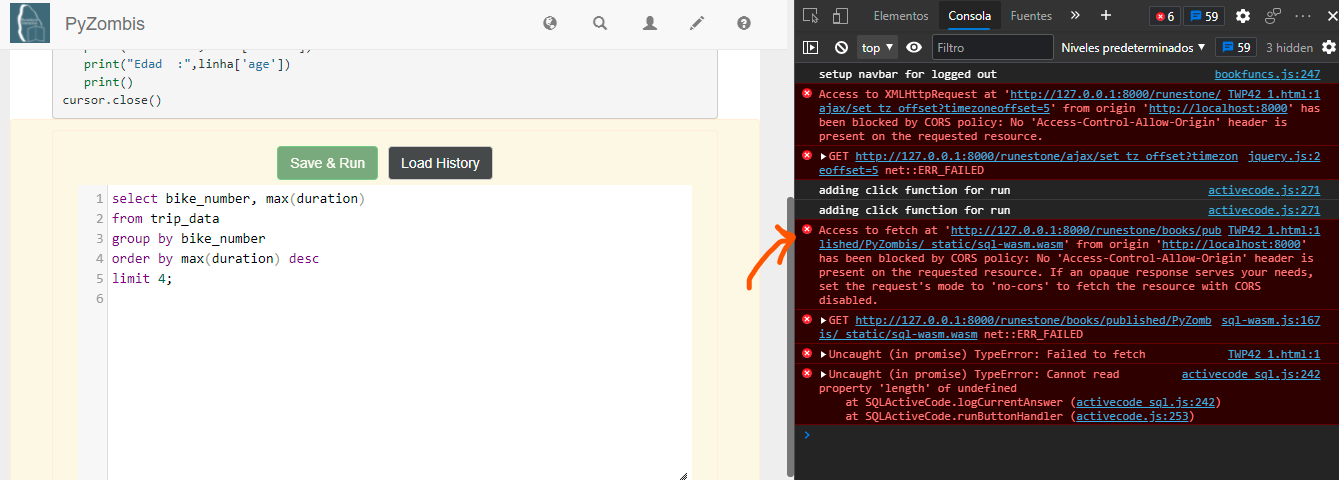
However there is an error happening right now to load the database (See image below).
Checklist
- [x] Variables, functions and comments are translated to Spanish
- [x] Functions follow underscore notation
- [x] Spell check done & typos fixed
- [x] All python code is PEP8 compliant
- [x] Test coverage with Playwright implemented; locators are Pyhton code
- [x] Reviewers assigned (all peers & at least 1 mentor)
Screenshots

![github-actions[bot] avatar](https://avatars.githubusercontent.com/in/15368?v=4 "Published by a pub.dev verified publisher")
You need to enable CORS on the server that's serving your SQLite database. This usually involves setting up appropriate headers:
If you control the server configuration, you can add Access-Control-Allow-Origin to allow requests from your desired domain.
If you're using a web server like Apache or Nginx, you can configure it to include these headers. If you don’t have control over the server, you can use a proxy server that adds the necessary CORS headers. For local development, you can disable CORS in your browser, though this isn’t recommended for production use. To configure CORS in a simple Python Flask server, you could do something like:
from flask import Flask, jsonify from flask_cors import CORS
app = Flask(name) CORS(app) # This will enable CORS for all routes
@app.route('/data') def data(): return jsonify({"data": "This is some data!"})
if name == 'main': app.run() Ensure your server is set up to handle CORS, and you should be able to make those cross-origin requests without trouble! Give these a try and see if it smooths things out.
