

 ProxymanApp
Scripting generates thousands of requests
Proxyman version? (Ex. Proxyman 1.4.3)
Version 2.12.0 (21200)
macOS Version? (Ex. mac 10.14)
macOS Catalina 10.15.7
Steps to reproduce
Create a script and activate either response or request checkbox. When a request arrives, Proxyman generates thousands of these requests and all get stuck in pending state. This can only be aborted by unchecking response or request.
Expected behavior
Alter the request/response and finish. Tried several older versions and always got this problem. Not sure why this is happening?
Screenshots (optional)

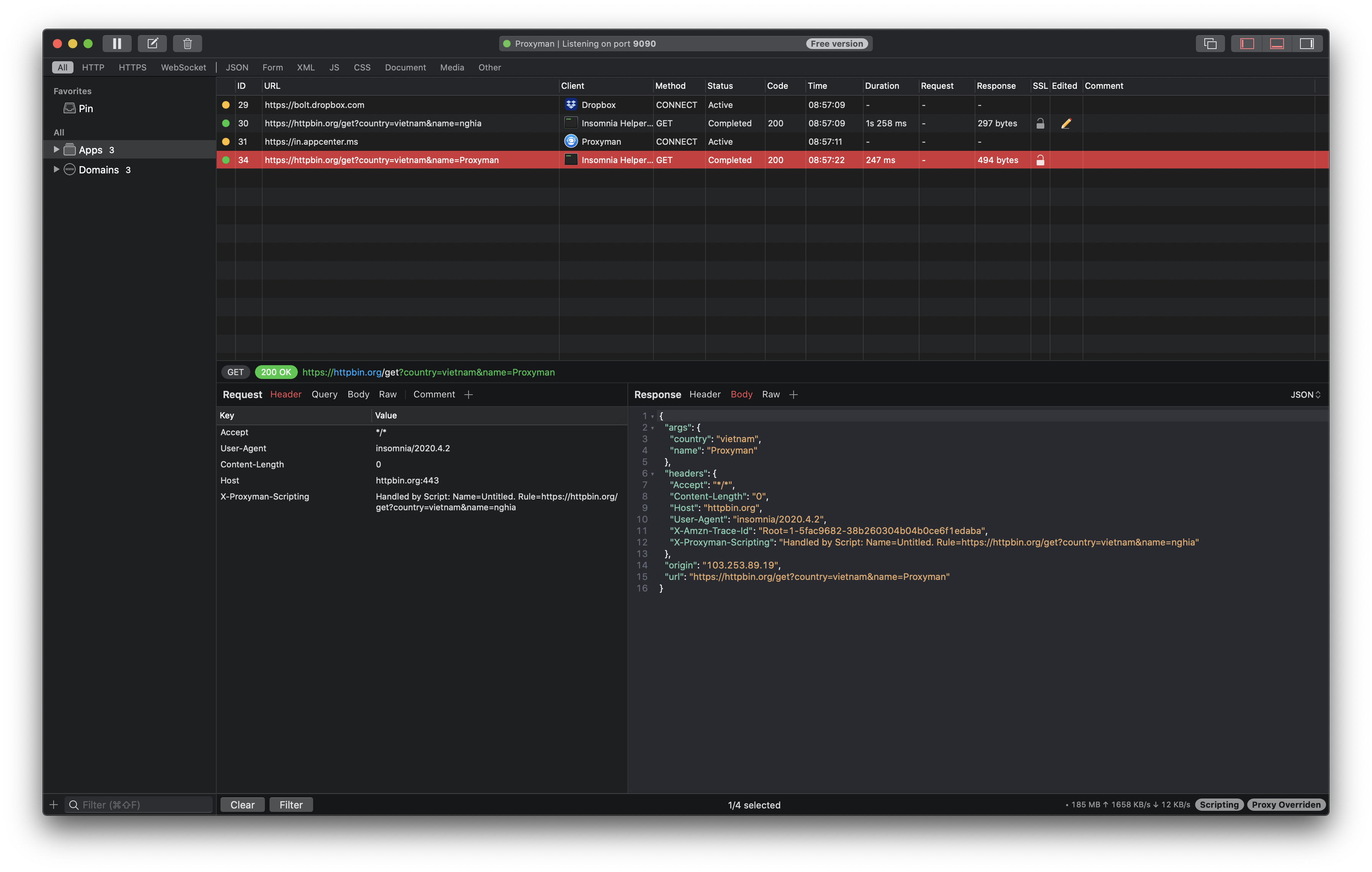
Hey @phhoef can you share with me how you setup the script rule and what the request URL is?
A screenshot is great since I can reproduce it

Hi @phhoef , do you set up any special tool in the middle? Like Proxy or Proxy-CLI 🤔
I'm unable to reproduce your bug. Proxyman only generates one request.
Please share with me the script, URL Rule, and the URL that you're encountering the bug. I'm happy to help you fix it 👍
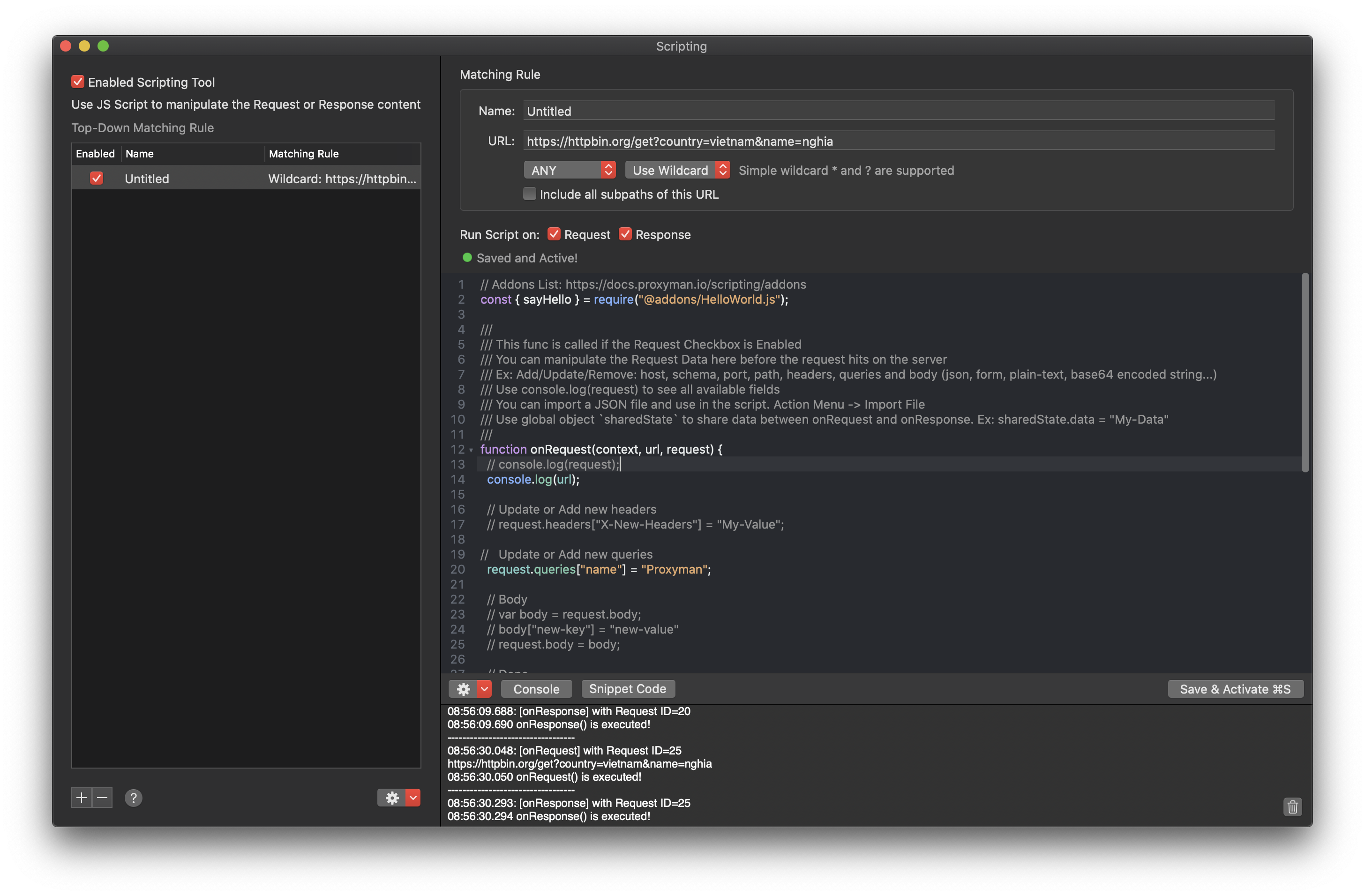
// Addons List: https://docs.proxyman.io/scripting/addons
const { sayHello } = require("@addons/HelloWorld.js");

///
/// This func is called if the Request Checkbox is Enabled
/// You can manipulate the Request Data here before the request hits on the server
/// Ex: Add/Update/Remove: host, schema, port, path, headers, queries and body (json, form, plain-text, base64 encoded string...)
/// Use console.log(request) to see all available fields
/// You can import a JSON file and use in the script. Action Menu -> Import File
/// Use global object `sharedState` to share data between onRequest and onResponse. Ex: sharedState.data = "My-Data"
///
function onRequest(context, url, request) {
  // console.log(request);
  console.log(url);

  // Update or Add new headers
  // request.headers["X-New-Headers"] = "My-Value";

//   Update or Add new queries
  request.queries["name"] = "Proxyman";

  // Body
  // var body = request.body;
  // body["new-key"] = "new-value"
  // request.body = body;

  // Done
  return request;
}

///
/// This func is called if the Response Checkbox is Enabled
/// You can manipulate the Response Data here before it goes to the client
/// Ex: Add/Update/Remove: headers, statusCode and body (json, plain-text, base64 encoded string)
/// Use console.log(response) to see all available fields
///
function onResponse(context, url, request, response) {
  // console.log(response);

  // Update or Add new headers
  response.headers["Content-Type"] = "application/json";

  // Update status Code
  // response.statusCode = 500;

  // Update Body
  var body = response.body;
  body["new-key"] = "Proxyman";
  response.body = body;

  // Done
  return response;
}
Good morning @NghiaTranUIT,
thanks for your response. I didn't find a regularity, when the problem occurs. I'll try to give you a detailed description of what I've done. It seems that the behavior changes, so I cannot reproduce the issue every time.
Here is what I am trying to do: I am receiving requests from an external application. I want to use Proxyman as a reverse proxy (remote mapping) to forward the traffic to another external server. Both applications are communicating via CMIS. I would like to debug the traffic.
I disabled the macOS proxy, enabled a port forwarding in my firewall and setup the remote map. I also tried disabling the remote map and set the new host via JS. I've encountered the problem in both scenarios.
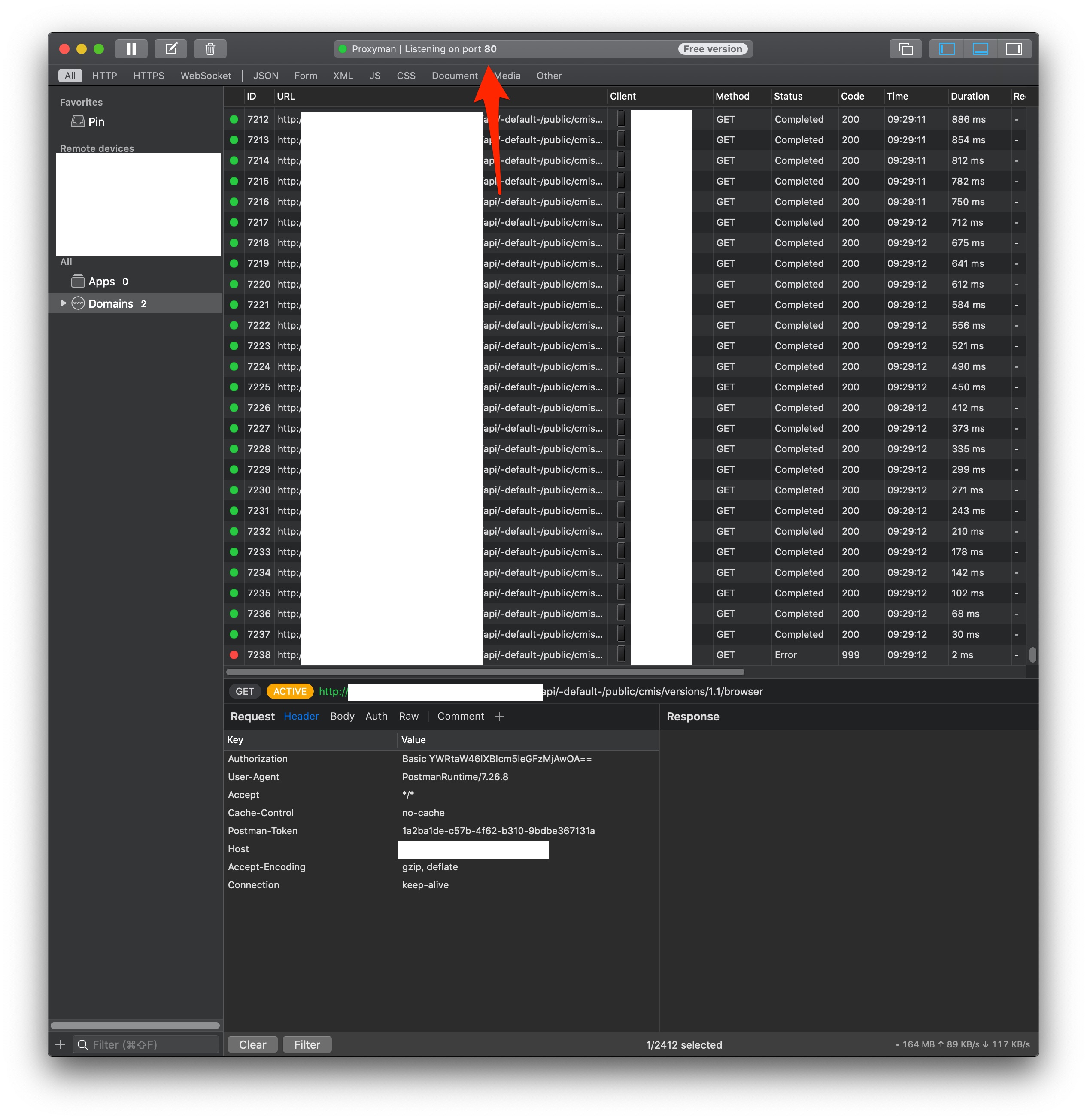
Please find attached some screenshots. I blurred the hostname and IP as this is my static public IP. The weird thing is, that even when the script is disabled (but request and response are checked) the problem can occur. So, I am not completely sure if it's related to the scripting mechanism. The remote map was disabled during all the tests.
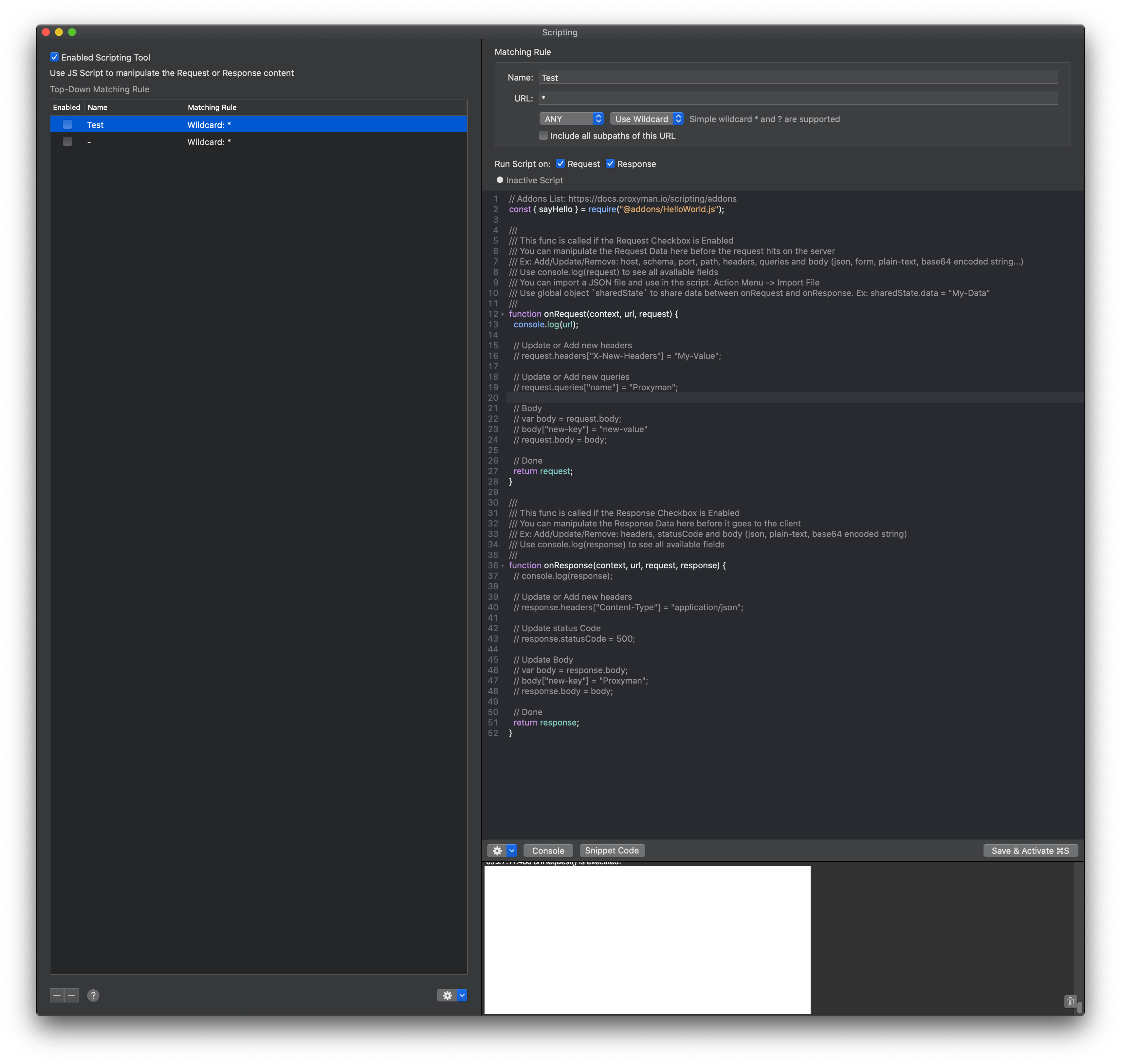
The amount of requests is growing and all requests are not finished

After disabling the request and response checkbox, it stops after some seconds. The requests becoming green ...
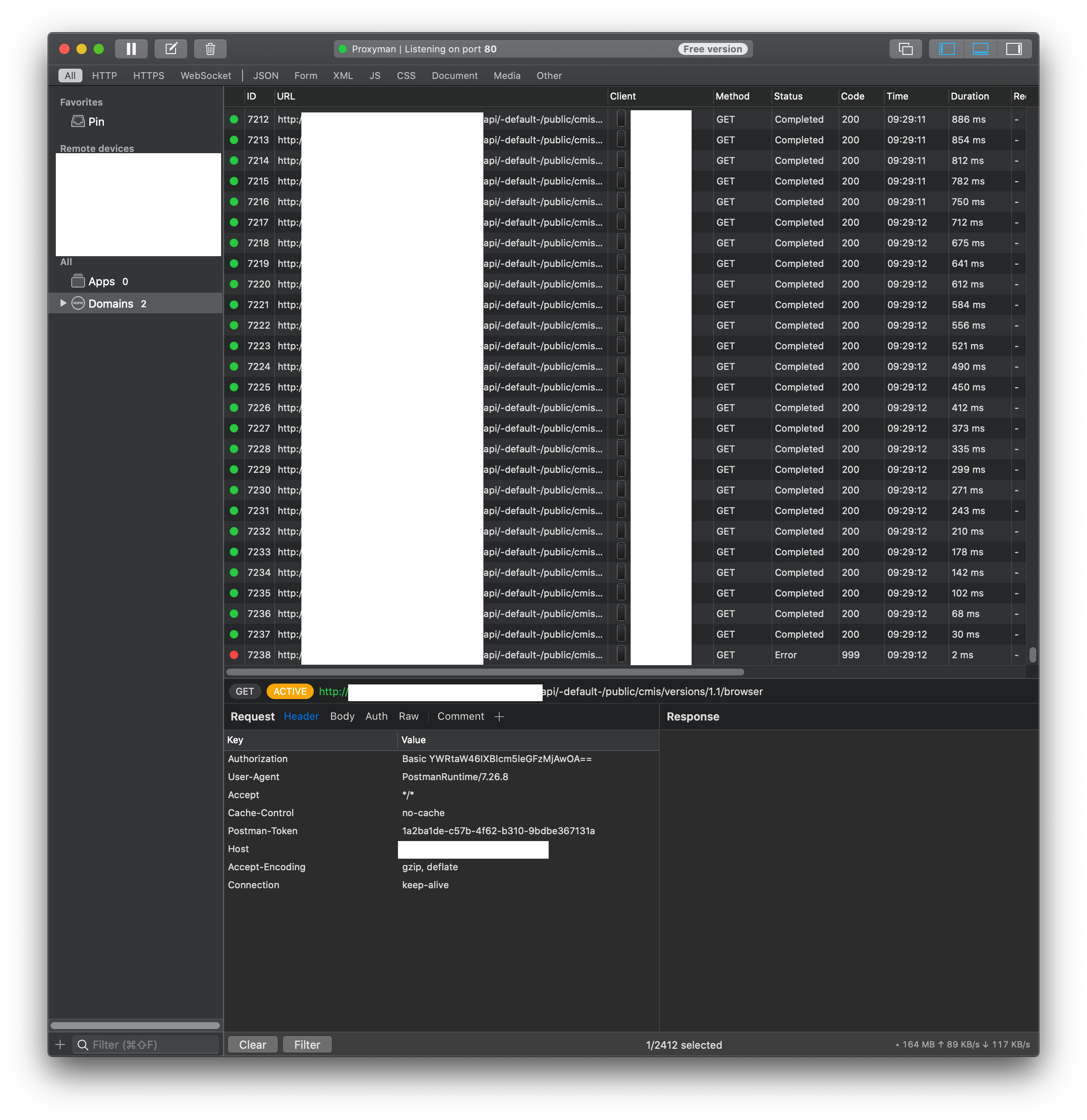
As you see, the script is actually doing nothing, but my feeling is, that it's still somehow related to the scripting feature. If you would like, we can setup a meeting and I'll show you the problem.
Do you need more information? Can I enable debug logging and get some insights of what's going on? Thanks for your help!
Thanks for the detailed report 👍
Just wondering, if you disable all Tools (Includes Map Remote and Scripting), and set up as you mention. Are those requests working properly and you can see the proxy traffic?
I suppose that the bug might come from the core, not the tool. Since the core doesn't handle your case properly, it causes the Tools not working as well
I am completely new to Proxyman, so maybe it's a problem of my setup. I think I disabled all tools, as no label is shown in the lower right corner.
You're right. I miss it. You already disabled all the tools.
So, the bug is from the core. For some reason, it doesn't handle the incoming request properly (active state, Yellow color).
Let me try to reproduce your environment and fix it.
Did you have the chance to look into the problem? Were you able to reproduce the issue? Can I provide more information? The problem also occurs after upgrading to macOS Big Sur.
I tried to set up the same scenario but I couldn't reproduce the bug : /
Just wondering: how can you set up the Firewall Port forwarding from macOS? 🤔 I think it's the key to reproduce the bu
Not sure, if I understand your question. macOS does not handle the port forwarding at all. I am running a Sophos XG as gateway. I configured the Sophos to forward all requests incoming from port 9999 to my local machine to port 80. Proxyman listens on port 80 and receives these requests.
Not sure if the problem is really related to the port forwarding, as sometimes it is working. Didn't exactly figured out, when it's working and when not. I tried another reverse proxy (Reversee) with the same port forwarding and it worked as expected. That's why I came to the conclusion, that it must be related to Proxyman.
I am working on a Mac mini (Late 2018) connected via LAN and wifi. Both NICs do have different IP addresses and the port forwarding, forwards the requests only to one of them (LAN). Though, could proxyman fall into some kind of recursion due to two NICs?
If you like, we can arrange a TeamViewer session and I show you the problem. Is there any debug mechanism, I can enable, in order to provide you more insights?
@NghiaTranUIT I am also encountering this issue. My script is the default (haven't changed anything about it), and this is the rule (Proxyman is listening on port 8888):
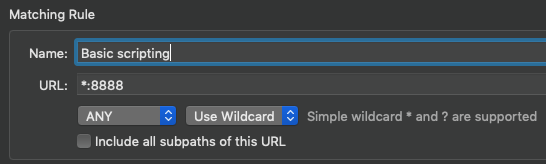
When I have this script enabled, it creates thousands of requests, just like for @phhoef.

Thanks for reproducible steps @lkipke I'm investigating it now.
I'd not recommend using *:8888 (if Proxyman is listening at 8888) to match all requests.
You can use *, all domains, which are enabled SSL Proxying, will execute the script 👍
Hallo @NghiaTranUIT, did you ever find some reasons for this behavior? I am currently debugging a similar situation and facing the exact same issue. Proxyman is generating thousands of pending requests and I do not find the reason.
I am now using Version 3.8.0 (30800) on macOS 12.5 on a MacBook Pro m1max.
One additional note: I am trying to debug a CMIS traffic. I have a script rule, that maps a remote server and I will have another script manipulating the body in some situations (currently disabled). When I fire a request with Postman against Proxyman, only 1 request is logged. But when I use CMIS Workbench, it generated thousands of requests, like it did ~1 year ago.
@phhoef Can you verify which port that Proxyman is listening?
Your old screenshot shows that you're using port 80, which might conflict with all localhost HTTP requests (HTTP use port 80)
@NghiaTranUIT thanks for your quick reply. Proxyman is listening on port 3000, and I want to map the requests to port 8080.

EDIT:
This is the mapping script:
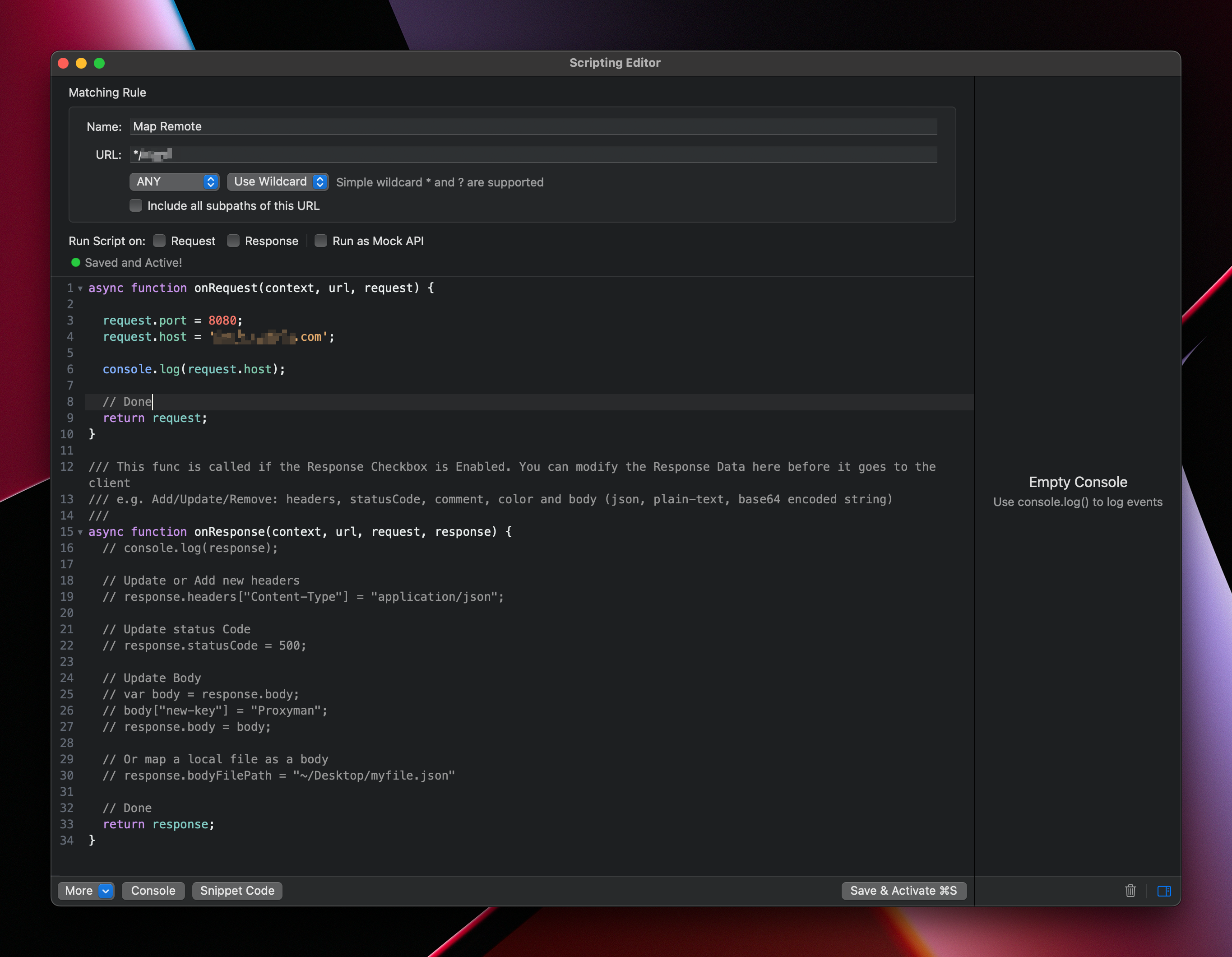
When CMIS Workbench tries to connect, all these requests are shown:
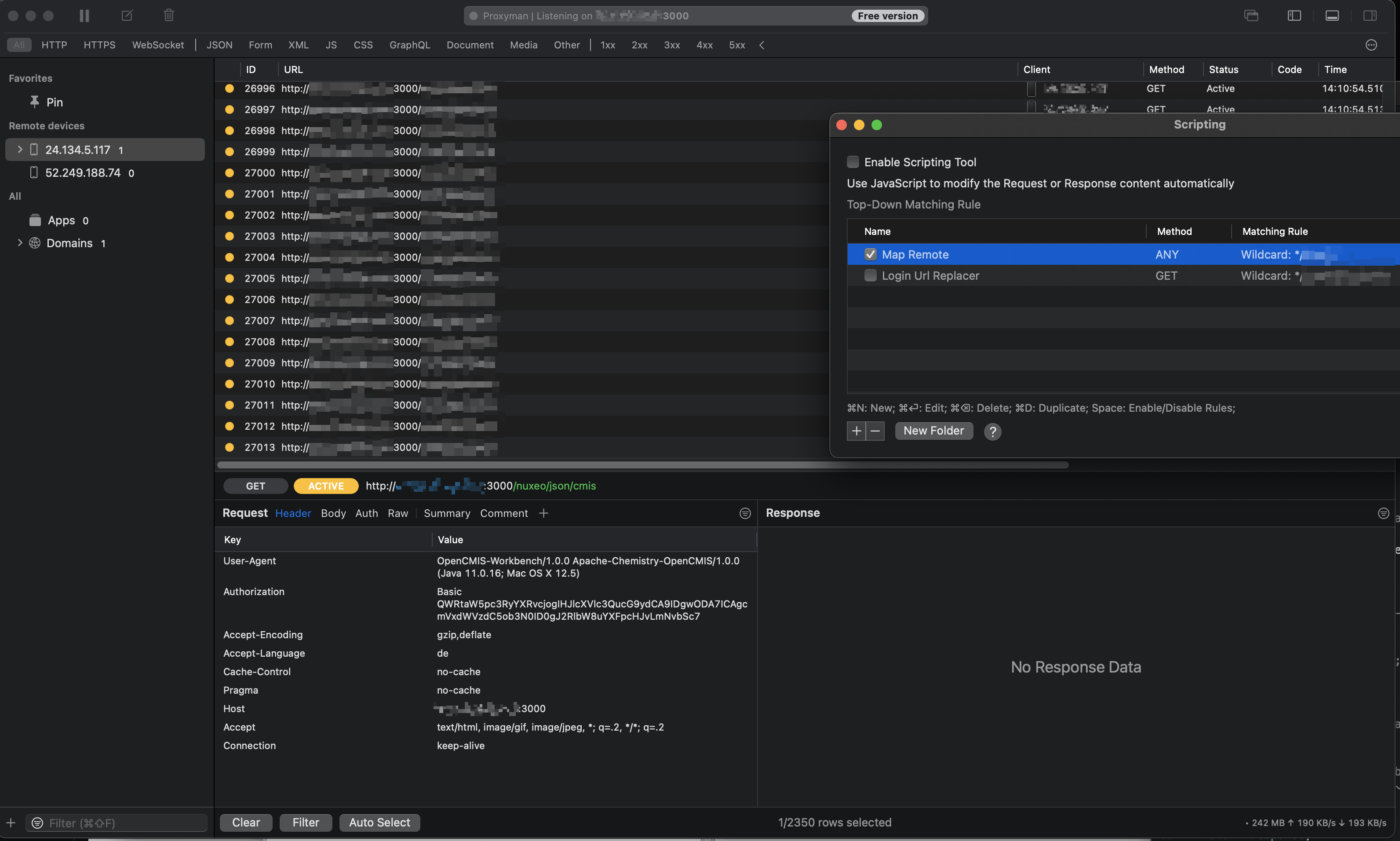
I guess you have a local server that uses port 3000 too?
Proxyman is listening on port 3000, and I want to map the requests to port 8080.
It's not a good way to map the request to port 8080.
If you'd like to map the request to port 8080, please follow:
- Reset the Proxy port to 9090 (In preference)
- Make the first request and make sure you can see it on Proxyman app
- Right Click -> Tools -> Map Remote
- Set the Port to 8080. It. will forward all traffic from this request to port 8080
No, I've no server running on port 3000. I just want to forward the all the traffic through Proxyman to understand what's going on. The actual application is running on a remote server on port 8080.
The flow is like: CMIS Workbench -> 3000 -> Proxyman -> 8080 -> external application server
I followed your instruction, and this mapping is working. I did this the same way, in the first place.
But I've the requirement to alter the response body of the external application. CMIS is sending the URL back as payload and I need to adapt it in order to actually make the CMIS Workbench communicate through proxyman. Therefore I've setup a script
async function onResponse(context, url, request, response) {

  var body = response.body;

  if (body.uri)
    body.uri = 'http://myUri.com';

  if (body.url1)
    body.url1 = 'http://myUri.com';
  if (body.url2)
    body.url2 = 'http://myUri.com';

  response.body = body;

  // Done
  return response;
}
Once the script is active, I'll get the thousands of requests.
Is there something wrong with my script? Only Response is checked.
The script looks totally fine to me. I don't think that causes duplicated requests since the script only affects on the Response.
What if you use port 9090 and your script? Does it happen?
Yes, currently listening on port 9090. Once the scripting is active and CMIS Workbench fires the first request, the log is filling up with pending requests.
If you like, we can have a TeamViewer session and I'll show it to you. Maybe I am doing something wrong ...?
I've small thing I've just noticed: Proxyman does show the client. For the first two requests the client is the CMIS workbench, but the duplicate requests are coming from Proxyman itself. It seems, that the 2nd request gets duplicated thousand times. I assume this, as the first request finishes and the second is pending while requests are duplicating ...
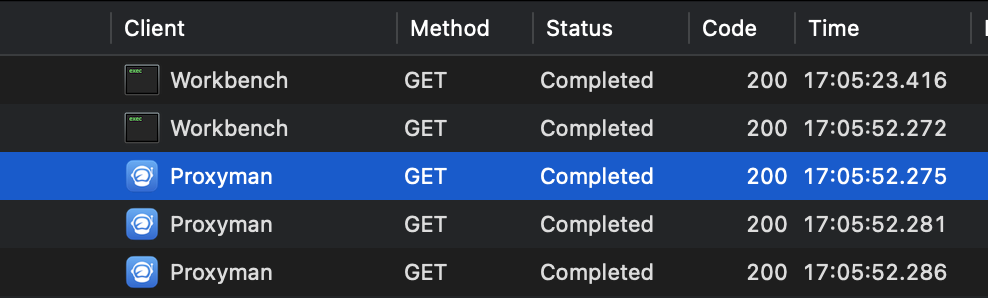
The problem already occurs, when there is a script enabled with Request or Response checked and the function is empty.
It seems somehow related to the script processing.
I can only stop the duplicated requests by unchecking the Response checkbox.
EDIT: Is there a log or something similar, I can activate, to see what's going on?
I was now able to reproduce the issue with Postman. The strange thing is, that the script seems to not alter the request.
I simplified the script and just added a new property to the body and it never occurred. I am quite clueless, do you have some ideas?
- Can you share with me the Postman request?
- What is your proxy port?
- and please share the script.
If you have a video or something, it'd be great.
I'd like to reproduce on my machine.
- You can import the request with the following link: https://www.getpostman.com/collections/f5795c93307eacde9a9a
- I am using Port 9090 and map to https/443
- Script is pretty small
async function onResponse(context, url, request, response) {

  var body = response.body;
  body['test'] = 'A test';

  response.body = body;

  // Done
  return response;
}
The video and the proxyman export file are too big for Github. I've uploaded it to wetransfer. You can download it in the next 7 days from the following link: https://we.tl/t-0qUXPmJSEQ
Hope this helps. Are you able to reproduce the issue on your machine with these information?
Hi @NghiaTranUIT were you able to reproduce the issue? Do you need more information from me?
I understand the problem (Thanks for your video) 👍
The problem is that you make a request to 127.0.0.1:9090/todo/1
You should not do that because port 9090 is a Proxy Server, not a local host server.
Typically, you will have a localhost server, which is listening at localhost:3000, then you can make a request to http://127.0.0.1:3000/todo/1.
To use with Proxyman, instead of using 9090, you have to set the HTTP Proxy to 9090.
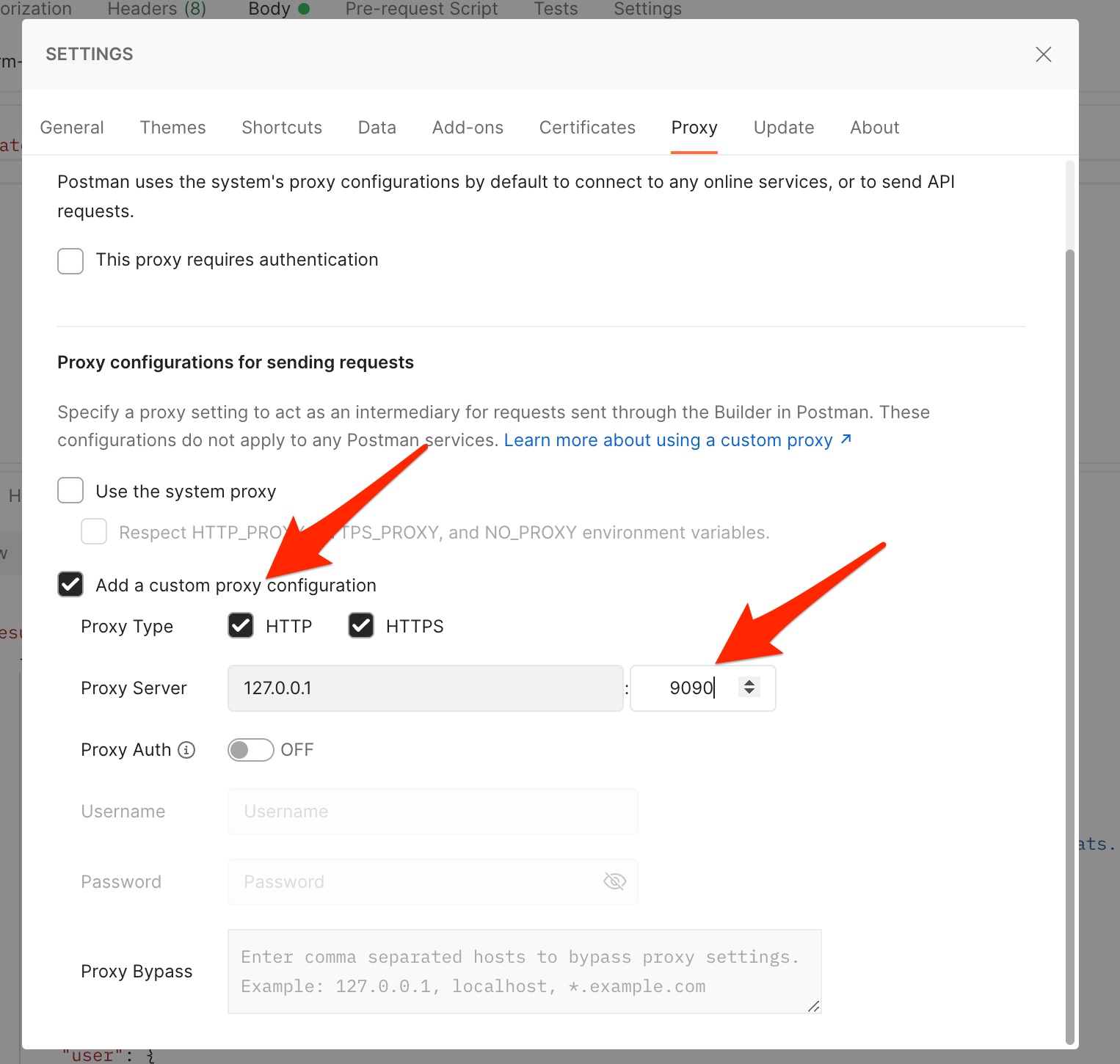
Make sure you disable the SSL Certificate Verification in the Preference: https://docs.proxyman.io/debug-devices/http-clients#2.-postman
If you don't have a localhost server, you can use Scripting..
Here is a walkthrough:
- Disable the Map Remote and remove all scripting rules.
- Open Postman, set an HTTP/HTTPS Proxy to port 9090, and disable the SSL Verification.
- Open Proxyman,
- Back to Postman -> Make a request to
http://12.7.0.0.1:3000/todo/1(Don't worry about the port 3000, but don't use 9090) - Back to Proxyman -> Right click on the error request (because http://12.7.0.0.1:3000/todo/1 is not available) -> Tools -> Scripting -> Check the Request, Response
- Use this script
// Addons List: https://docs.proxyman.io/scripting/addons
const { sayHello } = require("@addons/HelloWorld.js");

async function onRequest(context, url, request) {
    request.scheme = "https";
    request.port = 443; // Don't forget to override the port
    request.host = "placeholder.com";
    return request;

  // Done
  return request;
}

/// This func is called if the Response Checkbox is Enabled. You can modify the Response Data here before it goes to the client
/// e.g. Add/Update/Remove: headers, statusCode, comment, color and body (json, plain-text, base64 encoded string)
///
async function onResponse(context, url, request, response) {
  // console.log(response);

  // Update or Add new headers
  response.headers["Content-Type"] = "application/json";

  // Update Body
  var body = response.body;
  body["new-key"] = "Proxyman";
  response.body = body;


  // Done
  return response;
}
Good morning @NghiaTranUIT,
thanks for your investigation. When testing with postman, I can change proxy settings. Unfortunately, I do not have this possibility when using the external system.
Can you explain, why the proxy is necessary? I do not completely understand your approach. Is there a way to bypass the proxy approach?
It's a normal approach. You should make a request call to your actual service, e.g https://myserver.com:443, localhost:3000, NOT directly make a request to a Proxy Server (localhost:9090) 👍
To use a Web Debugging Proxy (Proxyman, Fiddler, Charles), you have to set the HTTP Proxy.