

 ProtonVPN
Unable to connect on Ubuntu server 20.04.3 LTS (ARM64 Raspberry Pie 4 model B).
Hello,
I successfully installed and logged in to protonvpn-cli.
But when I run :
protonvpn-cli c -f
I get the following output :
Setting up ProtonVPN.

An unknown error has occured. Please ensure that you have internet connectivity.
If the issue persists, please contact support.
When I run :
protonvpn-cli --get-logs
I get :
Generating logs...
Opening file explorer...
Error: no "view" mailcap rules found for type "inode/directory"
/usr/bin/xdg-open: 869: www-browser: not found
/usr/bin/xdg-open: 869: links2: not found
/usr/bin/xdg-open: 869: elinks: not found
/usr/bin/xdg-open: 869: links: not found
/usr/bin/xdg-open: 869: lynx: not found
/usr/bin/xdg-open: 869: w3m: not found
xdg-open: no method available for opening '/home/romainfallet/.cache/protonvpn/logs'
I am on Ubuntu server 20.04.3 LTS (ARM64 Raspberry Pie 4 model B).
Thanks for your help!


Hello @kolyan94, after contacting ProtonVPN support, they told me that the ProtonVPN CLI for linux does not work on Ubuntu SERVER edition, it is only intended to be used on Ubuntu DESKTOP edition.
It's funny for a CLI.
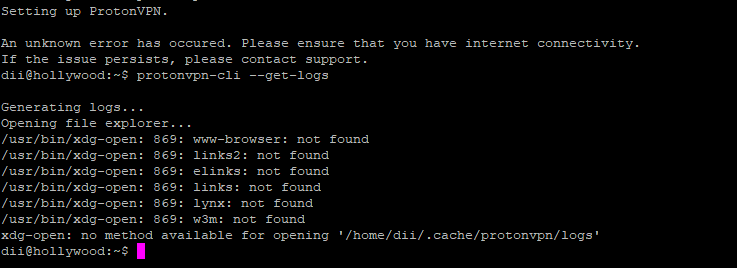 Same problem here
Looks to me you just need to install those packages. Though im not an expert but i think that would at least get rid of those errors.
Also, why would the application not work on ubuntu server? What nonsense is that? It is a python program. If all required dependencies are there, it should work.
But again, im kind of a noob myself so i might be wrong. It sounds stupid though.
