

 Project-MONAI
`WSIReader` does not support `TiffFile` backend
image_reader.WSIReader supports tifffile (https://github.com/Project-MONAI/MONAI/blob/e4624678cc15b5a5670776715c935279f7837c89/monai/data/image_reader.py#L1257), but it does not supported in wsi_reader.WSIReader. Can I ask what is the purpose here to remove the supports?
I'm not sure but it seems tifffile loads faster in some cases.
For example:


Hi @yiheng-wang-nv, thank you very much to raise this issue. Could you please let me know what is the input image that you are using? and also your environment?
We have intentionally dropped tifffile after cucim reported to be faster than tifffile in reading the entire image to make the code base simpler and more maintainable. Here is the benchmarking code: https://gist.github.com/gigony/260d152a83519614ca8c46df551f0d57

Hi @drbeh , the input image is from: https://www.kaggle.com/competitions/mayo-clinic-strip-ai/data
Thanks, @yiheng-wang-nv. Can you also provide information on your environment?
python -c 'import monai; monai.config.print_debug_info()'
Hi @yiheng-wang-nv, I have tested the two backend to load '006388_0.tif' and the results were the other way around. Can you please check your experiment again? Also be aware of how your memory is being managed since the size of this single file is about 24GB on RAM.
Here is what I get:
Tifffile:
CPU times: user 1min 4s, sys: 19.6 s, total: 1min 24s
Wall time: 27.5 s
CuCIM:
CPU times: user 15.3 s, sys: 8.89 s, total: 24.2 s
Wall time: 24.2 s
Hi @yiheng-wang-nv, I have tested the two backend to load
'006388_0.tif'and the results were the other way around. Can you please check your experiment again? Also be aware of how your memory is being managed since the size of this single file is about 24GB on RAM. Here is what I get:Tifffile:
CPU times: user 1min 4s, sys: 19.6 s, total: 1min 24s
Wall time: 27.5 s
CuCIM:
CPU times: user 15.3 s, sys: 8.89 s, total: 24.2 s
Wall time: 24.2 s
Thanks @drbeh . I used a machine with high RAM, I'm sure my experiment is correct, but it may really depend on which machine is used.
the version I used is: 0.9.1rc5+1.g6338ea4e
@yiheng-wang-nv, can you please run the experiment again with the order of loading reversed? (first cucim and then tifffile)
also it would be helpful to provide your environment info. Thanks
python -c 'import monai; monai.config.print_debug_info()'
FWIW, 006388_0.tif is not really a WSI, more a regular TIFF: no pyramid levels, wrong resolution metadata, small tiles, ZIP compression, horizontal predictor.

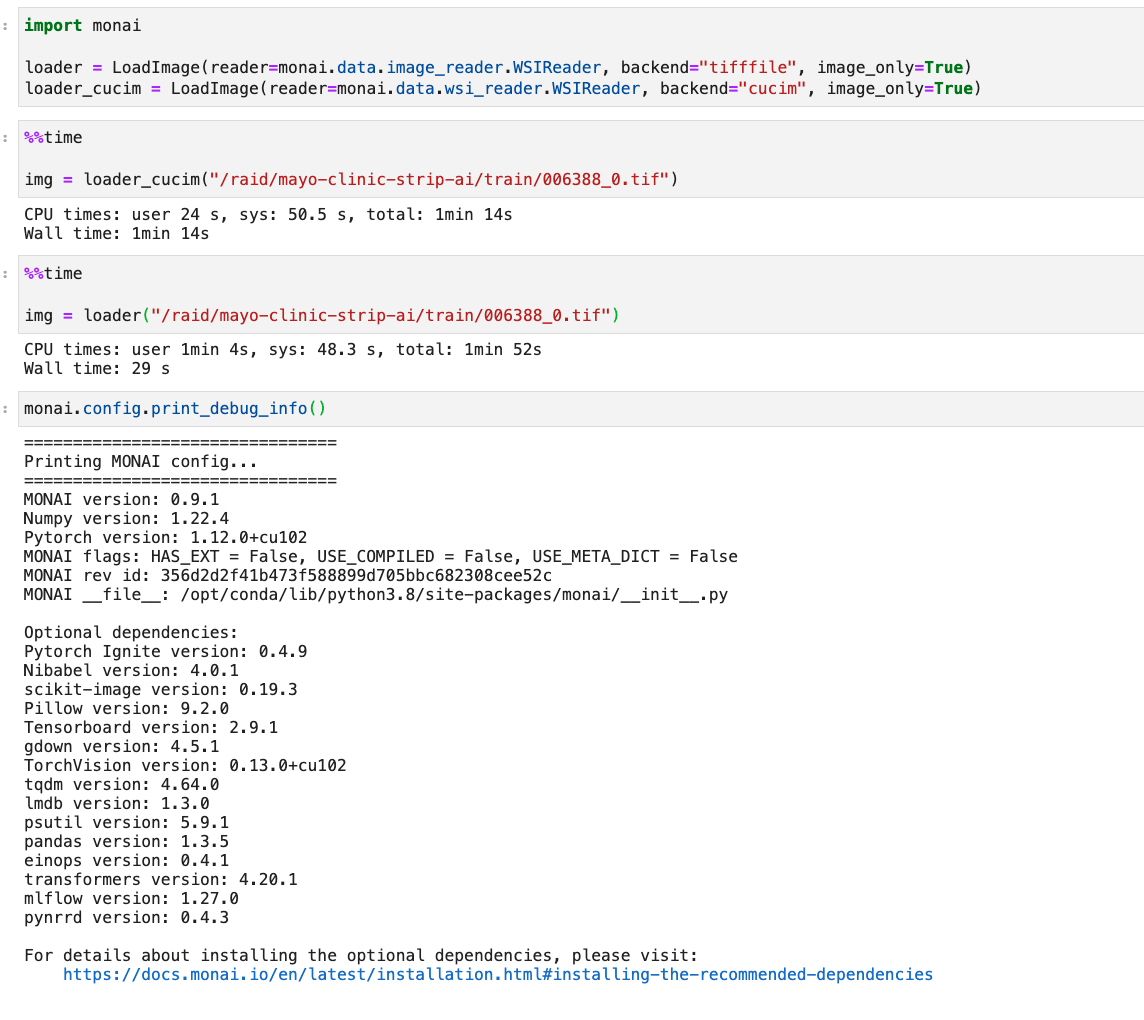 Hi @drbeh , I re-tested it with monai 0.9.1, and check cucim first.
Hi @gigony, @grlee77, Do you know why Yiheng is experiencing slower loading of this tif file using cucim? Thanks
Hi @yiheng-wang-nv and @drbeh
Image information
❯ tiffinfo notebooks/input/006388_0.tif
TIFF Directory at offset 0x4e3268cc (1311926476)
  Image Width: 34007 Image Length: 60797
  Tile Width: 128 Tile Length: 128
  Resolution: 10, 10 pixels/cm
  Bits/Sample: 8
  Sample Format: unsigned integer
  Compression Scheme: AdobeDeflate
  Photometric Interpretation: RGB color
  Orientation: row 0 top, col 0 lhs
  Samples/Pixel: 3
  Planar Configuration: single image plane
  Predictor: horizontal differencing 2 (0x2)
Test code
import os
from cucim import CuImage
from contextlib import ContextDecorator
from time import perf_counter
from tifffile import imread
import numpy as np
import torch

import monai
from monai.transforms import LoadImage

loader = LoadImage(reader=monai.data.image_reader.WSIReader,
                   backend="tifffile", image_only=True)
loader_cucim = LoadImage(
    reader=monai.data.wsi_reader.WSIReader, backend="cucim", image_only=True)


class Timer(ContextDecorator):
    def __init__(self, message):
        self.message = message
        self.end = None

    def elapsed_time(self):
        self.end = perf_counter()
        return self.end - self.start

    def __enter__(self):
        self.start = perf_counter()
        return self

    def __exit__(self, exc_type, exc, exc_tb):
        if not self.end:
            self.elapsed_time()
        print("{} : {}".format(self.message, self.end - self.start))


image_file = "/home/gbae/repo/cucim/notebooks/input/006388_0.tif"


with Timer("  Thread elapsed time (tifffile)") as timer:
    image = imread(image_file)
print(f"    type: {type(image)}, shape: {image.shape}, dtype: {image.dtype}")

del image

# https://github.com/rapidsai/cucim/wiki/release_notes_v22.02.00#example-api-usages

with Timer("  Thread elapsed time (cucim, num_workers=1)") as timer:
    img = CuImage(image_file)
    image = img.read_region()
    image = np.asarray(image)
print(f"    type: {type(image)}, shape: {image.shape}, dtype: {image.dtype}")

del image

with Timer("  Thread elapsed time (cucim, num_workers=1, specifying location/size)") as timer:
    img = CuImage(image_file)
    image = img.read_region((0, 0), (34007, 60797))
    image = np.asarray(image)
print(f"    type: {type(image)}, shape: {image.shape}, dtype: {image.dtype}")

del image

num_threads = os.cpu_count()
with Timer(f"  Thread elapsed time (cucim, num_workers={num_threads})") as timer:
    img = CuImage(image_file)
    image = img.read_region(num_workers=num_threads)
    image = np.asarray(image)
print(f"    type: {type(image)}, shape: {image.shape}, dtype: {image.dtype}")

del image

with Timer("  Thread elapsed time (tifffile loader)") as timer:
    image = loader(image_file)
print(f"    type: {type(image)}, shape: {image.shape}, dtype: {image.dtype}")

del image

with Timer("  Thread elapsed time (cucim loader)") as timer:
    image = loader_cucim(image_file)
print(f"    type: {type(image)}, shape: {image.shape}, dtype: {image.dtype}")

del image

with Timer("  Thread elapsed time (mimic monai cucim loader, num_workers=1)") as timer:
    img = CuImage(image_file)
    image = img.read_region(num_workers=1)
    image = np.moveaxis(image, -1, 0)
    image = np.ascontiguousarray(image)
    image = np.asarray(image, dtype=np.float32)
    image = torch.from_numpy(image)
print(f"    type: {type(image)}, shape: {image.shape}, dtype: {image.dtype}")

del image

with Timer(f"  Thread elapsed time (mimic monai cucim loader, num_workers={num_threads})") as timer:
    img = CuImage(image_file)
    image = img.read_region(num_workers=num_threads)
    image = np.moveaxis(image, -1, 0)
    image = np.ascontiguousarray(image)
    image = np.asarray(image, dtype=np.float32)
    image = torch.from_numpy(image)
print(f"    type: {type(image)}, shape: {image.shape}, dtype: {image.dtype}")
This is the result
  Thread elapsed time (tifffile) : 10.761376535985619
    type: <class 'numpy.ndarray'>, shape: (60797, 34007, 3), dtype: uint8
  Thread elapsed time (cucim, num_workers=1) : 6.1665689669316635
    type: <class 'numpy.ndarray'>, shape: (60797, 34007, 3), dtype: uint8
  Thread elapsed time (cucim, num_workers=1, specifying location/size) : 6.136442722985521
    type: <class 'numpy.ndarray'>, shape: (60797, 34007, 3), dtype: uint8
  Thread elapsed time (cucim, num_workers=32) : 1.1633656659396365
    type: <class 'numpy.ndarray'>, shape: (60797, 34007, 3), dtype: uint8
  Thread elapsed time (tifffile loader) : 15.5943678249605
    type: <class 'monai.data.meta_tensor.MetaTensor'>, shape: (3, 60797, 34007), dtype: torch.float32
  Thread elapsed time (cucim loader) : 14.059558755951002
    type: <class 'monai.data.meta_tensor.MetaTensor'>, shape: (3, 60797, 34007), dtype: torch.float32
  Thread elapsed time (mimic monai cucim loader, num_workers=1) : 10.625215215026401
    type: <class 'torch.Tensor'>, shape: torch.Size([3, 60797, 34007]), dtype: torch.float32
  Thread elapsed time (mimic monai cucim loader, num_workers=32) : 5.21964049898088
    type: <class 'torch.Tensor'>, shape: torch.Size([3, 60797, 34007]), dtype: torch.float32
@yiheng-wang-nv Since MONAI's image loader force to have channel first tensor, if your pipeline works good with channel last tensor, please use cuCIM directly (14 secs-> 6 secs for 1 thread, 14 -> 1 sec for 32 thread)
And you can also get similar data with the image loaded by MONAI if you directly use cuCIM. In this case, you can use multithreadeds to load the image faster (5 secs) And if you use MONAI with the patch (https://github.com/Project-MONAI/MONAI/pull/4934) applied, monai cucim loader will get a similar performance with using cuCIM directly (14 secs -> 10 secs).
In current MONAI's implementation, cuCIM backend has a disadvantage over tifffile backend (For tifffile backend, converting to contiguous array is applied first before converting data type [uint8 -> float32] ).
I think that could be a reason for the differences in a different system.
With #4934 applied, I can see the following results (14 secs to 10 secs for monai cucim loader)
  Thread elapsed time (tifffile) : 11.544818989932537
    type: <class 'numpy.ndarray'>, shape: (60797, 34007, 3), dtype: uint8
  Thread elapsed time (cucim, num_workers=1) : 5.978483060956933
    type: <class 'numpy.ndarray'>, shape: (60797, 34007, 3), dtype: uint8
  Thread elapsed time (cucim, num_workers=1, specifying location/size) : 6.006091748946346
    type: <class 'numpy.ndarray'>, shape: (60797, 34007, 3), dtype: uint8
  Thread elapsed time (cucim, num_workers=32) : 1.165883683017455
    type: <class 'numpy.ndarray'>, shape: (60797, 34007, 3), dtype: uint8
  Thread elapsed time (tifffile loader) : 15.213442040025257
    type: <class 'monai.data.meta_tensor.MetaTensor'>, shape: (3, 60797, 34007), dtype: torch.float32
  Thread elapsed time (cucim loader) : 10.268190009985119
    type: <class 'monai.data.meta_tensor.MetaTensor'>, shape: (3, 60797, 34007), dtype: torch.float32
  Thread elapsed time (mimic monai cucim loader, num_workers=1) : 10.394060018006712
    type: <class 'torch.Tensor'>, shape: torch.Size([3, 60797, 34007]), dtype: torch.float32
  Thread elapsed time (mimic monai cucim loader, num_workers=32) : 5.20623895409517
    type: <class 'torch.Tensor'>, shape: torch.Size([3, 60797, 34007]), dtype: torch.float32
Since data type and tensor shape conversion takes time, it might be a good idea to do that in GPU.
cc @grlee77 @jakirkham
