

 Prograda
How to use?
I have some special issues when install that package. In my case i use vcpkg and Visual studio 2017. So what i do:
- Install some libs on vcpkg:
vcpkg install boost:x64-windows
vcpkg install boost:x64-windows-static
- Shared vcpkg libs into "CMakeLists.txt":
if(CMAKE_TOOLCHAIN_FILE)
    include(${CMAKE_TOOLCHAIN_FILE})
endif(CMAKE_TOOLCHAIN_FILE)
- Configure project on cmake(gui).exe (add some libs from repo SkyboltDependenciesHeaderOnly)
Found Boost: C:/temp/vcpkg/installed/x64-windows/include (found version "1.79.0") found components: log log_setup filesystem thread regex chrono atomic
Configuring done
Generating done
but have some warning on SkyboltVis:
CMake Warning at C:/Program Files/CMake/share/cmake-3.23/Modules/FindBoost.cmake:1384 (message):
  New Boost version may have incorrect or missing dependencies and imported
  targets
Call Stack (most recent call first):
  C:/Program Files/CMake/share/cmake-3.23/Modules/FindBoost.cmake:1507 (_Boost_COMPONENT_DEPENDENCIES)
  C:/Program Files/CMake/share/cmake-3.23/Modules/FindBoost.cmake:2117 (_Boost_MISSING_DEPENDENCIES)
  C:/temp/vcpkg/installed/x64-windows/share/boost/vcpkg-cmake-wrapper.cmake:11 (_find_package)
  C:/temp/vcpkg/scripts/buildsystems/vcpkg.cmake:778 (include)
  src/Skybolt/SkyboltVis/CMakeLists.txt:7 (find_package)
Summary when i build (F7) (MinimalApi) VS project : LNK2019 Skybolt.Vis what i do wrong? maybe version of boost?

SkyboltVisTests.exe:
test cases:      17 |16 passed | 1 Failed
assertations:   61 | 60 passed| 1 Failed

OsgImageHelpersTests.cpp(17) FAILED:
SIGSEGV - Segmentation violation signal
Common and Sim tests all done.
According to this comment the boost warning is caused by using a CMake version that's newer than the boost version. I expect updating CMake should fix the warning.
It's difficult to tell what's causing the seg fault. Are you able to debug it with gdb and post a backtrace (call stack) of the crash?

when upgrade cmake to 3.24.2 boost warning gone,
Cmake 3.24.2 (exe) Configurate (osg and boost from vcpkg, all headers from SkyboltDependenciesHeaderOnly) result:
Selecting Windows SDK version 10.0.17763.0 to target Windows 10.0.18363.
Found Boost: C:/temp/vcpkg/installed/x64-windows/include (found version "1.79.0")
Found Boost: C:/temp/vcpkg/installed/x64-windows/include (found version "1.79.0") found components: log program_options log_setup filesystem thread regex chrono atomic
Found Boost: C:/temp/vcpkg/installed/x64-windows/include (found version "1.79.0") found components: log log_setup filesystem thread regex chrono atomic
Found OpenGL: opengl32
Configuring done
Generating done
when open Projects and run error still alive.
Can you guide me how exactly backtrace with gdb (Didn't work in it)?
i try do that with VS 2017 and got this:
at last:
osg::ref_ptr<osgDB::ReaderWriter> writer = osgDB::Registry::instance()->getReaderWriterForExtension(extension);
writer is null.
Exception thrown: Read access violation.
writer.**_ptr** was nullptr. happened
maybe osg has trouble with dependeches?
minimalApi 2 errors(much better :)):
Severity Code Description Project File String Suppression status
Error C2440 initialization: unable to convert 'T *const' to 'T *' MinimalApp C:\temp\vcpkg\installed\x64-windows\include\osg\ref_ptr 39


Severity Code Description Project File String Suppression status
Error C2439 osg::ref_ptr<skybolt::vis::RenderTarget>::_ptr: Cannot initialize MinimalApp member C:\temp\vcpkg\installed\x64-windows\include\osg\ref_ptr 39
Ignore my comment about gdb, I thought you were on Linux for some reason.
The crash is happening because OsgImageHelpers.cpp is failing to write out a PNG image because the osgDB::ReaderWriter was not found for the PNG file type. Make sure your version of OSG was built with PNG support, provided by the PNG plugin (osgdb_png.dll).
I have osgdb_png.dll in vcpkg\installed\x64-windows\tools\osg\osgPlugins-3.6.5 , how set right paths for it?
ok im reinstall ALL of that by conanfile.py on different mashine and catch suggest issue:
`[2022-12-27 20:23:34.722097] [0x00003920] [warning] Settings file not found: '"C:\Users\xfire\AppData\Local\Skybolt\Settings.json"' [2022-12-27 20:23:34.736097] [0x00003920] [info] Loaded plugin: FftOcean.dll [2022-12-27 20:23:34.736097] [0x00003920] [info] 20 CPU cores detected. Creating 19 background threads. [2022-12-27 20:23:34.737142] [0x00003920] [info] Registered asset package: Core [2022-12-27 20:23:34.737142] [0x00003920] [info] Registered asset package: Globe [2022-12-27 20:23:34.737142] [0x00003920] [info] Registered asset package: Movers void StateSet::setGlobalDefaults() ShaderPipeline disabled. [2022-12-27 20:23:35.426868] [0x00003920] [info] [2022-12-27 20:23:35.426868] [0x00003920] [error] Error reading file Environment/Space/MoonDisc.jpg: read error
could not call invalid osg pointer class osg::Image` why :(
conan lock create conanfile.py --lockfile-out=windows.lock command in Skybolt folder
Requirements
    boost/1.75.0 from 'conancenter' - Cache
    brotli/1.0.9 from 'conancenter' - Cache
    bzip2/1.0.8 from 'conancenter' - Cache
    catch2/2.13.8 from 'conancenter' - Cache
    cpp-httplib/0.10.1 from 'conancenter' - Cache
    cxxtimer/1.0.0@user/stable from local cache - Cache
    earcut/2.2.3 from 'conancenter' - Cache
    freetype/2.10.4 from 'conancenter' - Cache
    getopt-for-visual-studio/20200201 from 'conancenter' - Cache
    giflib/5.2.1 from 'conancenter' - Cache
    glm/0.9.9.8 from 'conancenter' - Cache
    jbig/20160605 from 'conancenter' - Cache
    libcurl/7.74.0 from 'conancenter' - Cache
    libdeflate/1.15 from 'conancenter' - Cache
    libjpeg/9d from 'conancenter' - Cache
    libpng/1.6.37 from 'conancenter' - Cache
    libtiff/4.2.0 from 'conancenter' - Cache
    libwebp/1.2.4 from 'conancenter' - Cache
    mufft/1.0.0@user/stable from local cache - Cache
    nlohmann_json/3.10.5 from 'conancenter' - Cache
    opengl/system from 'conancenter' - Cache
    openscenegraph-mr/3.7.0@user/stable from local cache - Cache
    openssl/1.1.1o from 'conancenter' - Cache
    px_sched/1.0.0@user/stable from local cache - Cache
    xsimd/7.4.10@user/stable from local cache - Cache
    xz_utils/5.2.5 from 'conancenter' - Cache
    zlib/1.2.12 from 'conancenter' - Cache
    zstd/1.5.2 from 'conancenter' - Cache
Packages
    boost/1.75.0:9122dbc53b72d49447592b7c1471ee184105ccbd - Cache
    brotli/1.0.9:339a42a93ab71cc1532756ab68b57e03a9527302 - Cache
    bzip2/1.0.8:53b5fd22ba061620078deefdae9a437c5f693201 - Cache
    catch2/2.13.8:5ab84d6acfe1f23c4fae0ab88f26e3a396351ac9 - Cache
    cpp-httplib/0.10.1:5ab84d6acfe1f23c4fae0ab88f26e3a396351ac9 - Cache
    cxxtimer/1.0.0@user/stable:5ab84d6acfe1f23c4fae0ab88f26e3a396351ac9 - Cache
    earcut/2.2.3:5ab84d6acfe1f23c4fae0ab88f26e3a396351ac9 - Cache
    freetype/2.10.4:ab90453798d425d2569b30b281e7ffd71b83ed38 - Cache
    getopt-for-visual-studio/20200201:5ab84d6acfe1f23c4fae0ab88f26e3a396351ac9 - Cache
    giflib/5.2.1:998b27f2f059c06e17a06dde624b816c152a6d5d - Cache
    glm/0.9.9.8:5ab84d6acfe1f23c4fae0ab88f26e3a396351ac9 - Cache
    jbig/20160605:3227e41c9aec6b7fc084139c2cd1f2b0510d9050 - Cache
    libcurl/7.74.0:eb0cde621f5dbe2f04ff2fa18f96f20987a73beb - Cache
    libdeflate/1.15:5a61a86bb3e07ce4262c80e1510f9c05e9b6d48b - Cache
    libjpeg/9d:5a61a86bb3e07ce4262c80e1510f9c05e9b6d48b - Cache
    libpng/1.6.37:8cfa2f2d9045fcd29f9c7fb36ce25c8202159f15 - Cache
    libtiff/4.2.0:e516e63be3ba74da89f8c84fabcded615a9fc93e - Cache
    libwebp/1.2.4:060bb9d4f9d0ac5a39d27747e7f861ae5fc2baeb - Cache
    mufft/1.0.0@user/stable:5a61a86bb3e07ce4262c80e1510f9c05e9b6d48b - Cache
    nlohmann_json/3.10.5:5ab84d6acfe1f23c4fae0ab88f26e3a396351ac9 - Cache
    opengl/system:5ab84d6acfe1f23c4fae0ab88f26e3a396351ac9 - Cache
    openscenegraph-mr/3.7.0@user/stable:5bafde22ec0efb67804f7df0a38225e229bf1f08 - Cache
    openssl/1.1.1o:5a61a86bb3e07ce4262c80e1510f9c05e9b6d48b - Cache
    px_sched/1.0.0@user/stable:5ab84d6acfe1f23c4fae0ab88f26e3a396351ac9 - Cache
    xsimd/7.4.10@user/stable:5ab84d6acfe1f23c4fae0ab88f26e3a396351ac9 - Cache
    xz_utils/5.2.5:5a61a86bb3e07ce4262c80e1510f9c05e9b6d48b - Cache
    zlib/1.2.12:5a61a86bb3e07ce4262c80e1510f9c05e9b6d48b - Cache
    zstd/1.5.2:634eb14beaa4acb3dd5f1de8d7774c7748dabed3 - Cache
Okay, I found something, it looks like USE_OSGPLUGIN(obj) does not find the necessary plugins, it is not yet clear how to add the OSG_LIBRARY_PATH path to conan...
It looks like one of two problems:
- Skybolt can't find image files. Please ensure
SKYBOLT_ASSETS_PATHenvironment variable is setup according to README.md - Skybolt can't find OSG plugins. You need to ensure the necessary OSG dlls are available on your system path. Since you built with conan, you can achieve this by running the
activate_runscript in the Skybolt build folder.
It looks like one of two problems:
- Skybolt can't find image files. Please ensure
SKYBOLT_ASSETS_PATHenvironment variable is setup according to README.md- Skybolt can't find OSG plugins. You need to ensure the necessary OSG dlls are available on your system path. Since you built with conan, you can achieve this by running the
activate_runscript in the Skybolt build folder.
- Done, still got warning:
No --settingsFile program argument specified. Using default settings file location: '"C:\\Users\\xfire\\AppData\\Local\\Skybolt\\Settings.json"'; -
activate_rundo nothing... catch this onSkyboltVisTest.exe:Error writing file C:\Users\xfire\AppData\Local\Temp\SkyboltTests\testKey_2_1_3.png: write error (Could not find plugin to write image to file "C:\Users\xfire\AppData\Local\Temp\SkyboltTests\testKey_2_1_3.png".)
at this post , got some answer by SE_OSGPLUGIN(obj), but i dont know where exactly add this.
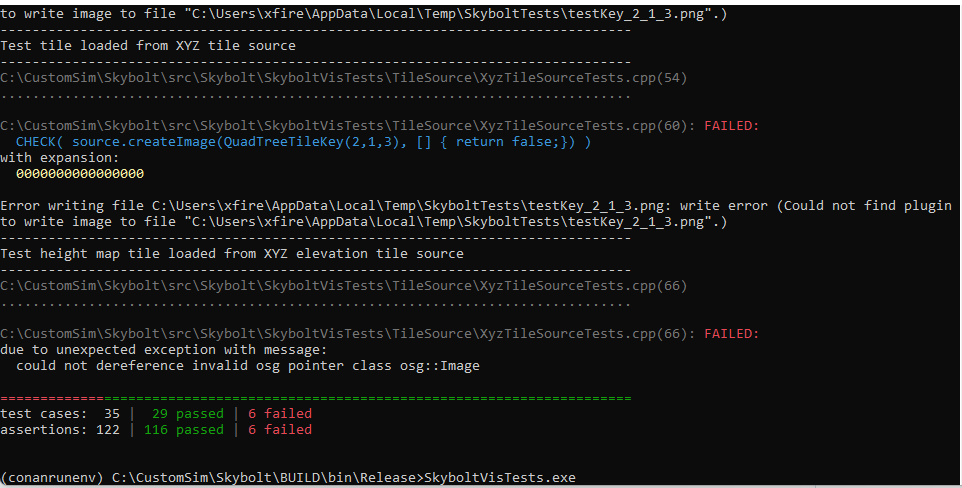
If you're using the shared library version of OSG, the USE_OSGPLUGIN is unnecessary as that only applies to static libraries. Skybolt should already set USE_OSGPLUGIN as needed if building against static OSG libraries.
I'd suggest checking your OSG bin folder to see if it has the required DLLs and plugins folder. Mine looks like this:
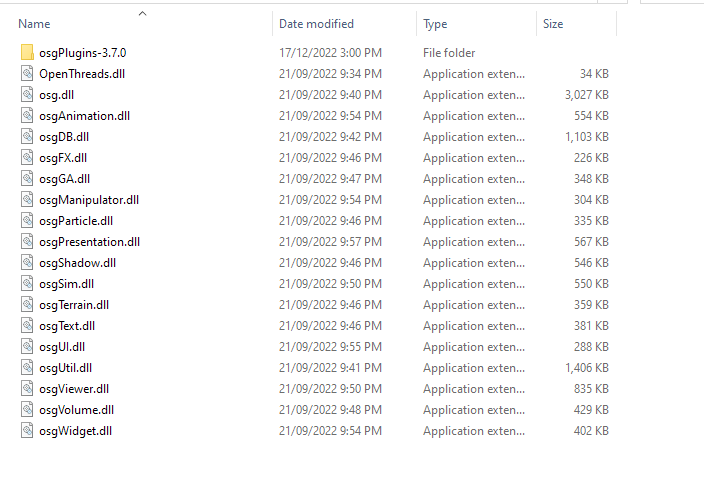
The second thing to check is that the OSG bin folder is on your PATH. This should happen automatically when you run the activate_run script.