

 PrefectHQ
Reschedule of schedules with docker agent not correctly working (after cancel it)
Description
If I cancel some scheduled flow runs, i'm not able to reschedule them via the scheduler. Even if I recreate the schedule, even I set another execution time.
Expected Behavior
- a planned flow (canceled and scheduled again) should run at the same time like it was planned before
- if the schedule is deleted and recreated, every canceled flow run task in the past should be ignored. everything else is very confusing.
Reproduction
Prepareation
- having a listening docker agent running
- set a daily schedule for a never-before-scheduled flow.
- activate the schedule -> you will see the planned flow runs in yellow
- on the screenshot you can see, it's planned for today 6pm.

- now click on this yellow bar -> the planned flow run opens
- click cancle on the right top corner -> the state changed to cancel, displayed as grey bar and moves behind in history (to the point i canceled) / the next flow run is planned for tomorrow

Now I tried two options:
Try 1: set state back to scheduled
-
set the state of this canceled flow back to scheduled
- [MISSING BEHAVIOR] the flow will run immediately (guess because he is also displayed in the past) -> should be run at this time it was planned originally.
- you can see a lot of states after the run (btw: the duration was clearly too short):
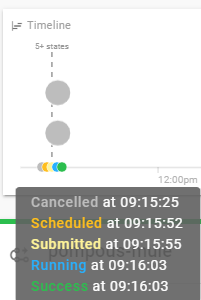
Expected: An planned-flow run should be planned at the same date/time after cancel and reschedule and not run immediately.
Try 2: recreate the schedule
-
recreate the schedule (even with different time)
- create a new schedule (daily, 17:59) (created Thursday morning)

- cancel the next flow run (Thursday 17:59) (is marked grey in the image below) -> the next will be on Friday evening.

- delete the schedule for this flow
- create a new schedule (daily, 17:58, [created still thursday morning]) -> so the next flwo run should be again on Thursday / today (but 17:58)
- disable/enable the schedules for this flow (i think this only speedsup the preview of schedule flow runs)
-
[MISSING BEHAVIOR] you can see the next run is planned for Friday (tomorrow) (so the Thursday run is missing!)
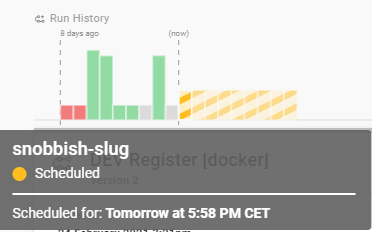
- create a new schedule (daily, 17:59) (created Thursday morning)
Expected: if I create a new schedule, it should behave like a new schedule (independent of deleted schedules with maybe canceled flows.)
Environment
Prefect Backend (not the cloud) with a running docker agent Prefect 0.14.6 Python 3.8.0 Ubuntu 18.04.5 LTS
Optionally run prefect diagnostics from the command line and paste the information here. -->
"system_information": {
    "platform": "Linux-4.15.0-135-generic-x86_64-with-glibc2.10",
    "prefect_backend": "server",
    "prefect_version": "0.14.6",
    "python_version": "3.8.0"
  }

Sidnote: If i register a new version, it works like expected. But it's still a bug.
Hi @MrJack91 - thanks for the bug report; I'm having trouble following all of your attempts.
For try 1.) it appears to have worked as expected; I don't know what flow you are running but if it succeeded that means it ran through all the tasks. When you set a flow run to "scheduled" manually, the default is that the it is scheduled for immediate execution. This can be adjusted to schedule in the future if needed.
For try 2.) there's not enough information provided for me to understand what you expected - I'll need the exact cron schedules you used.
The behavior that I expect is that if you turn the schedule on, cancel an individual run, and turn the schedule on / off, you will not see a new run created at the time of the cancelled run (this is related to how the scheduler handles idempotency). You can account for this by setting the cancelled run back to scheduled at the appropriate start time, essentially as you did here.

Hi @cicdw Thanks a lot for your answer.
I tried to improve the issue and added some details and per option the expected behavior. And I rewrite 2).
I'm pretty sure, that this is a bug!
For 1): how can I plan a canceled flow in the future again via the schedule? there is now way in my opinion. For 2): the first cron entry was daily 17:59, the second daily 17:58
If you would mind to reproduce it exactly the way i described, you would easy see. Keep in mind, that my main purpose is to revert a cancel of a daily schedule from the future.
Thanks a lot for your awesome work!!