

 Predelnik
Fast fail error when using DSpellCheck in Notepad++

Unfortunately, this is a long-standing issue for me when using this plug-in with Notepad++.
Occurs with 1.4.6, 1.4.9 -- will try it with 1.4.12, and I'll let you know. It's unfortunate, as the plug-in seems to work well during use. The 'Fast Fail' at exit is annoying, but not a critical failure (i.e., does not make Notepad++ unusable).
'Fast Fail Exception A fail fast exception occurred. Exception handlers will not be invoked and the process will be terminated immediately.'
Can you please describe what exactly you are doing when this happens? Is there any particular kind of file that triggers it?

Hi, Sergey:
It occurs when I quit Notepad++ with any file open (saved or not).
On Thu, Apr 18, 2019 at 10:19 AM Sergey Semushin [email protected] wrote:
Can you please describe what exactly you are doing when this happens? Is there any particular kind of file that triggers it?
— You are receiving this because you authored the thread. Reply to this email directly, view it on GitHub https://github.com/Predelnik/DSpellCheck/issues/173#issuecomment-484598731, or mute the thread https://github.com/notifications/unsubscribe-auth/ADFKRMNZIJMOYJWRJH2N2OTPRCURJANCNFSM4HG576UA .
Okay, thank you. If it will happen again can you please create dump file through task manager and send it to me by any means possible (e-mail or google drive/dropbox)
It could be done through context menu:
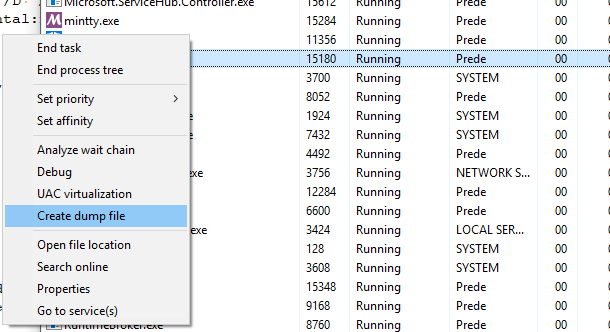 But also please mention which version of the plugin you were using when it happened as it would make things easier.
Hi:
I will -- thanks for making such a cool plug-in!
Will
On Thu, Apr 18, 2019 at 1:07 PM Sergey Semushin [email protected] wrote:
Okay, thank you. If it will happen again can you please create dump file through task manager and send it to me by any means possible (e-mail or google drive/dropbox) It could be done through context menu: [image: image] https://user-images.githubusercontent.com/2133957/56387986-802d9780-622e-11e9-9009-8dd6d2496081.png But also please mention which version of the plugin you were using when it happened as it would make things easier.
— You are receiving this because you authored the thread. Reply to this email directly, view it on GitHub https://github.com/Predelnik/DSpellCheck/issues/173#issuecomment-484670150, or mute the thread https://github.com/notifications/unsubscribe-auth/ADFKRMNT37QUWR7FLVTWLM3PRDIGZANCNFSM4HG576UA .
Hello Sharing a Notepad++ dump file (size is 117 MB): https://drive.google.com/file/d/1wrHTqvK5_XYIPhZSxR9z4rGIczEcuozz/view?usp=sharing
The Notepad++ Plugins Admin shows that I have DSpellCheck v1.4.15
The MD5 of the DLL C:\Program Files (x86)\Notepad++\plugins\DSpellCheck\DSpellCheck.dll is d3c21fe8cec535a37dfdb0caf36c6c36
Thanks

@SergeiShir Can you also post which plugins do you have installed except DSpellCheck, please?
Analysis of your dump shows that DSpellCheck already unloaded at that point and the issue happens during unloading of ExtSettings plugin. However since code from settings is calling KiUserCallbackDispatcher function, it might actually be some deferred code from winapi. It seems to me currently that it has to do with COM objects deinitialization which done in DSpellCheck to support native windows spell checker but the problem possibly occurs only with some combination of other plugins. My code for initalizing/deinitializing COM might not be entirely correct for sure, even without reproducing I'll try to gather some info about it.
Thank you for the response
(1) Notepad++ > Plugins menu > Plugins Admin shows these plugins:
Customize Toolbar 4.2 ExtSettings 1.2.1 Mime tools 2.5 Npp Converter 4.2.1 NppExport 0.2.9
(2) After I removed the "ExtSettings" folder from the "c:\Program Files (x86)\Notepad++\plugins", the Notepad++ closes WITHOUT any error
I reported this issue to the developer of the ExtSettings plugin (https://sourceforge.net/p/extsettings/tickets/1/)
Thank you for telling installed plugins and writing an issue to ExtSettings it might not be only its problem though, I also probably browse ExtSettings sources to tell definitely.
Possible problems on my side are:
- Calling
CoInitializeExwith non-defaultCOINIT_APARTMENTTHREADEDargument and I don't even remember if it was required for some reason or not. - I could probably separate work requiring
CoInitializeExetc. to separate thread which would make interaction with all this COM stuff independent from N++/other plugins for sure, which is probably for the best.
Update:
Following the instructions provided by the developer of the ExtSettings plugin (https://sourceforge.net/p/extsettings/tickets/1/), the issue was localized even more
There seems to be a conflict between these 2 extensions: DSpellCheck ExtSettings
When both of them are installed, Notepad++ shows this "Fast Fail Exception" error during exit. When only 1 of these 2 extensions is installed, there is NO error.
Hi, developer of ExtSettings plugin here.
My plugin is written in Delphi. As such it uses the Visual Component Library (VCL), a framework wrapping the Win32 API and native Windows COM-based GUI controls.
I don't know anything about the inner details of the VCL (that's the reason for using frameworks) but I'm sure that the VCL contains code for COM initialization and deinitialization. Thus, I guess it must cause a failure when another plugin did process-wide COM deinitialization before unloading the ExtSettings DLL is done.
@Predelnik I would say it's your turn to remove process-wide COM deinitialization from your plugin.

Thank you for your input @dinkumoil I'll certainly do something to fix this. ~~Unfortunately it's not easily reproduced on my end so checking if it was truly fixed would be a bit of a hassle~~
Edit: nvm, I can actually reproduce this in the form of n++ hanging on exit, so will certainly fix it
I wasn't able to reproduce the failure, have a look at the discussion with @SergeiShir on SourceForge.
I'm interested in what to do to reproduce the issue. Can you help, please? Does it depend on certain DSpellCheck settings?
For me it's simple: I open N++ with DSpellCheck and ExtSettings then look at task manager and see that N++ instance is left though no error messages are present. No special settings seem to be necessary. Removing either seems to fix the issue. I have noticed this because I use N++ for git and it waits for it to close.
But I'm on windows 8.1 currently and that may also play a role in how all of this manifests itself.
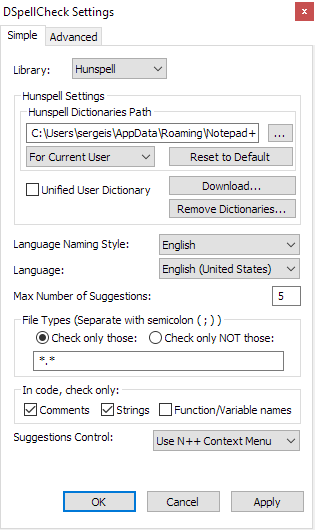
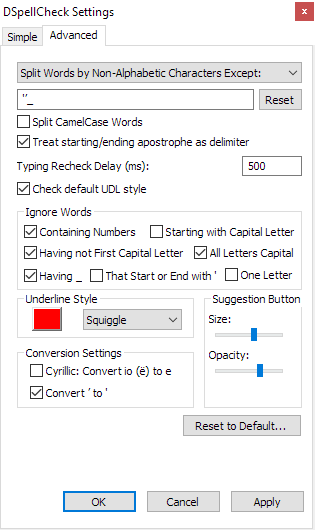
(1) Below I posted the DSpellCheck configuration on my computer.
DSpellCheck Settings - Simple:
DSpellCheck Settings - Advanced:
(2) You can see the ExtSettings configuration on my computer (and all information about my computer) here: https://sourceforge.net/p/extsettings/tickets/1/
Thank you
Looking at docs: https://docs.microsoft.com/en-us/windows/win32/api/combaseapi/nf-combaseapi-coinitializeex
It seems like code in DSpellCheck is not wrong, CoInitializeEx returns S_FALSE because it is already initialized but CoUnitialize should still be called but technically should just decrease some counter (no deinitialization until final call to CoUninitialize). COINIT_APARTMENTTHREADED also seems to be used by a lot of OLE stuff so it probably makes sense. This is very frustrating especially because behavior is different in different systems etc.
I have no idea, too. On my Windows 7 x64 and on my Windows 10 Prof. v1809 x64 machine I'm running a portable version of Notepad++ v7.8.4 x86 with both ExtSettings v1.2.1 and DSpellCheck v1.4.15 plugins installed with no problems.
Seems to be an issue with the machine of @SergeiShir or maybe there is another plugin that has to be present for crashing Notepad++. But I've installed quite a lot of plugins...
The debug info of my two machines:
Notepad++ v7.8.4   (32-bit)
Build time : Jan 29 2020 - 01:33:47
Path : E:\Downloads_Win7\npp.7.8.4.bin\notepad++.exe
Admin mode : OFF
Local Conf mode : ON
OS Name : Windows 7 Ultimate (64-bit)
OS Build : 7601.0
Plugins : AutoCodepage.dll BetterMultiSelection.dll CodeAlignmentNpp.dll ComparePlugin.dll DSpellCheck.dll Explorer.dll ExtSettings.dll LanguageHelp.dll LuaScript.dll mimeTools.dll NavigateTo.dll NppColumnSort.dll NppConverter.dll NppExec.dll NppExport.dll NppFTP.dll NppHasher.dll NppHorizontalRuler.dll NppMarkdownPanel.dll NppSaveAsAdmin.dll NppTextFX.dll NppToolBucket.dll NppUISpy.dll NppYEtc.dll OpenSelection.dll pork2sausage.dll ReloadFile.dll SelectQuotedText.dll SurroundSelection.dll XMLTools.dll _CustomizeToolbar.dll
Notepad++ v7.8.4   (32-bit)
Build time : Jan 29 2020 - 01:33:47
Path : E:\Desktop\Notepad++ Portable\npp.7.8.4.bin.x86\notepad++.exe
Admin mode : OFF
Local Conf mode : ON
OS Name : Windows 10 Enterprise (64-bit)
OS Version : 1809
OS Build : 17763.1158
Plugins : AutoCodepage.dll BetterMultiSelection.dll CodeAlignmentNpp.dll ComparePlugin.dll DSpellCheck.dll Explorer.dll ExtSettings.dll LanguageHelp.dll LuaScript.dll mimeTools.dll NavigateTo.dll NppColumnSort.dll NppConverter.dll NppExec.dll NppExport.dll NppFTP.dll NppHasher.dll NppHorizontalRuler.dll NppMarkdownPanel.dll NppSaveAsAdmin.dll NppTextFX.dll NppToolBucket.dll NppUISpy.dll NppYEtc.dll OpenSelection.dll pork2sausage.dll ReloadFile.dll SelectQuotedText.dll SurroundSelection.dll XMLTools.dll _CustomizeToolbar.dll
Thank you for response @dinkumoil I can still reproduce it in some way as I mentioned, on Windows 8 machine, so there's chance if my issue will go away that @SergeiShir's case would also be fixed.
By the way I decided to look at call stack from provided dump once more. Here it is:
Call Stack
 	ntdll.dll!_NtRaiseHardError@24()	Unknown
 	KERNELBASE.dll!_RaiseFailFastException@12()	Unknown
 	combase.dll!CrashProcessWithWERReport() Line 510	C++
>	combase.dll!DecrementMTAUsageHelper(_MTA_USAGE_INCREMENTOR * pIncrementor, bool fHostThread) Line 1464	C++
 	[Inline Frame] combase.dll!DecrementMTAUsage(bool) Line 1599	C++
 	combase.dll!CDllHost::MTAUninitializeApartmentOnly() Line 772	C++
 	combase.dll!CDllHost::ClientCleanupFinish(void * hEvent, _TP_TIMER * Timer) Line 1569	C++
 	combase.dll!DllHostProcessUninitialize() Line 1724	C++
 	combase.dll!ApartmentUninitialize(int fHostThread) Line 2770	C++
 	combase.dll!wCoUninitialize(COleTls & Tls, int fHostThread) Line 4137	C++
 	combase.dll!CoUninitialize() Line 4057	C++
 	imm32.dll!_CtfImmCoUninitialize@0()	Unknown
 	msctf.dll!_TF_Notify@12()	Unknown
 	user32.dll!CtfHookProcWorker(int,unsigned int,long,unsigned long)	Unknown
 	user32.dll!CallHookWithSEH()	Unknown
 	user32.dll!___fnHkINDWORD@4()	Unknown
 	ntdll.dll!_KiUserCallbackDispatcher@12()	Unknown
 	ExtSettings.dll!0509669c()	Unknown
 	ExtSettings.dll![Frames below may be incorrect and/or missing, no symbols loaded for ExtSettings.dll]	Unknown
 	ExtSettings.dll!05096ae6()	Unknown
 	ExtSettings.dll!0509af1f()	Unknown
 	ExtSettings.dll!052262dc()	Unknown
 	ntdll.dll!_LdrxCallInitRoutine@16()	Unknown
 	ntdll.dll!LdrpCallInitRoutine()	Unknown
 	ntdll.dll!LdrpProcessDetachNode()	Unknown
 	ntdll.dll!LdrpUnloadNode()	Unknown
 	ntdll.dll!_LdrpDecrementModuleLoadCountEx@8()	Unknown
 	ntdll.dll!_LdrUnloadDll@4()	Unknown
 	KERNELBASE.dll!FreeLibrary()	Unknown
 	notepad++.exe!00ea565c()	Unknown
 	notepad++.exe!00ea5757()	Unknown
 	notepad++.exe!00ea5129()	Unknown
 	notepad++.exe!00f485b8()	Unknown
What interested me this time is that CoUninitialize stuff happens to be called from DLL unloading procedures which might not be a good idea
Quote:
Because there is no way to control the order in which in-process servers are loaded or unloaded, do not call CoInitialize, CoInitializeEx, or CoUninitialize from the DllMain function.
Even if you don't call it directly it might be result of some window destroying functions called very late in the process. For example I find this discussion on calling DestroyWindow in DllMain on StackOverflow
So taking a guess here, if there's such possibility could you try moving windows deinitialization stuff to happen earlier, e.g. on N++ shutdown, I would be happy to test version with such a change at least on my Windows 8 machine to see if unwanted behavior would continue to happen or not.
@Predelnik wrote:
could you try moving windows deinitialization stuff to happen earlier, e.g. on N++ shutdown
I'm pretty sure that I'm not able to do that. All the COM handling stuff is encapsulated into the VCL framework, I'm not able to intercept that process.
My plugin only creates a window when opening its main dialog or its about box. Both are opened modal and destroyed when the user has closed them. Thus it is impossible that there is an issue with window destroying code because this never happens during DLL unload.
Ok I will try to investigate further
Edit:
Call Stack from Windows 8 hang
 	>	ntdll.dll!NtWaitForSingleObject()	Unknown
 	KERNELBASE.dll!WaitForSingleObjectEx()	Unknown
 	combase.dll!CDllHost::ClientCleanupFinish(void * hEvent) Line 1363	C++
 	combase.dll!DllHostProcessUninitialize() Line 1516	C++
 	combase.dll!ApartmentUninitialize(int fHostThread) Line 2591	C++
 	combase.dll!wCoUninitialize(COleTls & Tls, int fHostThread) Line 3894	C++
 	combase.dll!CoUninitialize() Line 3814	C++
 	imm32.dll!CtfImmCoUninitialize()	Unknown
 	msctf.dll!00007ffbc7125263()	Unknown
 	user32.dll!CtfHookProcWorker()	Unknown
 	user32.dll!CallHookWithSEH()	Unknown
 	user32.dll!__fnHkINDWORD()	Unknown
 	ntdll.dll!KiUserCallbackDispatcherContinue()	Unknown
 	user32.dll!NtUserDestroyWindow()	Unknown
 	ExtSettings.dll!000000000047ec42()	Unknown
 	ExtSettings.dll!00000000005bc319()	Unknown
 	ExtSettings.dll!00000000005cc541()	Unknown
 	ExtSettings.dll!0000000000407b08()	Unknown
 	ExtSettings.dll!00000000004e705d()	Unknown
 	ExtSettings.dll!00000000004ea0c8()	Unknown
 	ExtSettings.dll!000000000040a1ea()	Unknown
 	ExtSettings.dll!000000000040aa84()	Unknown
 	ExtSettings.dll!000000000040a3f3()	Unknown
 	ExtSettings.dll!0000000000411292()	Unknown
 	ExtSettings.dll!00000000006912c8()	Unknown
 	ntdll.dll!LdrpCallInitRoutine()	Unknown
 	ntdll.dll!LdrpProcessDetachNode()	Unknown
 	ntdll.dll!LdrpUnloadNode()	Unknown
 	ntdll.dll!LdrpDecrementNodeLoadCount()	Unknown
 	ntdll.dll!LdrUnloadDll()	Unknown
 	KERNELBASE.dll!FreeLibrary()	Unknown
 	notepad++.exe!00007ff7522c527e()	Unknown
 	notepad++.exe!00007ff7522c5365()	Unknown
 	notepad++.exe!00007ff7522c4d96()	Unknown
 	notepad++.exe!00007ff75238721a()	Unknown
Very similar, except it doesn't go past ClientCleanupFinish and NtUserDestroyWindow is present before KiUserCallbackDispatcherContinue