

 PowerShell
`$PSScriptRoot` is not populated when running a code block (via F8)
System Details
- Operating system name and version: Windows 10
- VS Code version: 1.10.2
- PowerShell extension version:
- Output from
$PSVersionTable:
PS C:\Source\neo4j-quick-demo> $pseditor.EditorServicesVersion

Major  Minor  Build  Revision
-----  -----  -----  --------
0      11     0      0


PS C:\Source\neo4j-quick-demo>
PS C:\Source\neo4j-quick-demo> code --list-extensions --show-versions
PS C:\Source\neo4j-quick-demo>
PS C:\Source\neo4j-quick-demo> $PSVersionTable

Name                           Value
----                           -----
PSVersion                      5.1.14393.953
PSEdition                      Desktop
PSCompatibleVersions           {1.0, 2.0, 3.0, 4.0...}
BuildVersion                   10.0.14393.953
CLRVersion                     4.0.30319.42000
WSManStackVersion              3.0
PSRemotingProtocolVersion      2.3
SerializationVersion           1.1.0.1
Issue Description
$PSScriptRoot is not populated when running a code block (via F8)
I am trying load DLLs that are in the same directory as the PowerShell script and use $PSScriptRoot to get the location for them.
When running the code in PowerShell it's fine, but using VSCode, when running the code snippet via F8, the variable is not populated.
Repro
- Open VSCode and create a PowerShell (.ps1) file
- Add the following command
Write-Host "$PSScriptRoot\abc" - Select the newly created line and Press F8 to execute the PowerShell in the integrated terminal
Expected result:
<full working path>\abc
e.g. If the script I was editing was in C:\Source I would expect the result to be C:\Source\abc
Actual result:
\abc


One could argue that since F8 simply runs the selected code in global scope, that it is expected that $PSScriptRoot would not be defined. This is how F8 works in ISE i.e.$PSScriptRoot is not defined.

True, although if the code is being run from a file that exists, and it's a ps1, in my mind there's an expectation that $PSScriptRoot should be discoverable. If I use the PS Debugging (F5) it exists.
I feel I do understand the technicalities here, and yes I can see your argument.
The bigger question in my mind is should the user know the difference? If so, how would VS Code convey that to the user, instead of errors and null values?
If I use the PS Debugging (F5) it exists.
Dot sourcing will evaluate $PSScriptRoot and when the file is executed without dot sourcing, it obviously works as well.
The bigger question in my mind is should the user know the difference?
IMO yes, because running script with F8 i.e. in the global session is subtly different than executing the script file or even dot sourcing it. $PSScriptRoot is just on example. Other differences are $PSCommandPath, $MyInvocation , Get-PSCallStack and likely others I haven't thought of. Also, the integrated console global session is "global" to all scripts you are editing. So these values would have to change for the lines of script that are being executed by F8. Which is likely doable except that have you tried to set $PSScriptRoot? It doesn't want to let you set it. :-) Anyway, if you don't appreciate these subtleties, you can get yourself into trouble thinking you have F8'd yourself to a working script when it won't work when invoked normally. All that said, the common stumbling block is likely to be $PSScriptRoot. If this variable can be set in the global scope and setting it doesn't interfere with proper script operation later, it is probably worth setting.
Finally, maybe the F8 feature could be made smart and if you have selected all the text in a script, it would dot source the script rather than execute script directly in the global session. Then, at least $PSScriptRoot and $PSCommandPath would be defined correctly.
I'd be happy if it wasn't supported, but somehow I was warned that "Stuff may not do what you expect" if it saw those tokens in the text.
warned that "Stuff may not do what you expect" if it saw those tokens in the text.
We should probably do that if we detect $PSCommandPath, $MyInvocation or Get-PSCallStack in the text. I think those are corner-case enough to not try to "fix up" in the global session.
Now that I think about it, perhaps the F8 mechanism could do the evaluation of $PSScriptRoot and replace it with the full path of the script's parent dir?
Yeah, F8 could just insert the script's parent dir into the session as $PSScriptRoot right before running the snippet. I believe people used to complain that the ISE did not do this. Might be nice to make it work.
However, I've been considering using VS Code's built in Run Selection in Terminal command instead of my own custom F8 implementation. This would mean that I wouldn't be able to do the $PSScriptRoot injection. However, I don't have a good reason to do that other than just removing "unnecessary" code. If the $PSScriptRoot injection is important enough (which it might be for interactive dev workflow) then I can still keep the current F8.
Thoughts?
ISE has the following property to get the Current File in the Editor:
$psise.CurrentFile
I don't know if you have ported it yet, but that makes it easy to inject into $PSScriptRoot when F8 is run. It always stays up-to-date with new editor tabs and even has path to where Untitled.ps1 would be saved.
This is one of the most annoying things in ISE. It requires special handling and thinking when developing because you need $PSScriptRoot in production and $psise.CurrentFile in testing specific code blocks.
A couple reasons for using F8 is because previous code in script is either dangerous to run multiple times (deleting files) or has performance impacts (large RESTful call or Get-ChildItem -Recurse). So I run a snippet and then test various things on that snippet and would like one "truth" of where the script is located.

Hit this today, Really don't want to have to comment lots of code out to run that file. One might argue I need to factor my code correctly, but rightly or wrongly I expect people to be in this situation and want to F8 a script that tries to run files in relative folders.

Fixing this is a little bit more difficult than it may appear. The big problem with this one is that it's basically impossible to set the PSScriptRoot variable manually because it's replaced by the engine in every single scope.
That said, the engine creates the variable based on the ScriptExtent for the command. With the Parser API, you can parse specific input and specify a file source. Here's a proof of concept editor command preserves MyInvocation, PSScriptExtent, and position info for breakpoints.
Register-EditorCommand -Name TestingF8 -DisplayName 'Run selected text and preserve extent' -ScriptBlock {
    [System.Diagnostics.DebuggerHidden()]
    [System.Diagnostics.DebuggerStepThrough()]
    [CmdletBinding()]
    param()
    end {
        function __PSES__GetScriptBlockToInvoke {
            $context = $psEditor.GetEditorContext()
            $extent = $context.SelectedRange | ConvertTo-ScriptExtent

            $newScript = [System.Text.StringBuilder]::new().
                Append([char]' ', $extent.StartOffset - $extent.StartLineNumber - $extent.StartColumnNumber).
                Append([char]"`n", $extent.StartLineNumber - 1).
                Append([char]' ', $extent.StartColumnNumber - 1).
                Append($extent.Text).
                ToString()

            try {
                $errors = $null
                return [System.Management.Automation.Language.Parser]::ParseInput(
                    <# input:    #> $newScript,
                    <# fileName: #> $Context.CurrentFile.Path,
                    <# tokens:   #> [ref] $null,
                    <# errors:   #> [ref] $errors).
                    GetScriptBlock()
            } catch [System.Management.Automation.PSInvalidOperationException] {
                $exception = New-Object System.Management.Automation.ParseException($errors)
                $PSCmdlet.ThrowTerminatingError(
                    (New-Object System.Management.Automation.ErrorRecord(
                        <# exception:     #> $exception,
                        <# errorId:       #> 'RunSelectionParseError',
                        <# errorCategory: #> 'ParserError',
                        <# targetObject:  #> $newScript)))
            }
        }

        try {
            return . (__PSES__GetScriptBlockToInvoke)
        } catch {
            if ($PSItem -is [System.Management.Automation.ErrorRecord]) {
                $PSCmdlet.ThrowTerminatingError($PSItem)
                return
            }

            $PSCmdlet.ThrowTerminatingError(
                (New-Object System.Management.Automation.ErrorRecord(
                    <# exception:     #> $PSItem,
                    <# errorId:       #> 'RunSelectionRuntimeException',
                    <# errorCategory: #> 'NotSpecified',
                    <# targetObject:  #> $null)))
        }
    }
}

Very clever solution! If we tried that, one thing we'd want to do is send the EditorContext along with the run selection request so that it doesn't have to be fetched from within PowerShell, saving another round trip. If the editor sends the EditorContext with the request we can take this approach, otherwise go with the original approach.
I think this must be be related:
- $PSScriptRoot shows an empty string as tooltip when debugging in VS Code,
- when you try to examine it while the script is paused during a debug session, by manually typing in '$PSScripRoot' (or Write-Host $PSScriptRoot or Write-Output $PSScriptRoot) in the integrated console window, an empty string is also returned.
- but when script code using it is executed, either as a whole or line by line when single stepping, the correct path is used.

@TylerLeonhardt This should probably be retagged as an enhancement, since it's technically working as expected.
The ISE-Compatibility tag should also be removed as ISE does the same thing with F8 (unless I'm missing something) so it's not a user experience compatibility thing.


I can understand the challenges here, unless anyone has a suitable workaround I would love to see a solution. In the absence of a workaround can anyone suggest what development practice to follow to avoid the need to use $psscriptroot to access relative paths. I guess with "application code" you don't have a concept of F8 and you generally don't use relative references, they are defined elsewhere in the "project". Script writing I feel is different, and if you are dot sourcing modules in a relative path, then your only other choice is commenting out code. Any ideas?
@simonsabin if I'm using psscriptroot in my code, I'll set a Breakpoint and use the debugging tool to run either the script itself or a pester test that calls the script, works just fine.
I guess with "application code" you don't have a concept of F8 and you generally don't use relative references, they are defined elsewhere in the "project".
@simonsabin Maybe? My original issue was with "application code" trying to load vendored DLLs. If the code has no concept of where it's running from then loading dependencies becomes very difficult.
I'll set a Breakpoint and use the debugging tool to run either the script itself or a pester test that calls the script, works just fine.
@JustinGrote While this may be a workaround, it's not really feasible to do that for every time you run F8
This should probably be retagged as an enhancement, since it's technically working as expected.
I'm happy with that. It's somewhat trivial to create (I think) a runspace with no script file e.g.
test.ps1
Write-Host "Outside Block ScriptRoot = $PSScriptRoot"

Invoke-Command {
  Write-Host "Inside Block ScriptRoot = $PSScriptRoot"
}

Invoke-Expression 'Write-Host "Inside IEX ScriptRoot = $PSScriptRoot"'
C:\Source\tmp> .\test.ps1
Outside Block ScriptRoot = C:\Source\tmp
Inside Block ScriptRoot = C:\Source\tmp
Inside IEX ScriptRoot =
C:\Source\tmp>
@glennsarti by application code I guess I means compiled code in a project like system.
@JustinGrote Got to agree with @glennsarti that its not a feasible workaround for every time.
Has anyone tried implementing @SeeminglyScience in VS Code
Is changing the behavior of $PSScriptRoot a good idea? In the terminal, if you copy/paste something $PSScriptRoot is null. We are going to confuse people.

The current behavior is pretty consistent along Powershell, Powershell ISE and VS Code: $PSScriptRoot is populated only when the code is being executed as a saved script, it is not when it is executed directly in the console.
The only (discrepancy? aberration?) is that F8 -- in ISE as well as Code -- behaves as if you copy the selected text to the clipboard and paste it into the console. Which is not exactly what it does internally (the clipboard isn't changed by F8), but probably very close.
So I think it may not be a bad idea to make F8 behave like a saved script, but only if the change is applied in ISE as well, and not just in Code. Changing it just at one place would create confusion, indeed.
I see that anyone developing scripts that require the use of $psscriptroot will benefit from being able to use F8. I don't see anyone that is using $psscriptroot being disadvantaged because they expect the value to be null. The only reasoning would be they are detecting F8 behaviour and doing something about it, this will just mean they don't. However I can't see anyone having done that, given there isn't really a work around.
The current solution I see folks doing is editing the scripts to have the right path or breakpointing and setting the value. Both of which are massively disruptive.
I did a bit more investigation on this
Since this works in an F8 context:
if (-not $PSScriptRoot) {$PSScriptRoot = $pwd}
Maybe it would be possible to add something similar to the F8 code, replacing $pwd with the current file path, and maybe $pwd if it is unsaved.
Seems to generally be fine, and it is preserved in the scope so even if you load a child script/scope that changes PSScriptRoot, it's preserved when it comes back out
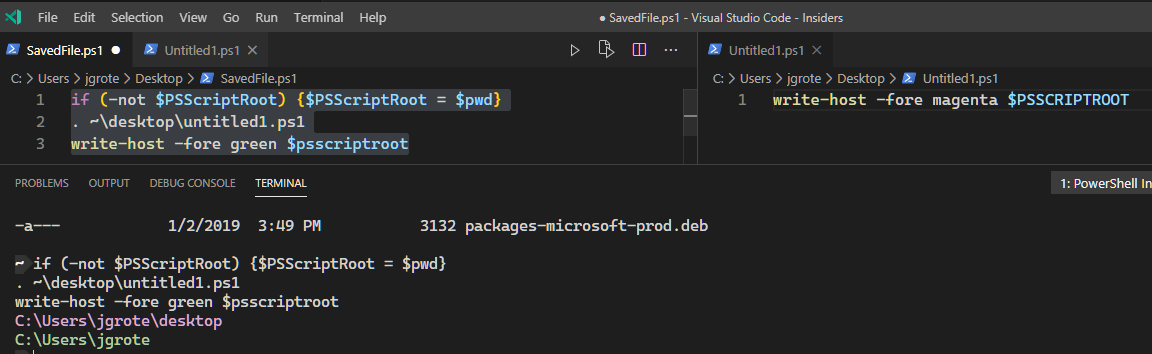
@TylerLeonhardt perhaps it is as simple as appending if (-not $PSScriptRoot) {$PSScriptRoot = MyDocumentPathFetchedFromVSCode} to the text fetched from the document?
https://github.com/PowerShell/vscode-powershell/blob/495c7d9b41dc8d96503291d4e7b9bdcb71dfc8d0/src/features/Console.ts#L240-L242
isn't pwd the terminal directory path and has no correlation to the script you are highlighting code from.
@simonsabin well yes I'm just using that as an example because the actual variable would have to be programatically injected by vscode extension because the editor services has no idea what document you have open at the moment. That's why I said replace $pwd with the current file path
If a document is unsaved, should the behavior be to leave it blank or try to be helpful and set it to $pwd? Seems to me the latter, it wouldn't hurt anything.
VSCode saves them in 'AppData\Roaming\Code - Insiders\Backups' but it's not a .ps1 file and probably not relevant to what someone is trying to do if referencing $PSScriptRoot, which is why I recommended $pwd instead.
Thinking about this a step further. if we are looking at this from a productivity thing, shouldn't one also be looking at the fact one can't debug with F8 I found issue #455 that implied that one could debug with F8 but I've not been able to get it working.
psISE.CurrentFile.FullPath uses the $PWD.Path for Untitled files. This makes the most sense to carry over to VSCode rather than using the Backups path for $PSScriptRoot
The full behavior should be:
- If F8 is run from a saved script,
$PSScriptRootis the path to that script. - If F8 is run from an untitled script,
$PSScriptRootuses$PWD.Pathas the path.
I'd say that 2 would be confusing. the text is not part of a script and thus psscriptroot should be empty. If you want psscriptroot to be populated save the file.
I really can't see where you would be using psscriptroot in an file that isn't saved to disk.