

 PowerShell
OCGV:Out-ConsoleGridView on bullseye behaves different then before
I dont know how to rexactly describe, but I am using PWSH on on Raspberry Pi and therefor use Out-ConsoleGridView a lot. In Bullseye it behaves different:
https://user-images.githubusercontent.com/65505278/159687170-6acb1ccd-0041-46c2-ab5f-53af13a8f315.mp4
First select is really a click with the mouse. but from this point on, the row selection will follow the cursor and eventually select the item by itself rather then only on a left mouse click. This happened to me first on bullseye and actually in XRDP and VNC-Connections. The Raspi4 is running headless, so I am connecting remote. Maybe someone has an idea what is going wrong here?

Oh, hey! Sorry, I missed this. This project is in a bit of a holding pattern right now, we're not planning any future releases (but that could change).
My guess is that it's going to be something with how your TERM is set, things like this can be really picky about that especially if you're going over XRDP etc.

Oh please keep up work on this. I believe it is very essential to non Win systems. I am using this like crazy on Raspis. It IS important.
That is good to know! Glad it's helpful. For your bug, is this a new behavior? Did it change between versions of GraphicalTools, or PowerShell, or your system?
Actually the only change was buster to bullseye. I think consoleguitools stayed the same version. I will look for term settings tomorrow again. Too late up here, heading to bed ;-)
That is good to know! Glad it's helpful. For your bug, is this a new behavior? Did it change between versions of GraphicalTools, or PowerShell, or your system?
Oh yes. I use it in a project https://github.com/MrFly72/Synology_Mediathek_Download It basically does this: It will query by rest-api a list of movies/TV SHows from a specific source-website for german TV. The request is filtered by my specific tv-shows (or kids shows ;-) ) and will present the result in Out-ConsoleGridView to mark the shows that should be downloaded. It will then check if the file has already been downloaded before, if not it will start the download via rest-api on a Syology NAS. It will wait for the download to finish and will rename it by a given rule (eg. date_time_showname_seriesinfo.mp4) And this whole thing is running in PS-Core on a Raspberry Pi 4. Why it is running on that? Easy answers:
- Power Consumption of the Raspi is less then 3 Watt per hour, it is always on
- Script can be run via SSH connect from anywhere in the world Why powershell? As I love powershell and I am I think quite good at it, so it was my easier way. Additionally the whole project started on windows, but because of point 1 in the list, I dont want to let a windows run all the time and starting it up took too long.
@MrFly72 - Pretty sure the following Terminal.Gui issues are related:
- https://github.com/migueldeicaza/gui.cs/issues/1697
- https://github.com/migueldeicaza/gui.cs/issues/1617
Some other mouse bugs have been fixed since the most recent version of ocgv was released. I'm about to push for an updated release.

Interesting enough it is not a problem when I first start a tmux session and use push inside that session.
@tig does v1.6.4 resolve these issues? If so, I can get it updated here and release. Otherwise, please ping me and let me know when!
@tig does v1.6.4 resolve these issues? If so, I can get it updated here and release. Otherwise, please ping me and let me know when!
I have no easy way to reproduce the issues to prove they are fixed as I don't have access to (or even really know what it is) 'bullseye'.
I just brought GraphicalTools down locally and changed the .csproj to point to 1.6 of Terminal.Gui (also updated Nstack to 0.17.
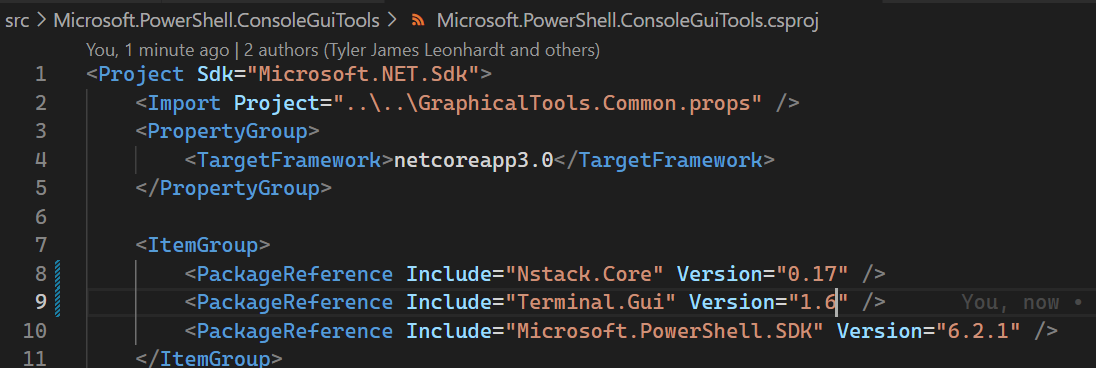
Then I built it using the instructions in the GraphicalTools/README.md.
So... if you want to do the same and verify these issues are actually fixed, I will then work on a pull request and work with the PS team to get them to release an updated version ;-).
@andschwa please prefix title with "OCGV: ".
I don't think this is still repo, FWIW.
It is still reproducable with my Raspberry Pi and the current release. bullseye is the newest Debian release 11 It is running on a raspberry Pi with an arm64 processor in 64bit mode. I wil try to build the project and try to test.
I can confirm, that this problem still exists on 0.7.2 And worst, it seem not to run anymore under tmux, which means, it gives me the cursor problem as mentioned above, and does not launch anymore under tmux (it keeps a black screen)
Ok, found out the problem with TMUX. On default the TERM on tmux will be "screen". I configured the .tmux.conf so that it will also do tmux-256color and now this is running. The new features are cool (select all, select none). But nevertheless, without tmux, the mouse problem still exists in the standard shell window on debian desktop
@MrFly72 - can you please recap what's working and what's not for you here? I want to make sure I'm tracking it correctly, and reading the above, I get confused.
Happy to do that. But I am now on the run for a long weekend in Germany so will do on Tuesday. (Or if I find some time in the travel we do)
One first question. How does it behave if the screen eg. Only shows 20 elements and I have already selected 18. is the scrolling area then still 20 and the pinned elements will "walk up" in the list or are place 1-18 fix with the pinned elements and only the lines 19-20 will move?
Happy to do that. But I am now on the run for a long weekend in Germany so will do on Tuesday. (Or if I find some time in the travel we do)
I'm in Europe now for a month. Where in Germany? In NL right now. Hamburg next week, then Denmark...
I am based in the Frankfurt Area. For the scrolling. It would be my wish for them to scroll and not to stay. So all fine. Pinned elements can move with the list.
@MrFly72 - can you please recap what's working and what's not for you here? I want to make sure I'm tracking it correctly, and reading the above, I get confused.
Ok. So basically it changed in behaviour with 0.7.2. When using mouse in an rdp-session to raspberry pi over xrdp, moving the mouse over entries will sometimes select them although not pressing the mouse. it seems like terminal has something to do with it. if i am using tmux (which I do from SSH a lot, as I can have easy background download tasks) it seems to work. If there is any debugging I can enable, please advice.
Tadaaaaa, I just made a build on the current source, and it looks like this one is fixed, too. I believe there is a change in cursor handling of the mouse cursor. before the mouse tried to highlight the line under the cursor and that led to the "click" behaviour. The new build is now not highlighting the line under the cursor and will not select the element. I will try the build in my daily use for some time. also the cursor move to next line is great!