

 PostHog
Feature Flag with Groups Are Not Working For Me
I'm trying to create feature flags based on groups and they seem to not be working.
We have a self-hosted "scale plan" Posthog app and I tried to follow the guide from https://posthog.com/docs/user-guides/group-analytics#integrating-groups-with-feature-flags for creating feature flags with groups, but I can't seem to make it work.
I'm creating a group like the below, where posthog is from posthog-js;
posthog.group('groupKey', 'groupName', { ...groupProperties } )
The groups are getting created and I can see them on the self-hosted Posthog app.
I have also created a feature flag (say with the name feature-flag-name)
In the release condition, I set the Match By to the groupKey.
Side Note: At this point, going back my application and checking posthog.isFeatureEnabled('feature-flag-name') returns true.
However, if I;
- go back to the Posthog app
- set the release condition filters based on the
groupPropertiesI want (or any group filter at all) - go to my application, refresh the application to pick up the Posthog app change
- checking
posthog.isFeatureEnabled('feature-flag-name')always return false
I'm not sure if I'm doing anything wrong. So please I'd be happy to receive any help.
Thanks
PS: If there is a need for reaching me directly, I'm on the slack channel as @Longe

Hey @Orelongz , a common case for this happening is when you don't set a group (using posthog.group() ) in your application before checking for the feature flag value.
So, can you confirm that before you call isFeatureEnabled in your app, there's a posthog.group() call which sets the group / properties to include the same ones on which the feature flag depends? If these don't match, it will always return false

Hello @neilkakkar, I've tried to follow this tutorial: https://posthog.com/tutorials/limit-session-recordings. It works on local, but for some reason, on preview (I'm using Vercel), I dont receive any response from the method isFeatureEnabled.
my code:
posthog.init(POSTHOG_KEY || "", {
      api_host:  "https://app.posthog.com",
      disable_session_recording: true,
      loaded: (posthog) => {
        if (posthog.isFeatureEnabled("my_key")) {
          posthog.startSessionRecording();
        }
      },
    });
Do I need more config?
Thanks!

Can you share a link to the vercel preview if public?
If not, can you confirm the /decide api call is made?
Also, seems like you're not using the hook from the tutorial, so you need to wrap your isFeatureEnabled call inside a posthog.onFeatureFlags(callback) callback, as otherwise it can fire before the flags load.
Can you share a link to the vercel preview if public?
If not, can you confirm the
/decideapi call is made?Also, seems like you're not using the hook from the tutorial, so you need to wrap your
isFeatureEnabledcall inside aposthog.onFeatureFlags(callback)callback, as otherwise it can fire before the flags load.
I wrapped it and I confirm the api: https://eu.posthog.com/decide/?v=3&ip=1&_=1681318002025&ver=1.51.3 has been called, and has returned
{
    "config": {
        "enable_collect_everything": true
    },
    "toolbarParams": {},
    "isAuthenticated": false,
    "supportedCompression": [
        "gzip",
        "gzip-js",
        "lz64"
    ],
    "featureFlags": {
        "limit_session_recordings": false
    },
    "sessionRecording": {
        "endpoint": "/s/",
        "consoleLogRecordingEnabled": true,
        "recorderVersion": "v1"
    },
    "errorsWhileComputingFlags": false,
    "featureFlagPayloads": {},
    "capturePerformance": true,
    "autocapture_opt_out": false,
    "siteApps": []
}
Great, could you please clarify what does this mean?:
I dont receive any response from the method
Is it that the response is false? or undefined? or throws an error?
Great, could you please clarify what does this mean?:
I dont receive any response from the method
Is it that the response is false? or undefined? or throws an error?
it response false, do it checks for distinct_id?
That seems accurate, based on what decide sends. Do you expect it to respond true? Can I see your feature flag definition? (i.e. how you set it up, is it based on some person properties?)
I set Match by Users and the Release conditions is all users that using "Chrome" as browser.
Does this happen for new anonymous users only, or all existing users as well?
Most probably the users don't have the browser property ingested yet, so it's not toggling on for them. In these cases, you can either remove the property, or pass it in yourself to flag evaluation, so we use the one you send, rather than waiting for it to be ingested, which occurs later.
Does this happen for new anonymous users only, or all existing users as well?
Most probably the users don't have the browser property ingested yet, so it's not toggling on for them. In these cases, you can either remove the property, or pass it in yourself to flag evaluation, so we use the one you send, rather than waiting for it to be ingested, which occurs later.
I changed conditions, and inside onFeatureFlags callback I have no flags, even from https://eu.posthog.com/decide/?v=3&ip=1&_=1681318002025&ver=1.51.3 I get
"featureFlags": {
        "my_key": false
    },

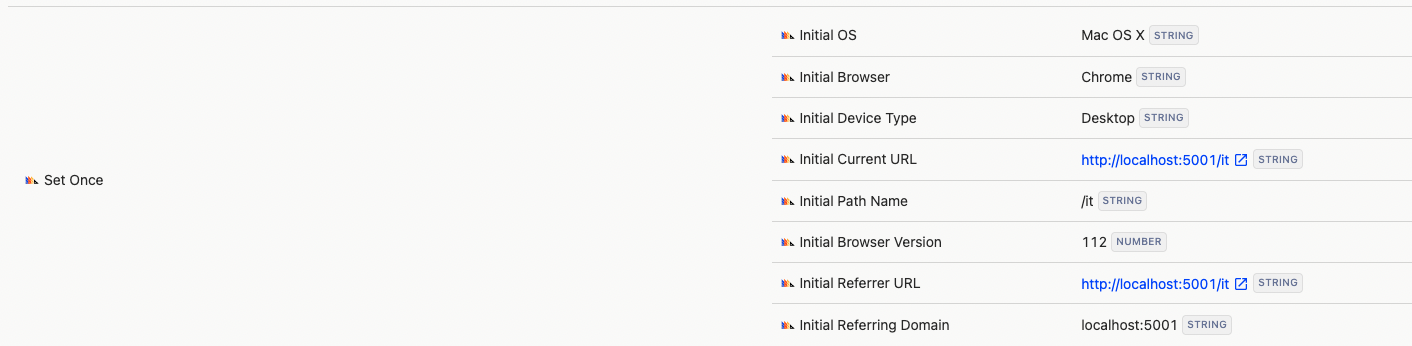

See, this has the exact same problem as with browser = Chrome; because it doesn't matter what property it is, as long as it's a new user we haven't seen before, we can't know properties till they're ingested, so you'll need to pass these in if you want it to work. In this case, you'll need to add {$initial_path_name: "/lt"} to your feature flag calls.
Can you try once with no properties, to confirm this is indeed the issue?
Without properties it works like you described, where can I found the documentations aboout feature flag calls?
https://posthog.com/docs/libraries/node#feature-flags - search for "overriding server properties"
https://posthog.com/docs/libraries/node#feature-flags - search for "overriding server properties"
Ok got it, ty!
If you use geoip properties (like continent code, country code, city name, etc. etc.) it will work without having to override any properties, because we do this ourselves without depending on ingestion, using the ip address in the request.
Try using these kind of properties then.
@ivanagas can we update the tutorial with this information please? (I'll soon work on adding the property overrides to posthog-js so we have first class support there as well, would be nice to incorporate this in too!)
If you use geoip properties (like continent code, country code, city name, etc. etc.) it will work without having to override any properties, because we do this ourselves without depending on ingestion, using the ip address in the request.
Try using these kind of properties then.
@ivanagas can we update the tutorial with this information please? (I'll soon work on adding the property overrides to posthog-js so we have first class support there as well, would be nice to incorporate this in too!)
Yeah I read it now over this popup:

Hellp @neilkakkar, I've found that every time I refresh the page on a Vercel's preview, seems like it doesn't save the ph_ on inside cookies which means it creates a new distinct_id... Do I have to save it somewhere? or make a call? I would like that can be persistent during the session
Thanks in advance!
How are you initialising the library?
it also might just be a vercel preview issue, where they discard all cookies & localstorage, not sure
How are you initialising the library?
it also might just be a vercel preview issue, where they discard all cookies & localstorage, not sure
Here how I implemented it
posthog.init(process.env.NEXT_PUBLIC_POSTHOG_KEY || "", {
     api_host:
       process.env.NEXT_PUBLIC_POSTHOG_HOST || "https://app.posthog.com",
     disable_session_recording: true,
   });
 posthog.onFeatureFlags(() => {
     if (posthog.isFeatureEnabled("__key")) {
       posthog.startSessionRecording();
     }
   });
 posthog.reloadFeatureFlags();
That looks good, if I were you I'd check vercel & any settings there
It’s probably because vercel.app is rightly listed on https://publicsuffix.org/ and browsers prevent to store cookie on it Using the option: cross_subdomain_cookie: false in vercel preview solved my problem. Thanks for ur time!