

 Pizzabelly
timestamp
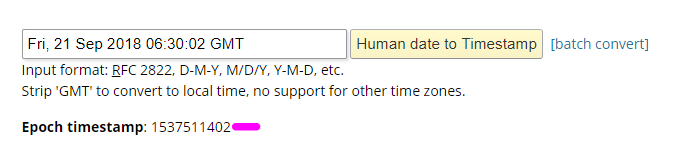 i saw a post saying to do the timestamp like this. but i want it to start at 00:00 then start timing instead of starting at like 5 mins or whatever. can someone please help. or anything. because i dont get any of this lol

I couldn't find a way to get an accurate epoch on Windows without something like GnuWindows.
http://gnuwin32.sourceforge.net/packages/coreutils.htm
Just change "date.exe" to "gnudate.exe" so it doesn't conflict with the Windows date command.
gnudate +%s>epoch.txt Needs two % if you use it in a script gnudate +%%s>epoch.txt
This is the a snippet of the script i use to insert it into the config:
:_LoopStart
:: Stuff here about getting info from program, and what to use. If program changes do:
set /p EpochTime=<Epoch.txt
timeout /t 1
SetLocal EnableDelayedExpansion
:: Edit the following three lines as needed.
:: Specifiy the full path to the file, or the current directory will be used
Set _PathtoFile=...\PathHere\EasyRP-windows\config.ini
Set _OldLine=StartTimestamp=
Set _NewLine=StartTimestamp=%EpochTime%
:: End of Search parameters
Call :_Parse "%_PathtoFile%"
Set _Len=0
Set _Str=%_OldLine%
Set _Str=%_Str:"=.%987654321
goto _Loop1
:_Loop1Done
Set _Num=%_Str:~9,1%
Set /A _Len=_Len+_Num
PushD %_FilePath%
If Exist %_FileName%.new Del %_FileName%.new
If Exist %_FileName%.old Del %_FileName%.old
Set _LineNo=0
For /F "Tokens=* Eol=" %%I In (%_FileName%%_FileExt%) Do (
Set _tmp=%%I
Set /A _LineNo+=1
If /I "!_tmp:~0,%_Len%!"=="%_OldLine%" (
>>%_FileName%.new Echo %_NewLine%
) Else (
If !_LineNo! GTR 1 If "!_tmp:~0,1!"=="[" Echo.>>%_FileName%.new
SetLocal DisableDelayedExpansion
>>%_FileName%.new Echo %%I
EndLocal
))
Ren %_FileName%%_FileExt% %_FileName%.old
Ren %_FileName%.new %_FileName%.ini
PopD
ENDLOCAL
ENDLOCAL
SETLOCAL
ENDLOCAL
Goto _LoopStart
:::::::::::::::::::::::::::::::::::::::::::::::::::::::::::::::::::::::::::
:_Parse
Set _FilePath=%~dp1
Set _FileName=%~n1
Set _FileExt=%~x1
exit /b
:_Loop1
If NOT "%_Str:~18%"=="" Set _Str=%_Str:~9%& Set /A _Len+=9& Goto _Loop1
goto _Loop1Done


I don't use this anymore, but think i combined it with JREPL, and it was something like this: The script:
@Echo Off
Set _EasyRPFolderPath=C:\srcds\Bots\Discord\EasyRP-windows
:CheckEasyRP
tasklist /FI "IMAGENAME eq easyrp.exe" 2>NUL | find /I /N "easyrp.exe">NUL
if "%ERRORLEVEL%"=="0" goto LoopStart
Call getEpoch.bat
goto EasyRPNotRunning


:EasyRPNotRunning
start /d "% _EasyRPFolderPath%" easyrp.exe
timeout /t 2
goto CheckEasyRP


:LoopStart
timeout /t 2
tasklist /FI "IMAGENAME eq easyrp.exe" 2>NUL | find /I /N "easyrp.exe">NUL
if "%ERRORLEVEL%"=="0" goto EasyRPGo
goto EasyRPNotGo

:EasyRPGo
goto PotPlayer

:EasyRPNotGo
exit


:PotPlayer
tasklist /FI "IMAGENAME eq PotPlayerMini64.exe" 2>NUL | find /I /N "PotPlayerMini64.exe">NUL
if "%ERRORLEVEL%"=="0" goto PotPlayerRunning
goto PotPlayerNotRunning

:PotPlayerRunning
goto StartScript

:PotPlayerNotRunning
taskkill /im "easyrp.exe"
exit


:StartScript
tasklist /fi "imagename eq PotPlayerMini64.exe" /fo list /v | jrepl "^Window Title:|\[[^\]]*\]|\.(?!.*\.).*#\.|\_" "# " /t # /inc "/^Window Title:/" /exc "/^Window Title: N\/A/" /a|jrepl "^ +| +$" "">PotPlayerTitle.txt

set /p PotPlayerTitle=<PotPlayerTitle.txt
timeout /t 2

fc /b PotPlayerTitle.txt PotPlayerTitlePre-Epoch.txt > nul
if errorlevel 1 goto files_differ
goto PlayerSame
timeout /t 1
:files_differ
set /p PotPlayerTitleTXTEpoch=<PotPlayerTitle.txt
timeout /t 1
@echo %PotPlayerTitleTXTEpoch%>PotPlayerTitleEpoch.txt
timeout /t 1
Call getEpoch.bat
:PlayerSame
timeout /t 2
@echo %PotPlayerTitle%>PotPlayerTitlePre-Epoch.txt
SetLocal EnableDelayedExpansion
:: Edit the following three lines as needed.
:: Specifiy the full path to the file, or the current directory will be used
Set _PathtoFile=% _EasyRPFolderPath%\config.ini
Set _OldLine=State=
Set _NewLine=State="%PotPlayerTitle%"
:: End of Search parameters
Call :_Parse "%_PathtoFile%"
Set _Len=0
Set _Str=%_OldLine%
Set _Str=%_Str:"=.%987654321
goto _Loop1
:_Loop1Done
Set _Num=%_Str:~9,1%
Set /A _Len=_Len+_Num
PushD %_FilePath%
If Exist %_FileName%.new Del %_FileName%.new
If Exist %_FileName%.old Del %_FileName%.old
Set _LineNo=0
For /F "Tokens=* Eol=" %%I In (%_FileName%%_FileExt%) Do (
Set _tmp=%%I
Set /A _LineNo+=1
If /I "!_tmp:~0,%_Len%!"=="%_OldLine%" (
>>%_FileName%.new Echo %_NewLine%
) Else (
If !_LineNo! GTR 1 If "!_tmp:~0,1!"=="[" Echo.>>%_FileName%.new
SetLocal DisableDelayedExpansion
>>%_FileName%.new Echo %%I
EndLocal
))
timeout /t 1
Ren %_FileName%%_FileExt% %_FileName%.old
Ren %_FileName%.new %_FileName%.ini
PopD
ENDLOCAL
ENDLOCAL
ENDLOCAL
SETLOCAL
ENDLOCAL
set /p EpochTime=<Epoch.txt
timeout /t 2
SetLocal EnableDelayedExpansion
:: Edit the following three lines as needed.
:: Specifiy the full path to the file, or the current directory will be used
Set _PathtoFile=% _EasyRPFolderPath%\config.ini
Set _OldLine=StartTimestamp=
Set _NewLine=StartTimestamp=%EpochTime%
:: End of Search parameters
Call :_Parse "%_PathtoFile%"
Set _Len=0
Set _Str=%_OldLine%
Set _Str=%_Str:"=.%987654321
goto _Loop2
:_Loop2Done
Set _Num=%_Str:~9,1%
Set /A _Len=_Len+_Num
PushD %_FilePath%
If Exist %_FileName%.new Del %_FileName%.new
If Exist %_FileName%.old Del %_FileName%.old
Set _LineNo=0
For /F "Tokens=* Eol=" %%I In (%_FileName%%_FileExt%) Do (
Set _tmp=%%I
Set /A _LineNo+=1
If /I "!_tmp:~0,%_Len%!"=="%_OldLine%" (
>>%_FileName%.new Echo %_NewLine%
) Else (
If !_LineNo! GTR 1 If "!_tmp:~0,1!"=="[" Echo.>>%_FileName%.new
SetLocal DisableDelayedExpansion
>>%_FileName%.new Echo %%I
EndLocal
))
Ren %_FileName%%_FileExt% %_FileName%.old
Ren %_FileName%.new %_FileName%.ini
PopD
ENDLOCAL
ENDLOCAL
ENDLOCAL
SETLOCAL
ENDLOCAL
Goto LoopStart
:::::::::::::::::::::::::::::::::::::::::::::::::::::::::::::::::::::::::::
:: Subroutines
:::::::::::::::::::::::::::::::::::::::::::::::::::::::::::::::::::::::::::
:_Parse
Set _FilePath=%~dp1
Set _FileName=%~n1
Set _FileExt=%~x1
exit /b
:_Loop1
If NOT "%_Str:~18%"=="" Set _Str=%_Str:~9%& Set /A _Len+=9& Goto _Loop1
goto _Loop1Done
:_Loop2
If NOT "%_Str:~18%"=="" Set _Str=%_Str:~9%& Set /A _Len+=9& Goto _Loop2
goto _Loop2Done
getEpoch.bat:
gnudate +%%s>epoch.txt
Note: I have "gnudate.exe" and "JREPL.BAT" in the same folder as well,
even with them already being added as environment variables.
Plus i could only get gnudate to work if i put it in another bat file, and called that from the script.
Now i just use Taiga or manually start something i then re-name in Discord. Mostly because it can fail some times, and you get "config file not found - Shutting down..." Then have to relaunch EasyRP/the script. Most of this is just copy pasted anyway. Not much of a coder so don't care enough to fix it. (It's also a god dang mess) Be cool if EasyRP added the function to watch a program, grab data from it, modify it, and then use that. Just like this script is doing. Tho EasyRP seems kind of dead. Even the rewrite, and GUI. We don't even have an official build that includes the new character limit. (100 to 128)
"config file not found - Shutting down..." issue found here: https://github.com/Pizzabelly/EasyRP/issues/72 Can't build from master to get the 128 character limit because MSBuild keeps failing issue here: https://github.com/Pizzabelly/EasyRP/issues/71
I don't really use this anymore as i've switched to Plex, and: https://github.com/phineas05/discord-rich-presence-plex/issues/20
But i did change the script a bit more. Still by no means actual code. But it works, and in stable.
Needs easyrp.exe config.ini JREPL.BAT gnudate.exe sed.exe getEpoch.bat MediaPrefix.txt AplicationEXE.txt in the same folder.
MediaPrefix.txt can be empty, but AplicationEXE.txt needs to be the name of the executable. FireFox.exe or PotPlayerMini64.exe
Replace/change C:\C_stuff\EasyRP-windows to whatever your location for it is.
JREPL.BAT
gnupdate.exe
sed.exe
getEpoch.bat: gnudate +%%s>epoch.txt
@Echo Off

:BatInit
set "started="
2>nul (
 9>"%~f0.lock" (
  set "started=1"
  call :BatStart
 )
)
@if defined started (
    del "%~f0.lock" >nul 2>nul
) else (
    echo Process aborted: "%~f0" is already running
    @ping localhost > nul
)

exit /b


:BatStart
cd /d %~dp0

:CheckEasyRP
tasklist /FI "IMAGENAME eq easyrp.exe" 2>NUL | find /I /N "easyrp.exe">NUL
if "%ERRORLEVEL%"=="0" goto LoopStart
Call getEpoch.bat
goto EasyRPNotRunning


:EasyRPNotRunning
start /d "C:\C_stuff\EasyRP-windows" easyrp.exe
timeout /t 2
goto CheckEasyRP


:LoopStart
tasklist /FI "IMAGENAME eq easyrp.exe" 2>NUL | find /I /N "easyrp.exe">NUL
if "%ERRORLEVEL%"=="0" goto EasyRPGo
goto EasyRPNotGo

:EasyRPGo
goto Application

:EasyRPNotGo
exit


:Application
set /p ApplicationEXE=<AplicationEXE.txt
tasklist /FI "IMAGENAME eq %ApplicationEXE%" 2>NUL | find /I /N "%ApplicationEXE%">NUL
if "%ERRORLEVEL%"=="0" goto ApplicationRunning
goto ApplicationNotRunning

:ApplicationRunning
goto StartScript

:ApplicationNotRunning
taskkill /im "easyrp.exe"
exit


:StartScript
set /p MediaPrefix=<MediaPrefix.txt
tasklist /fi "imagename eq %ApplicationEXE%" /fo list /v | jrepl "^Window Title:|\[[^\]]*\]|\.(?!.*\.).*#\.|\_" "# " /t # /inc "/^Window Title:/" /exc "/^Window Title: N\/A/" /a|jrepl "^ +| +$" "">ApplicationTitlePre-Edit.txt
set /p ApplicationTitle=<ApplicationTitlePre-Edit.txt
@echo %MediaPrefix%%ApplicationTitle%>ApplicationTitlePre-Edit.txt
type ApplicationTitlePre-Edit.txt | sed "s/ - Mozilla Firefox//" >ApplicationTitlePre-Edit2.txt
type ApplicationTitlePre-Edit2.txt | sed "s/ Private Browsing//" >ApplicationTitlePre-Edit.txt
head -c 128 ApplicationTitlePre-Edit.txt>ApplicationTitle.txt

set /p ApplicationTitle=<ApplicationTitle.txt

fc /L ApplicationTitle.txt ApplicationTitlePre-Epoch.txt > nul && Echo Same || Echo Different or error
if errorlevel 1 goto files_differ
goto PlayerSame
:files_differ
set /p ApplicationTitleTXTEpoch=<ApplicationTitle.txt
@echo %ApplicationTitleTXTEpoch%>ApplicationTitleEpoch.txt
Call getEpoch.bat
:PlayerSame
@echo %ApplicationTitle%>ApplicationTitlePre-Epoch.txt
SetLocal EnableDelayedExpansion
:: Edit the following three lines as needed.
:: Specifiy the full path to the file, or the current directory will be used
Set _PathtoFile=C:\C_stuff\EasyRP-windows\config.ini
Set _OldLine=State=
Set _NewLine=State="%ApplicationTitle%"
:: End of Search parameters
Call :_Parse "%_PathtoFile%"
Set _Len=0
Set _Str=%_OldLine%
Set _Str=%_Str:"=.%987654321
goto _Loop1
:_Loop1Done
Set _Num=%_Str:~9,1%
Set /A _Len=_Len+_Num
PushD %_FilePath%
If Exist %_FileName%.new Del %_FileName%.new
If Exist %_FileName%.old Del %_FileName%.old
Set _LineNo=0
For /F "Tokens=* Eol=" %%I In (%_FileName%%_FileExt%) Do (
Set _tmp=%%I
Set /A _LineNo+=1
If /I "!_tmp:~0,%_Len%!"=="%_OldLine%" (
>>%_FileName%.new Echo %_NewLine%
) Else (
If !_LineNo! GTR 1 If "!_tmp:~0,1!"=="[" Echo.>>%_FileName%.new
SetLocal DisableDelayedExpansion
>>%_FileName%.new Echo %%I
EndLocal
))
timeout /t 1
Ren %_FileName%%_FileExt% %_FileName%.old
Ren %_FileName%.new %_FileName%.ini
PopD
ENDLOCAL
ENDLOCAL
ENDLOCAL
SETLOCAL
ENDLOCAL
set /p EpochTime=<Epoch.txt
timeout /t 1
SetLocal EnableDelayedExpansion
:: Edit the following three lines as needed.
:: Specifiy the full path to the file, or the current directory will be used
Set _PathtoFile=C:\C_stuff\EasyRP-windows\config.ini
Set _OldLine=StartTimestamp=
Set _NewLine=StartTimestamp=%EpochTime%
:: End of Search parameters
Call :_Parse "%_PathtoFile%"
Set _Len=0
Set _Str=%_OldLine%
Set _Str=%_Str:"=.%987654321
goto _Loop2
:_Loop2Done
Set _Num=%_Str:~9,1%
Set /A _Len=_Len+_Num
PushD %_FilePath%
If Exist %_FileName%.new Del %_FileName%.new
If Exist %_FileName%.old Del %_FileName%.old
Set _LineNo=0
For /F "Tokens=* Eol=" %%I In (%_FileName%%_FileExt%) Do (
Set _tmp=%%I
Set /A _LineNo+=1
If /I "!_tmp:~0,%_Len%!"=="%_OldLine%" (
>>%_FileName%.new Echo %_NewLine%
) Else (
If !_LineNo! GTR 1 If "!_tmp:~0,1!"=="[" Echo.>>%_FileName%.new
SetLocal DisableDelayedExpansion
>>%_FileName%.new Echo %%I
EndLocal
))
Ren %_FileName%%_FileExt% %_FileName%.old
Ren %_FileName%.new %_FileName%.ini
PopD
ENDLOCAL
ENDLOCAL
ENDLOCAL
SETLOCAL
ENDLOCAL
Goto LoopStart
:::::::::::::::::::::::::::::::::::::::::::::::::::::::::::::::::::::::::::
:: Subroutines
:::::::::::::::::::::::::::::::::::::::::::::::::::::::::::::::::::::::::::
:_Parse
Set _FilePath=%~dp1
Set _FileName=%~n1
Set _FileExt=%~x1
exit /b
:_Loop1
If NOT "%_Str:~18%"=="" Set _Str=%_Str:~9%& Set /A _Len+=9& Goto _Loop1
goto _Loop1Done
:_Loop2
If NOT "%_Str:~18%"=="" Set _Str=%_Str:~9%& Set /A _Len+=9& Goto _Loop2
goto _Loop2Done
Also finally found out how to build this thing from master: https://github.com/Pizzabelly/EasyRP/issues/71