
picollm
 picollm copied to clipboard
 Picovoice
On-device LLM Inference Powered by X-Bit Quantization
picoLLM Inference Engine






Made in Vancouver, Canada by Picovoice


picoLLM Inference Engine is a highly accurate and cross-platform SDK optimized for running compressed large language models. picoLLM Inference Engine is:
- Accurate; picoLLM Compression improves GPTQ by significant margins
- Private; LLM inference runs 100% locally.
- Cross-Platform
- Linux (x86_64), macOS (arm64, x86_64), and Windows (x86_64)
- Raspberry Pi (5 and 4)
- Android and iOS
- Chrome, Safari, Edge, and Firefox
- Runs on CPU and GPU
- Free for open-weight models
Table of Contents
- picoLLM
- Table of Contents
- Showcases
- Raspberry Pi
- Android
- iOS
- Cross-Browser Local LLM
- Llama-3-70B-Instruct on GeForce RTX 4090
- Local LLM-Powered Voice Assistant on Raspberry Pi
- Local Llama-3-8B-Instruct Voice Assistant on CPU
- Accuracy
- Models
- AccessKey
- Demos
- Python
- Node.js
- Android
- iOS
- Web
- C
- SDKs
- Python
- Node.js
- Android
- iOS
- Web
- C
- Releases
Showcases
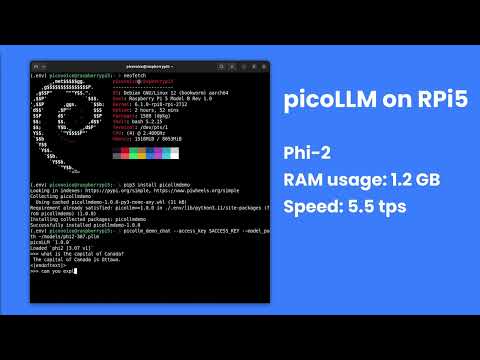
Raspberry Pi
Android
iOS
Cross-Browser Local LLM
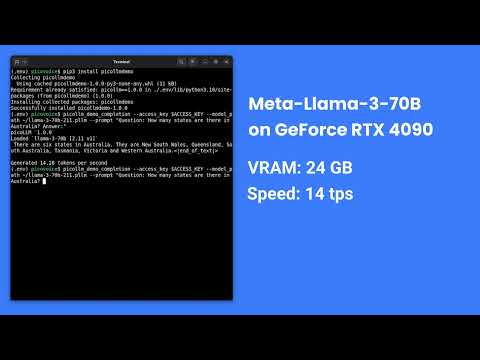
Llama-3-70B-Instruct on GeForce RTX 4090
Local LLM-Powered Voice Assistant on Raspberry Pi
Local Llama-3-8B-Instruct Voice Assistant on CPU
Accuracy
picoLLM Compression is a novel large language model (LLM) quantization algorithm developed within Picovoice. Given a task-specific cost function, picoLLM Compression automatically learns the optimal bit allocation strategy across and within LLM's weights. Existing techniques require a fixed bit allocation scheme, which is subpar.
For example, picoLLM Compression recovers MMLU score degradation of widely adopted GPTQ by 91%, 99%, and 100% at 2, 3, and 4-bit settings. The figure below depicts the MMLU comparison between picoLLM and GPTQ for Llama-3-8b [1].

Models
picoLLM Inference Engine supports the following open-weight models. The models are on Picovoice Console.
- Gemma
gemma-2bgemma-2b-itgemma-7bgemma-7b-it
- Llama-2
llama-2-7bllama-2-7b-chatllama-2-13bllama-2-13b-chatllama-2-70bllama-2-70b-chat
- Llama-3
llama-3-8bllama-3-8b-instructllama-3-70bllama-3-70b-instruct
- Llama-3.2
llama3.2-1b-instructllama3.2-3b-instruct
- Mistral
mistral-7b-v0.1mistral-7b-instruct-v0.1mistral-7b-instruct-v0.2
- Mixtral
mixtral-8x7b-v0.1mixtral-8x7b-instruct-v0.1
- Phi-2
phi2
- Phi-3
phi3
AccessKey
AccessKey is your authentication and authorization token for deploying Picovoice SDKs, including picoLLM. Anyone who is using Picovoice needs to have a valid AccessKey. You must keep your AccessKey secret. You would need internet connectivity to validate your AccessKey with Picovoice license servers even though the LLM inference is running 100% offline and completely free for open-weight models. Everyone who signs up for Picovoice Console receives a unique AccessKey.
Demos
Python Demos
Install the demo package:
pip3 install picollmdemo
Run the following in the terminal:
picollm_demo_completion --access_key ${ACCESS_KEY} --model_path ${MODEL_PATH} --prompt ${PROMPT}
Replace ${ACCESS_KEY} with yours obtained from Picovoice Console, ${MODEL_PATH} with the path to a model file
downloaded from Picovoice Console, and ${PROMPT} with a prompt string.
For more information about Python demos go to demo/python.
Node.js Demos
Install the demo package:
yarn global add @picovoice/picollm-node-demo
Run the following in the terminal:
picollm-completion-demo --access_key ${ACCESS_KEY} --model_path ${MODEL_PATH} --prompt ${PROMPT}
Replace ${ACCESS_KEY} with yours obtained from Picovoice Console, ${MODEL_PATH} with the path to a model file
downloaded from Picovoice Console, and ${PROMPT} with a prompt string.
For more information about Node.js demos go to Node.js demo.
Android Demos
Using Android Studio, open the Completion demo as an Android project, copy your AccessKey into MainActivity.java, and run the application.
To learn about how to use picoLLM in a chat application, try out the Chat demo.
For more information about Android demos go to demo/android.
iOS Demos
To run the completion demo, go to demo/ios/Completion and run:
pod install
Replace let ACCESS_KEY = "${YOUR_ACCESS_KEY_HERE}" in the file VieModel.swift with your AccessKey obtained from Picovoice Console.
Then, using Xcode, open the generated PicoLLMCompletionDemo.xcworkspace and run the application.
To learn about how to use picoLLM in a chat application, try out the Chat demo.
For more information about iOS demos go to demo/ios.
Web Demos
From demo/web run the following in the terminal:
yarn
yarn start
(or)
npm install
npm run start
Open http://localhost:5000 in your browser to try the demo.
C Demos
Build the demo:
cmake -S demo/c/ -B demo/c/build && cmake --build demo/c/build
Run the demo:
./demo/c/build/picollm_demo_completion -a ${ACCESS_KEY} -l ${LIBRARY_PATH} -m ${MODEL_FILE_PATH} -p ${PROMPT}
Replace ${ACCESS_KEY} with yours obtained from Picovoice Console, ${LIBRARY_PATH} with the path to the shared
library file located in the lib directory, ${MODEL_FILE_PATH} with the path to a model file downloaded from
Picovoice Console, and ${PROMPT} with a prompt string.
For more information about C demos go to demo/c.
SDKs
Python SDK
Install the Python SDK:
pip3 install picollm
Create an instance of the engine and generate a prompt completion:
import picollm

pllm = picollm.create(
    access_key='${ACCESS_KEY}',
    model_path='${MODEL_PATH}')

res = pllm.generate('${PROMPT}')
print(res.completion)
Replace ${ACCESS_KEY} with yours obtained from Picovoice Console, ${MODEL_PATH} to the path to a model file
downloaded from Picovoice Console, and ${PROMPT} to a prompt string. Finally, when done be sure to explicitly release
the resources using pllm.release().
Node.js SDK
Install the Node.js SDK:
yarn add @picovoice/picollm-node
Create instances of the picoLLM class:
const { PicoLLM } = require("@picovoice/picollm-node");
const pllm = new PicoLLM('${ACCESS_KEY}', '${MODEL_PATH}');

const res = await pllm.generate('${PROMPT}');
console.log(res.completion);
Replace ${ACCESS_KEY} with yours obtained from Picovoice Console, ${MODEL_PATH} to the path to a model file
downloaded from Picovoice Console, and ${PROMPT} to a prompt string. Finally, when done be sure to explicitly release
the resources using pllm.release().
Android SDK
Create an instance of the inference engine and generate a prompt completion:
import ai.picovoice.picollm.*;

try {
    PicoLLM picollm = new PicoLLM.Builder()
        .setAccessKey("${ACCESS_KEY}")
        .setModelPath("${MODEL_PATH}")
        .build();
    PicoLLMCompletion res = picollm.generate(
        "${PROMPT}",
        new PicoLLMGenerateParams.Builder().build());
} catch (PicoLLMException e) { }
Replace ${ACCESS_KEY} with your AccessKey from Picovoice Console, ${MODEL_PATH} to the path to a model file
downloaded from Picovoice Console, and ${PROMPT} to a prompt string. Finally, when done be sure to explicitly release
the resources using picollm.delete().
iOS SDK
Create an instance of the engine and generate a prompt completion:
import PicoLLM

let pllm = try PicoLLM(
    accessKey: "${ACCESS_KEY}",
    modelPath: "${MODEL_PATH}")

let res = pllm.generate(prompt: "${PROMPT}")
print(res.completion)
Replace ${ACCESS_KEY} with yours obtained from Picovoice Console, ${MODEL_PATH} to the path to a model file
downloaded from Picovoice Console, and ${PROMPT} to a prompt string.
Web SDK
Install the web SDK using yarn:
yarn add @picovoice/picollm-web
or using npm:
npm install --save @picovoice/picollm-web
Create an instance of the engine using PicoLLMWorker and transcribe an audio file:
import { PicoLLMWorker } from "@picovoice/picollm-web";

const picoLLMModel = {
  modelFile: '${MODEL_FILE}'
}

const picoLLM = await PicoLLMWorker.create(
  "${ACCESS_KEY}",
  picoLLMModel
);

const res = await picoLLM.generate(`${PROMPT}`);
console.log(res.completion);
Replace ${ACCESS_KEY} with yours obtained from Picovoice Console, ${MODEL_FILE} with the contents of the model file as File, Blob or URL (path to model file) format and ${PROMPT} with a prompt string. Finally, when done release the resources using picoLLM.release().
C SDK
Create an instance of the engine and generate a prompt completion:
pv_picollm_t *pllm = NULL;
pv_picollm_init(
    "${ACCESS_KEY}",
    "${MODEL_PATH}",
    "best",
    &pllm);

pv_picollm_usage_t usage;
pv_picollm_endpoint_t endpoint;
int32_t num_completion_tokens;
pv_picollm_completion_token_t *completion_tokens;
char *output;
pv_picollm_generate(
    pllm,
    "${PROMPT}",
    -1,    // completion_token_limit
    NULL,  // stop_phrases
    0,     // num_stop_phrases
    -1,    // seed
    0.f,   // presence_penalty
    0.f,   // frequency_penalty
    0.f,   // temperature
    1.f,   // top_p
    0,     // num_top_choices
    NULL,  // stream_callback
    NULL,  // stream_callback_context
    &usage,
    &endpoint,
    &completion_tokens,
    &num_completion_tokens,
    &output);
printf("%s\n", output);
Replace ${ACCESS_KEY} with yours obtained from Picovoice Console, ${MODEL_PATH} to the path to a model file
downloaded from Picovoice Console, and ${PROMPT} to a prompt string.
Finally, when done, be sure to release the resources explicitly:
pv_picollm_delete(pllm);
Releases
v1.2.0 - November 26th, 2024
- Performance improvements
- Added support for phi3.5
v1.1.0 - October 1st, 2024
- Added
interrupt()function for halting completion generation early - Performance improvements
- Added support for phi3
- Bug fixes
v1.0.0 - May 28th, 2024
- Initial release
 Picovoice