

 Phobos-developers
Digital display

Nightly build for this pull request:
- compiled-dll-4c3152b0e90b65cd052e9822f14566d0916f327a.zip This comment is automatic and is meant to allow guests to get latest nightly builds without registering. It is updated on every successful build.
![github-actions[bot] avatar](https://avatars.githubusercontent.com/in/15368?v=4 "Published by a pub.dev verified publisher")
I saw the discussion on discord, they maybe didn't read the New-or-Enhanced-Logics.md carefully, digital show has local definition, most of functions has local definition except Buildings/Units.ShowHPOffset.WithoutShield.
My point is that there's so much new tags that it would be better as it's own type class.

My point is that there's so much new tags that it would be better as it's own type class.
Ok, I get it, I will improve it later.
I found that HP value did not perform well on spies, so I hope to add a percentage to show HP.

I found that HP value did not perform well on spies, so I hope to add a percentage to show HP.
I don't have time recently. I may do it in the future.
I noticed that Buildings.ShieldNumberInterval= doesn't seem to work? The shield value Interval doesn't changed.
I noticed that Buildings.ShieldNumberInterval= doesn't seem to work? The shield value Interval doesn't changed.
The first version had some bug, some entries of shield used '_' instead of '.' You can use the current version Here are entries use '_' in the first version this->ShieldValue_ShowBackground.Read(exINI, pSection, "ShieldValue_ShowBackground"); this->ShieldValue_UseSHPShow.Read(exINI, pSection, "ShieldValue_UseSHPShow"); this->ShieldValue_ShowSHP.Read(pINI, pSection, "ShieldValue_ShowSHP"); this->ShieldValue_ShowPAL.Read(pINI, pSection, "ShieldValue_ShowPAL"); this->ShieldValue_ShowInterval.Read(exINI, pSection, "ShieldValue_ShowInterval");
There are some code style, documentation issues and one or two other things that should be addressed.
Update completed
What about the following:
There should be an ability to align the text and anchor it to different sides/corners/center I guess. Did you look into this? IMO at least the anchoring of the text to the left/right/center of HP bar should be customizable. And perhaps it would be good to be able to customize the position (say, maybe someone wants it to display to the right of HP bar), but that can be left for later.
What about the following:
There should be an ability to align the text and anchor it to different sides/corners/center I guess. Did you look into this? IMO at least the anchoring of the text to the left/right/center of HP bar should be customizable. And perhaps it would be good to be able to customize the position (say, maybe someone wants it to display to the right of HP bar), but that can be left for later.
I forgot about it.
What about the following:
There should be an ability to align the text and anchor it to different sides/corners/center I guess. Did you look into this? IMO at least the anchoring of the text to the left/right/center of HP bar should be customizable. And perhaps it would be good to be able to customize the position (say, maybe someone wants it to display to the right of HP bar), but that can be left for later.
Update completed
@8abs We don't sell anything here. In fact, you don't need to compile anything yourself, just scroll through the pull request to find this comment where you can download the most recent build with this particular feature.
Thank you very much for informing me that "Nightly Build" is what I need. I'm less than a noob on programming and this website's UI and basic functions. I only come here to download your masterpieces to enhance my DIY map. This function really would make my map wonderful. Thank you all for your contribution. (BTW, I will never make any profit with my map. Even I give out money as bonus for my own group of friend to play and compete to the last survivor with this map. This bring us a lot of joy. My comment about giving you money above is only for gratefulness. After all even Github support people sponsoring the contributor. Hope you can understand it.


How about customized font position by using coordinate and offer an option whether display maximum HP. Obviously the maximum HP part makes the text too long. (500/500 seems too long compared with a direct 500)
How about customized font position by using coordinate and offer an option whether display maximum HP. Obviously the maximum HP part makes the text too long. (500/500 seems too long compared with a direct 500)
It may be updated in a week. Including percentage display and hide strength.
All code has been completed and will not be updated unless errors are found during testing.
 I am not sure if default values are valid/suitable. This is with those values overriden:
[DigitalDisplayTypes]
0=DEFHPDISPLAY

[DEFHPDISPLAY]
UseSHP=yes
SHP.Interval=4,0
SHP.Interval.Building=4,2
Offest seems to be gone somewhere and building HP are drawn whereever.
[DigitalDisplayTypes]
0=DEFHPDISPLAY

[DEFHPDISPLAY]
UseSHP=yes
SHP.Interval=4,0
SHP.Interval.Building=4,2
Offest seems to be gone somewhere and building HP are drawn whereever.
I use my own SHP file to display the location is just right. Just like the illustration
That's not the point. The point is that it doesn't work as expected by default (without specification of any parameters). The only difference between my and your SHP is that I have a smaller SHP size. By not working as expected I meant that the building text is drawn in other direction and default offset on a unit is too big. Maybe also alignment needs to be adjusted.
That's not the point. The point is that it doesn't work as expected by default (without specification of any parameters). The only difference between my and your SHP is that I have a smaller SHP size. By not working as expected I meant that the building text is drawn in other direction and default offset on a unit is too big. Maybe also alignment needs to be adjusted.
Wait a minute, the building display doesn't look normal. let me have a look.
How to deal with the display of units? The size of SHP canvas is different.
Not a full review, but a bit of the feedback. We'll give more feedback later when I get it working on my setup.
- You missed
Offests in the docs. - I think you should remove separate building and non-building intervals and leave only one interval. We already have an ability to specify different display types, so this is redundant.
How to deal with the display of units? The size of SHP canvas is different.
Different between what? Ideally the drawing needs to be done relative to health bar.
 Modified like this?
I don't know why the direction of your building display would be abnormal. Maybe you can use negative intervals.
Modified like this?
I don't know why the direction of your building display would be abnormal. Maybe you can use negative intervals.
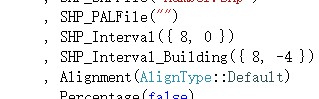 The default interval is a negative number, and the description in the docs is incorrect.