

 PhilJay
StackedValueFormatter has inconsistent behavior
The problem
StackedValueFormatter when setting the drawWholeStack parameter to false is expected to draw only the topmost value on the stack which is a sum of all stack values from the given BarEntry:
setValueFormatter(StackedValueFormatter(drawWholeStack = false, null, 0))
This approach works as long as the BarEntry has distinct values like this:
new BarEntry(0f, new float[] {1f, 2f, 3f})
which would make the bar look like desired:
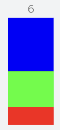
If any of the BarEntry values are the same, like here (two times 2f):
new BarEntry(0f, new float[] {1f, 2f, 2f})
then the stacks with duplicated values will have a sum of all values drawn above them:
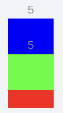
What is causing the problem
The implementation of the getBarStackedLabel in the StackedValueFormatter contains an if statement that is supposed to check if the given value to be formatted is the value from the top of the bar stack:
// find out if we are on top of the stack
if (vals[vals.length - 1] == value) {
    // return the "sum" across all stack values
    return mFormat.format(entry.getY()) + mSuffix;
} else {
    return ""; // return empty
}
The value is always one of the provided via the BarEntry. Given the values 1f, 2f, 2f the topmost one will be 2f. But the if condition will be true twice in this case resulting in the label being drawn twice for each 2f value.
Possible solution
Since the duplication of the values is causing the bug you can slightly alter (for example by subtracting an insignificantly small number to the value) the duplicated values so that they are no longer duplicated like this:
entries.add(new BarEntry(0f, new float[] {1f, 2f - 0.0000001f, 2f}));
I've also played around a bit with this and found out that for given $y$ value it is best to subtract (or add) from the duplicated $y$ a value of: $y^{-10^7}$. For example, for y = 1 it would be 0.0000001.
This calculation is necessary since for higher y values the library seems to ignore differences that are too small in relation to the y value.
With this code, the bar will look as it should have from the start:
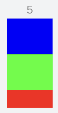
This approach is obviously not universal and might not be suitable for everybody.
The actual solution would require the developers to improve the getBarStackedLabel or even the BarEntry class itself as there is no way to recognize that the value taken from the BarEntry values is the value that is the last one in the value set which prevents us from consistent label drawing on the stacked bar-charts.
