

 PhilJay
How to Remove all unused space?
Hi,
I'm new to Android Dev and I'm really struggling to figure out how to get the library to behave the way I want.
I have a recycler & card view as below with com.github.mikephil.charting.charts.HorizontalBarChart within the cardview.
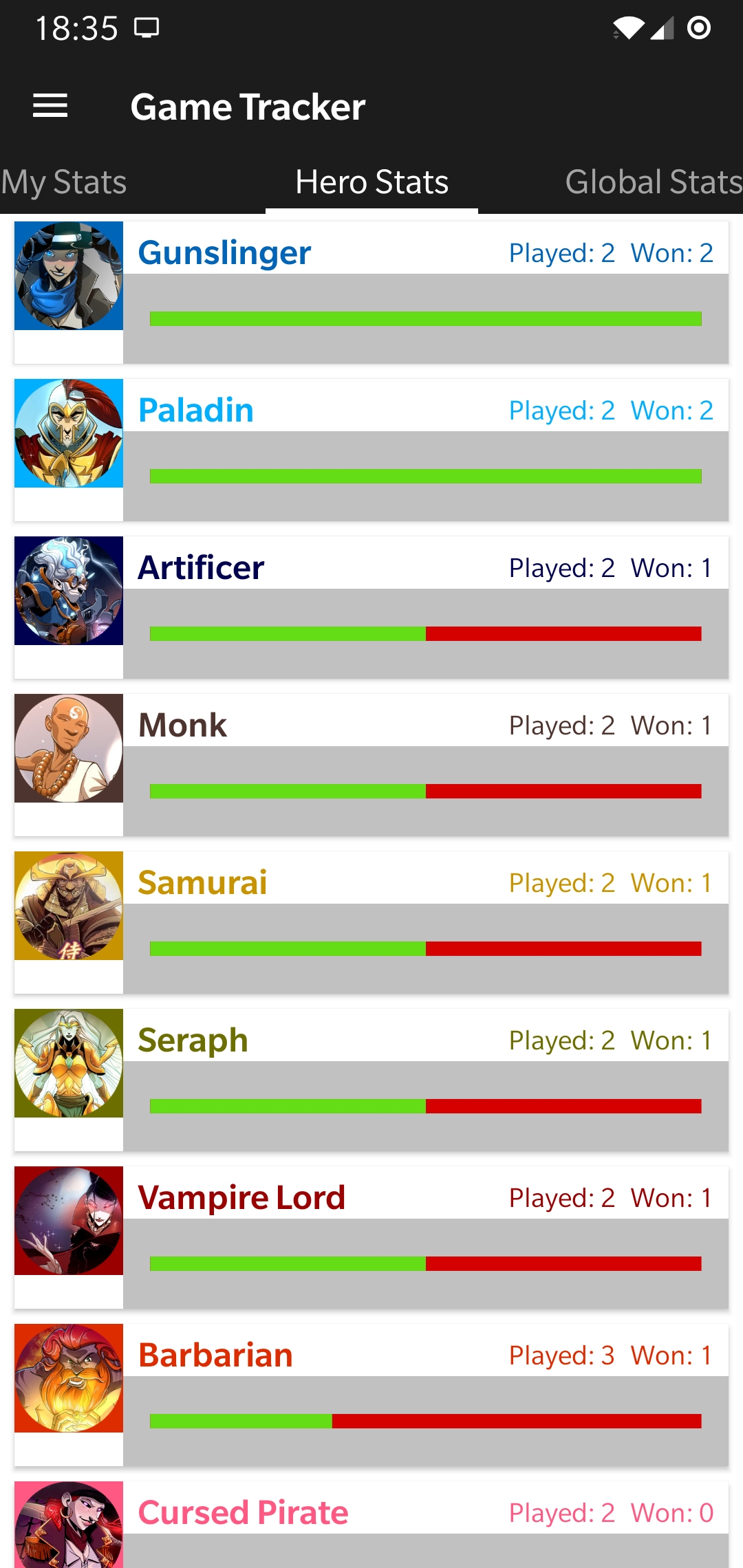
The grey area is my HorizontalBarChart view.
What I want to do is basically remove all of the grey so when I use wrap-content the card doesn't extend beyond the size of the image to the left.
I've tried setting ExtraOffsets and ViewPortOffsets to 0f which doesn't give me my desired result.
Here's my Layout.xml: ` <RelativeLayout xmlns:android="http://schemas.android.com/apk/res/android" xmlns:app="http://schemas.android.com/apk/res-auto" xmlns:tools="http://schemas.android.com/tools" android:layout_width="match_parent" android:layout_height="wrap_content" android:padding="0dp">
<androidx.cardview.widget.CardView xmlns:card_view="http://schemas.android.com/apk/res-auto"
    android:id="@+id/gamelog_card_view"
    android:layout_width="match_parent"
    android:layout_height="wrap_content"
    android:layout_marginLeft="8dp"
    android:layout_marginTop="4dp"
    android:layout_marginBottom="4dp"
    android:layout_marginRight="8dp"
    card_view:cardBackgroundColor="@color/colorCardViewBackground"
    card_view:cardCornerRadius="0dp"
    card_view:contentPadding="0dp"
    card_view:elevation="0dp">

    <RelativeLayout
        android:layout_width="wrap_content"
        android:layout_height="wrap_content">

        <ImageView
            android:id="@+id/gamelog_heroimg"
            android:layout_width="60dp"
            android:layout_height="60dp">
        </ImageView>

        <TextView
            android:id="@+id/gamelog_hero"
            android:layout_width="wrap_content"
            android:layout_height="wrap_content"
            android:paddingTop="4dp"
            android:paddingLeft="8dp"
            android:layout_toRightOf="@id/gamelog_heroimg"
            android:textColor="@color/colorCardViewText"
            android:textSize="14sp"
            android:textStyle="bold"></TextView>

        <TextView
            android:id="@+id/gamelog_games"
            android:layout_width="wrap_content"
            android:layout_height="wrap_content"
            android:layout_toLeftOf="@id/gamelog_wins"
            android:paddingTop="7dp"
            android:paddingRight="8dp"
            android:textColor="@color/colorCardViewText"
            android:textSize="11sp">
        </TextView>

        <TextView
            android:id="@+id/gamelog_wins"
            android:layout_width="wrap_content"
            android:layout_height="wrap_content"
            android:layout_alignParentRight="true"
            android:paddingRight="8dp"
            android:paddingTop="7dp"
            android:textColor="@color/colorCardViewText"
            android:textSize="11sp">
        </TextView>

        <com.github.mikephil.charting.charts.HorizontalBarChart
            android:id="@+id/gamelog_ratio_chart"
            android:layout_width="match_parent"
            android:layout_height="wrap_content"
            android:layout_below="@id/gamelog_hero"
            android:layout_toRightOf="@id/gamelog_heroimg"
            android:paddingLeft="0dp"
            android:paddingTop="0dp"
            android:paddingRight="0dp"
            android:background="#c1c1c1"
            android:paddingBottom="0dp" />

    </RelativeLayout>
</androidx.cardview.widget.CardView>
</RelativeLayout>`
And my java relevant to MPAndroidChart:
`
@Override
public void onBindViewHolder(MyViewHolder holder, final int position) {

    holder.mIMGView.setBackgroundColor(Color.parseColor(mColors.get(position)));

    holder.mIMGView.setImageResource(getResId(mIMG.get(position), R.drawable.class));
    holder.mHeroView.setText(mHeroes.get(position));
    holder.mHeroView.setTextColor(Color.parseColor(mColors.get(position)));
    holder.mGamesView.setText("Played: " + mGames.get(position));
    holder.mGamesView.setTextColor(Color.parseColor(mColors.get(position)));
    holder.mWinsView.setText("Won: " + mWins.get(position));
    holder.mWinsView.setTextColor(Color.parseColor(mColors.get(position)));

    ArrayList<BarEntry> wRatio = new ArrayList();
    wRatio.add(new BarEntry(0,mRatio.get(position)));
    BarDataSet barDataSet = new BarDataSet(wRatio,"");
    barDataSet.setColors(ContextCompat.getColor(holder.mRatioView.getContext(),R.color.colorBarWin));
    barDataSet.setBarShadowColor(ContextCompat.getColor(holder.mRatioView.getContext(),R.color.colorBarLoss));
    barDataSet.setDrawValues(false);
    barDataSet.setHighlightEnabled(false);
    barDataSet.setBarBorderWidth(0f);
    BarData ratioData = new BarData(barDataSet);

    ratioData.setBarWidth(0.4f);

    holder.mRatioView.setData(ratioData);
    holder.mRatioView.setDrawBarShadow(true);
    holder.mRatioView.setDrawValueAboveBar(false);
    holder.mRatioView.setPinchZoom(false);
    holder.mRatioView.setClickable(false);
    holder.mRatioView.setTouchEnabled(false);
    holder.mRatioView.setScaleEnabled(false);
    holder.mRatioView.setDragEnabled(false);

    holder.mRatioView.getDescription().setEnabled(false);

    holder.mRatioView.getLegend().setEnabled(false);

    holder.mRatioView.getXAxis().setEnabled(false);

    holder.mRatioView.getAxisLeft().setAxisMaximum(100f);
    holder.mRatioView.getAxisLeft().setAxisMinimum(0f);
    holder.mRatioView.getAxisLeft().setEnabled(false);

    holder.mRatioView.getAxisRight().setEnabled(false);

    holder.mRatioView.invalidate();

}
`
Any help will be massively appreciated!
Thanks, Ryan.

Same issue here, can't find a way to remove all padding left and right of a line chart.

Oh, found a way :)
Check chart.setMinOffset(..). This is by default set to 15 (dp) and might cause your rendering of unwanted space!