

 PerfectSlayer
disabled icon reappears in address bar after restart
What steps will reproduce the problem?
- Addon settings > Uncheck "Enable icon in address bar"
- Restart Firefox
What is the expected behavior? What do you see instead?
- the icon reappears in address bar (should not)
- Addon settigns > "Enable icon in address bar" remains unchecked
Could you describe us your platform?
- Firefox version: 56.0.2 / 57.0b14
- Operating system: Windows 10 64bit

I guess I just don't like the icon very much. I have 2 alternative branches if you want to consider a pull request.
folder_icon branch
- icons in png format and bright blue color to be visible in light and dark theme
- gray icons especially for light/dark theme but still not working Bugzilla@Mozilla
folder_icon_svg branch
- icon in svg
- just in case, svg icon for dark theme but as the above, still not working
Hi @Gregory-K Thanks for your report! In fact, I had to change my test script to use the web-ext command and I did not set the keep profile option. So I did not test if the settings are kept through restart 😞 (I had to quickly finish the port before the Firefox update the next Wednesday so the test phase was too short).
I can't fix it until Wednesday night because I do not have a development environment right now but I will look at the issue as soon as I can. And I do not like the icon either. Both address bar icon and extension icon should be changed but I am quite limited by my graphical skills. 😢 (in fact, after publishing the add-on to AMO, I start few .psd to find which "folder" icon could be better) But I like yours and I will definitely look at yours contributions to make a better icon 👍

Hi @PerfectSlayer, forgot to thank you for your useful extension.
No rush about the changes. Whenever you can. I can help you with the icons if you want. I can draw a couple to choose from. (for the address bar, I am inclined towards the .svg as the better solution)
I just found the issue: the settings are not loaded at the add-on startup… 😞 So it is fixed now. I will make a release tonight to fix it for everyone as soon as possible.
About the icon, I did some tests based on your proposal.
First, I use your PR and make a build but the icon looks quite small related to others:
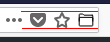 (Don't hesitate to zoom to 500% to see the guides 😉)
So I update the size of the icon to fill the page. Here is the result:
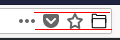
The icon is now more "squared" but we could always guess it's a folder. But then I dislike the stroke. Others icons look grey (rbg: 102, 102, 102) and lines are too thin. So I change the width from 2 to 3 pixels and update the color to match the default theme icons:

It's not so bad, isn't it? What do you think about it?
P.S.: And yes, we miss the support of theme icons for pageAction like they did for browserAction!
Thanks about the update. The first step was for you to like the change in the icon. Don't worry, as soon as I find spare time I will make it pixel perfect. I found another aesthetic mistake now that you zoomed in. The only problem for now is that firefox blends the svg icon (makes it brighter) in "light" theme but not in "dark". The icon is actually #000000 black as you already saw. Bugzilla@Mozilla I will search more into this.
Oh.. and I just saw this https://github.com/PerfectSlayer/scrollupfolder/issues/41... voted.