

 PeculiarVentures
MSI Installer: force shutdown of currently executing fortifyapp
Hello, I would like to know if it is possible - when installing Fortify in a Windows environment - to force shutdown of the active instance of the Fortifyapp. Is there any command-line option that can be passed to the .MSI installer to that aim?

@defacto64 We have this realization on Linux and macOS. @microshine Can we add it to the Windows installer too?

There is the WixCloseApplications action in the Win32 installer which (I hope) must close the application
<Custom Action="WixCloseApplications" Before="InstallInitialize" />
I'll do some tests

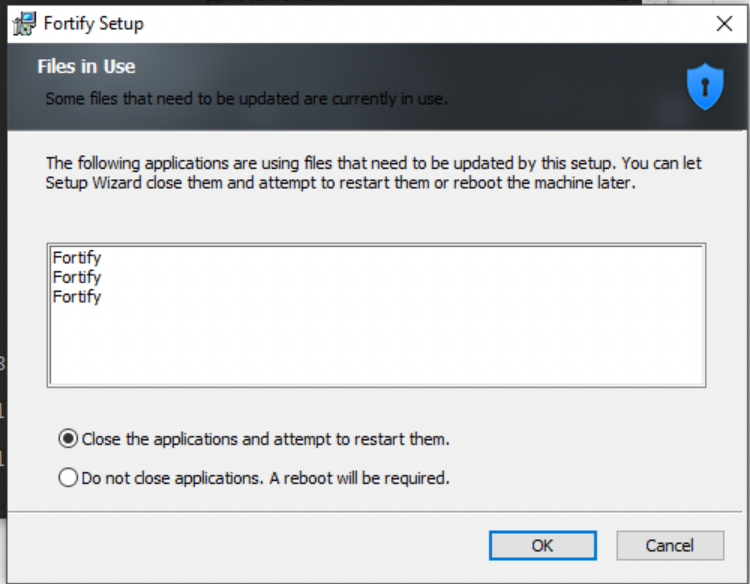
@defacto64 Here are some screens of how WixCloseApplications works
If Fortify is running it shows the next dialog
On OK button click without Fortify stopping it shows the next dialog
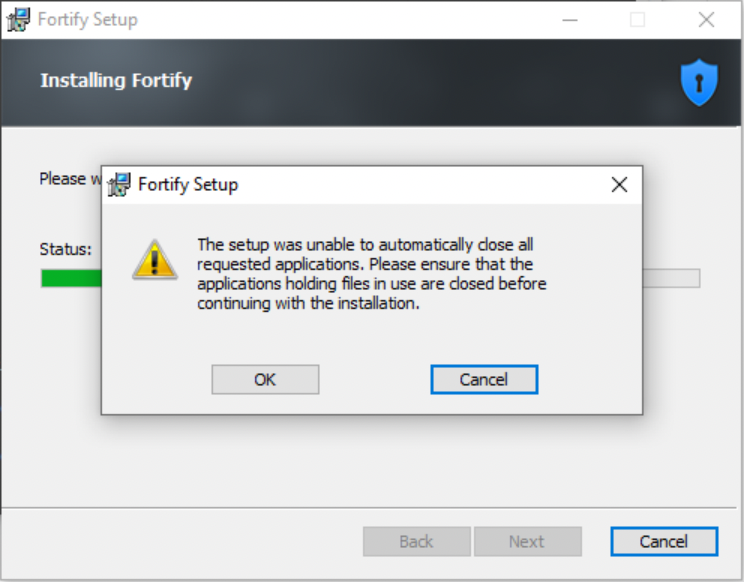
Standard Win32 Setup process doesn't allow to continue application installing with the previous version running. You need to stop the application manually or use the case with System rebooting.
I think it's possible to use a custom action to close the Fortify application as we do it in Linux and macOS.
Something like calling command line
taskkill /IM "fortify.exe" /F
@rmhrisk What do you think?
Yes, I am aware of how the thing works at UI level...
I think it's possible to use a custom action to close the Fortify application as we do it in Linux and macOS.
This could be a solution to the need I have described, in fact. Of course it should be an optional behavior (command line driven), not the default one.
