

 PathOfBuildingCommunity
PoB Crashing on Startup
Check version
- [X] I'm running the latest version of Path of Building and I've verified this by checking the changelog
Check for duplicates
- [X] I've checked for duplicate issues by using the search function of the issue tracker
What is the expected behaviour/value?
When I execute "Path of Building.exe", the application should start up.
What is the actual behaviour/value?
Green background/white text popup window shows up (see screenshot), after which it closes itself and the main PoB window/app doesn't appear. Checked Task Manager and it's not running.
Starting as Administrator makes no difference, same crash/quick exit.
Oddly enough, if I reinstall the application (i.e. via PathOfBuildingCommunity-Setup-2.19.2.exe), it does start up. But only once/the first time. If I exit the app, it never starts successfully again, unless I reinstall it.
How to reproduce the issue
- Execute "Path of Building.exe" (either as Administrator or regular user)
- Watch loading window text scroll by (see screenshot).
- Application/main UI window never comes up.
System Specs: Windows 10 21H2 (x64), 32GB RAM, i7-7700K, GeForce GTX 1070, latest drivers (516.94).
Character build code
N/A
Screenshots
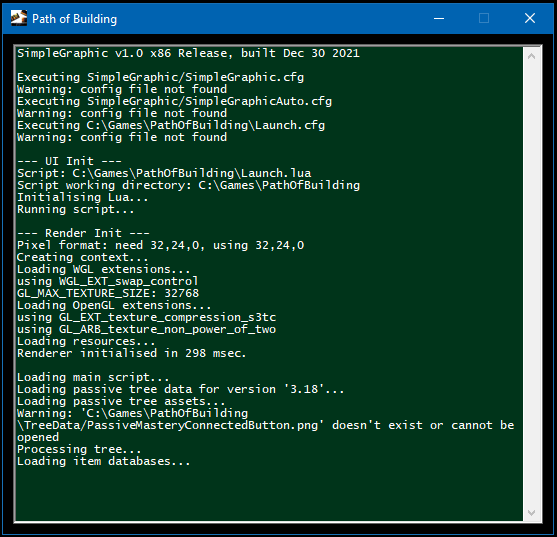

Did a bit more troubleshooting... some additional findings:
-
The only differences in terms of PoB directory/files between a fresh install vs. existing install is the existence of the "first.run" file in the former. And, oddly enough, if I create a "first.run" file and start the program, it loads up successfully all the way to the main program window. If I close it and restart it (without a "first.run" file), it dies again.
-
Pretty sure there is something screwy going on between the SimpleGraphic(?) app component(s) and the latest GeForce driver, but I'm not sure how to troubleshoot that part. I've had PoB installed and running fine on this PC for years and it only stopped running recently. The only thing that's different are updated GeForce drivers (and typical Windows 10 monthly updates).
Are there any PoB logs I can check or force the program executable to spit out some debug info, etc?
Thanks in advance for any help!
I figured it out and this can be closed, sorry! (do I close it or does someone else have to close it?)
Cause: It looks like PoB doesn't like the lua interpreter executable/DLL installed by Scoop (or anything else) when added to system path.
Solution: After a 'scoop uninstall lua' command (it had auto-installed as a dependency for something else I was playing with), PoB now starts and shut down successfully as expected.