

 PathOfBuildingCommunity
New crash on startup
Check version
- [X] I'm running the latest version of Path of Building and I've verified this by checking the changelog
Check for duplicates
- [X] I've checked for duplicate issues by using the search function of the issue tracker
What is the expected behaviour/value?
PoB should launch
What is the actual behaviour/value?
PoB version 2.18.1 just started crashing on startup today (was fine before). It crashes on the green screen immediately after the line starting after "Render""Pixel format...." - I can't screenshot it because its gone too quickly. I have the Geforce 516.59 drivers currently.
I tried the first.run workaround from the #4340 item but that hasn't fixed it - also tried various compatability modes and reinstalls.
How to reproduce the issue
No response
Character build code
n/a
Screenshots
No response


If you want to bypass this, run in compatibility mode for Windows 95. Sounds weird, but it does work. At least, until there's a proper fix for this.
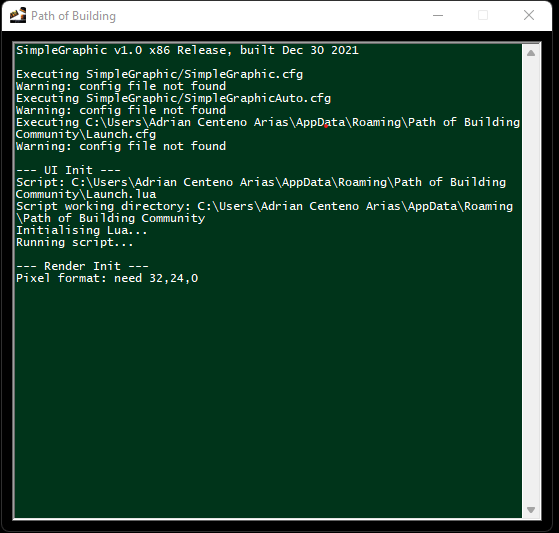
Also have the same issue as above. Same NVidia Gforce drivers aswell. Screenshot above is also what I get, except of course the difference in installation folder. I've tried reinstalling the drivers, reinstalling the PoB and also installing an older version of PoB community fork.

Quick Update. I downloaded the old Nvidia drivers from April and Path of Building launches without a problem.
Hmm, unfortunately I'm unable to reproduce this when downloading the same driver version. What hardware setup are you all running on? Graphics card, OS, and screens are what we usually find an issue with.
@Xerxian00 Can you find the file SimpleGraphic/SimpleGraphic.cfg and change the con_log line from 0 to 1? Then the logs should show up next to that file as SimpleGraphic.log. That way you can catch what the console is reporting.
I'll see if I can get a build out to have you guys test in the next few days and narrow down where the problem lies.

Hmm, unfortunately I'm unable to reproduce this when downloading the same driver version. What hardware setup are you all running on? Graphics card, OS, and screens are what we usually find an issue with.
@Xerxian00 Can you find the file
SimpleGraphic/SimpleGraphic.cfgand change thecon_logline from 0 to 1? Then the logs should show up next to that file asSimpleGraphic.log. That way y SimpleGraphic.log ou can catch what the console is reporting.I'll see if I can get a build out to have you guys test in the next few days and narrow down where the problem lies.
Thanks for your attention! Attached is the log file and my dxdiag
Backup your current SimpleGraphic.dll, and replace it with the SimpleGraphic.dll in the Artifacts section at the bottom of this page: https://github.com/Wires77/PathOfBuilding-SimpleGraphic/actions/runs/2695279364
That one has some extra code to catch the error, but I'll probably have to iterate on it several times since it hard crashes and doesn't leave us with a useful log.
Apologies for the late reply - I followed your steps but don't have anything different in the log file (the date stamp updated)
Log opened.
--- Render Init --- Pixel format: need 32,24,0
Not sure if this a setup problem on my end or a hint to the problem, but thought I'd mention it:
I did a first time setup with SimpleGraphic and PathOfBuilding with some debuggers.
I bombed out on RenderInit() right before ConPrintf("Loading main script...") in src/Launch.lua where the Visual Studio debugger caught Unhandled exception at 0x7707A939 (ntdll.dll) in Path{space}of{space}Building.exe: 0xC0000374: A heap has been corrupted (parameters: 0x770B68C8).
After hitting continue in Visual Studio to get passed that break-point, PoB actually started up fine and I was able to start using it locally. (If I'm not debugging in Visual Studio though the app will stop at the ever elusive --- Render Init --- Pixel format: need 32,24,0)
Also, @Labchimp's suggestion to downgrade to April's Nvidia driver (Version 512.59 for a 2080Ti) also allows me to open PoB release v2.19.2

It seems it is related to ntdll.dll file. Enclosed report: ----quote--- Nazwa aplikacji powodującej błąd: Path of Building.exe, wersja: , sygnatura czasowa: 0x606d1b4c Nazwa modułu powodującego błąd: ntdll.dll, wersja: 10.0.22621.440, sygnatura czasowa: 0xae4c35a1 Kod wyjątku: 0xc0000374 Przesunięcie błędu: 0x000ec8bf Identyfikator procesu powodującego błąd: 0x0x3720 Godzina uruchomienia aplikacji powodującej błąd: 0x0x1D8B5748E789CB3 Ścieżka aplikacji powodującej błąd: D:\Install10\PoE\PathOfBuildingCommunity-Portable-2.21.1\Path of Building.exe Ścieżka modułu powodującego błąd: C:\WINDOWS\SYSTEM32\ntdll.dll Identyfikator raportu: 34524f96-dadb-45a7-84ac-e1bd5c41ce25 Pełna nazwa pakietu powodującego błąd: Identyfikator aplikacji względem pakietu powodującego błąd:
---unquote---
Reinstalling Nvidia drivers doesn't help


Try https://github.com/PathOfBuildingCommunity/PathOfBuilding/issues/4736#issuecomment-1211478087

^ It works! Thank you. I understand this is a temporary fix since we are unable to update. Doing so will simply create the same issue again.
Thank you very much!
Closing in favour of https://github.com/PathOfBuildingCommunity/PathOfBuilding/issues/4736