
pdftron-react-native

pdftron-react-native copied to clipboard
 PDFTron
Annotation dialog "delete all" buttons don't call listeners (Android)
Describe the bug
In Android, deleting multiple annotations using "Delete all annotations on page handleAnnotationChanged nor handleExportAnnotationCommand.
Steps to Reproduce the Problem
- Use debug mode and run the example app in an Android device.
- Create multiple annotations (e.g. highlight two different words).
- Click the icon at the bottom-right of the screen to access Bookmarks dialog.
- Click the right-most tab to access Annotation tab.
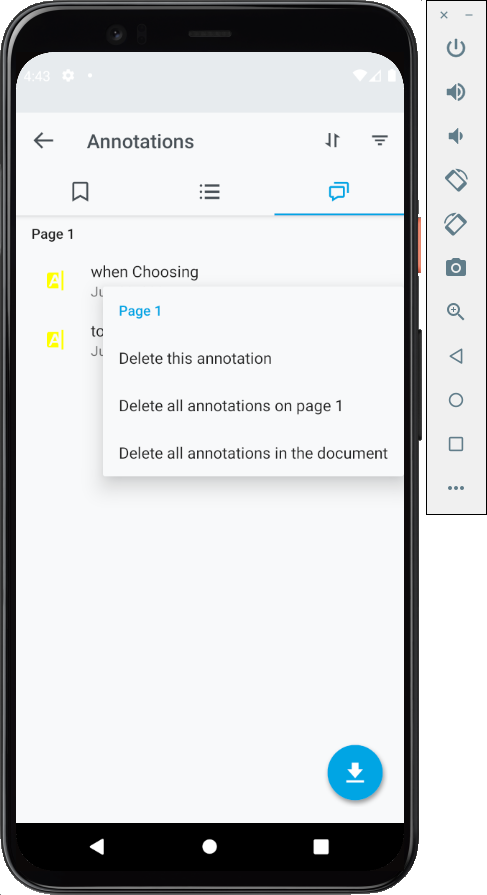
- Long press on any annotation and a list of options should appear: "Delete this annotation", "Delete all annotations on page 1", and "Delete all annotations in the document" (see screenshot below).
- Set a breakpoint at
handleAnnotationChangednorhandleExportAnnotationCommandinandroid/src/main/java/com/pdftron/reactnative/views/DocumentView.java. - Click "Delete all annotations on page 1" or "Delete all annotations in the document".
- The breakpoints are not hit.
Expected behavior
Because annotations were changed (deleted), I expected handleAnnotationChanged and handleExportAnnotationCommand breakpoints to be hit.
Screenshots
Platform/Device Information (please complete the following information if applicable):
- Platform: Android
- Device: Google Pixel 4 API 29 virtual device
- OS: Android 10.0

alternative would be to enable annotation manager instead which will be able to handle these two cases correctly
