

 PAIR-code
How facets visualization tool can be embed into a web page?
@jameswex OS : Ubuntu 17.10 nodejs --version : v6.11.4 google chrome : Version 65.0.3325.181 (Official Build) (64-bit)
I set up the installation for PAIR-code facets and Jupyter notebook as mentioned in your github page My project structure is, facets-demo (root folder) referring from the demo site here. - BUILD - d3.min.js - facets.html - index.html - worker.js Building the visualization using bazel as i already installed from here I got the visualization right here
Questions:
-
How would visualizations be embedding into a web page? Note: Need more information for embedding a web page
-
What is the structure of input CSV file (columns description) and Where do I get the sample datasets for facets_dive/overview? (raw datasets[binary, bitmap, ndjson]) a. How do I get JSON file into CSV file? b. Suppose If I loaded CSV file as chairs.csv How the display controls in facets_dive showing IMAGE refer the image below:

-
In Quickdraw demo how to segregate every image in the (https://storage.googleapis.com/quickdraw-data/upload/random-faces.png) file (sprite atlas) a. How to define the facets_dive_info_card on the right side of the facets quickdraw? (numstrokes means the number of strokes to draw the face/chair) and what about the other fields information?

To embed into a webpage, your facets-demo dir structure looks right, as it is based off of our github page for the facets project, which you can see working by going to the site you mentioned. If you move those files to your own webserver, you should be able to see the visualization in the webserver.
For showing your own data in Facets Dive, you need to provide a javascript array of items to visualize to the facets dive element, as per https://github.com/PAIR-code/facets/blob/gh-pages/index.html#L236 The items in the array are javascript dictionaries of key value pairs. So the data might look like this:
data = [{countrycode: 'US', id: 0, timestamp: 234462309}, {countrycode: 'BR', id: 1, timestamp: 234462310}];
We happen to get that data from a json file we host on our webserver (https://github.com/PAIR-code/facets/blob/gh-pages/test.json) but you could just as easily get it from a csv file. You just need to parse it into a javascript list of dicts and provide that to facets dive, as per the example above.
The facets dive info card, when an item in facets dive is selected, will show the key value pairs for the data point selected. You don't need to define anything about it, it will show whatever data you provided for the datapoints in your dataset.
In order to get images to show for each data point in your dataset in facets dive, you additionally need to provide a single sprite altas containing a thumbail image for each data point in your dataset. For your own dataset, you would need to pre-generate this sprite atlas image. Currently we don't provide any helper code/libraries to accomplish this, but it could be done in python using the PIL library or many other tools.

@jameswex Thanks for the reply. One more question is,
When I try to run a Dive Integration test from here
getting 17 failing tests, Refer the screenshot,
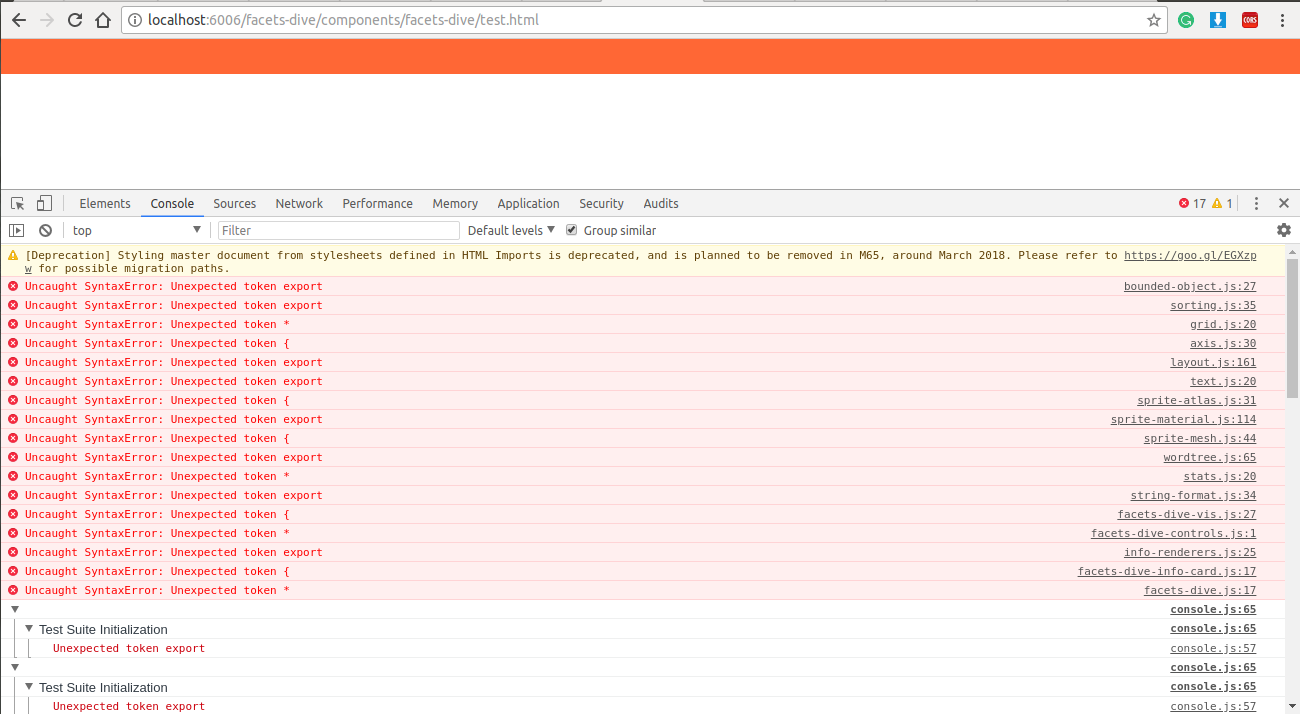 And I try to running Dive Unit test from here
getting 22 failing tests, Refer the screenshot,
And I try to running Dive Unit test from here
getting 22 failing tests, Refer the screenshot,
 How to resolve those failing tests?
Please re-sync to HEAD, these build failure of facets were fixed April 12th.