

 Overv
Overv
antialias is not working
hi, i have encountered a problem :
i write the following code the close antialias effect:
GL::Context& gl = window.GetContext(32, 24, 8, 0);
and 0 represent antialias is closed (antialias = 0)
// Choose final pixel format
const int pixelAttribs[] =
{
	WGL_DRAW_TO_WINDOW_ARB, GL_TRUE,
	WGL_SUPPORT_OPENGL_ARB, GL_TRUE,
	WGL_DOUBLE_BUFFER_ARB, GL_TRUE,
	WGL_PIXEL_TYPE_ARB, WGL_TYPE_RGBA_ARB,
	WGL_COLOR_BITS_ARB, color,
	WGL_DEPTH_BITS_ARB, depth,
	WGL_STENCIL_BITS_ARB, stencil,

//following two line should work but do nothing
	WGL_SAMPLE_BUFFERS_ARB, antialias > 1 ? GL_TRUE : GL_FALSE,
	WGL_SAMPLES_ARB, antialias > 1 ? antialias : 0,
	0
};
but i still got the blured triangle edge

anyway to solve this?
what i actually want :


I'm not sure why that would happen. What happens if you pass 1 instead of zero?

following pics are the results i just tested:
oogl sample 4

oogl sample 1
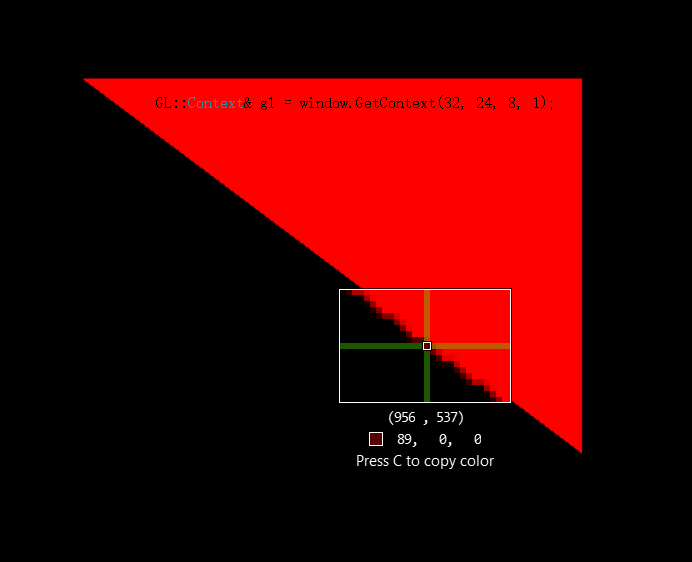
it seems antialias is working? sample 4 is much smoother than sample 0 & 1
and i test ogl tutorial sample 2 things are diffirent.
glfw sample 4

glfw sample 0 or sample disabled

Are you saying that calling glDisable(GL_MULTIIPLE_SAMPLE) manually with OOGL solves the problem?
but there is no "glDisable(GL_MULTIIPLE_SAMPLE)" in oogl the problem should be solved by including glew i think
Okay, but if you run glDisable(GL_MULTIIPLE_SAMPLE) with OOGL, does it solve the problem?
nope, still blured even using glew (instead "Extensions.cpp"). but i found glReadPixel can read the correct pixel value from framebuffer( no AA is applied)

so there is no need to solve the blured image edge. thanks for your reply.